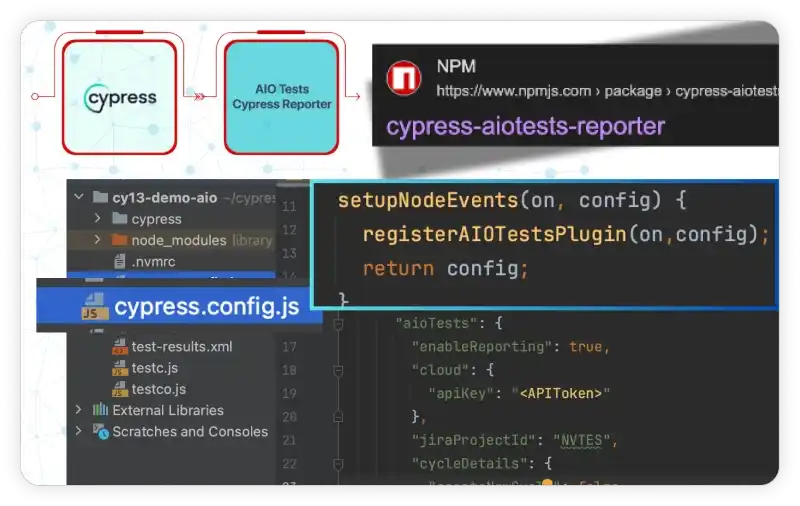
Automation Testing for Modern QA Teams

Delivers powerful automation support through non-intrusive integration with your testing frameworks, simplifies reporting, and leverages REST APIs to seamlessly integrate your automated tests, written in the language of your choice.

What You Can Expect?

What are the most compatible testing frameworks?

Empowers users to directly import & report results from various testing frameworks in AIO Tests programmatically, providing immediate execution feedback to developers

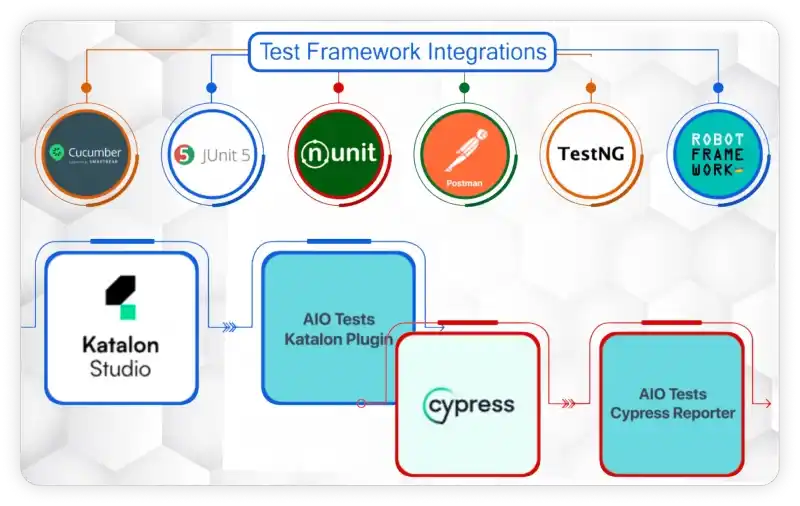
  • Integrates with Cucumber and allows users to report step-level results right from the results file.
  • Report automation results for UI (Webdriver etc), E2E, Unit, API tests with AIO's native integration for JUnit, TestNG, NUnit, Robot, Cucumber and Newman files.
  • Report results from frameworks based in any of your favorite languages - Java, C#, Python, Javascript.
  • Create and report results from your Postman API tests without typing a word by using the Newman reporter.

What are the benefits of direct integrations with tools?

Simple, configuration-based tools eliminate the need for API calls, providing the fastest way to report automation results to AIO Tests

  • Katalon Studio lets you easily map automated tests to AIO Tests and report test case results to test cycles.
  • Create execution cycles, upload evidence, and report results, all with AIO's simple configurable Cypress reporter.
  • Integrate reporting of Postman API Test results from your CI/CD flows using the Newman reporter.
Group of people working together in a professional setting

How can CI/CD integrations improve development workflows?

Offers seamless CI/CD integrations that enhance your test automation workflow, enabling quick and efficient execution throughout the software development lifecycle

  • Easily trigger the Jenkins builds directly from the AIO Tests platform.
  • The Jenkins plugin makes it easy to report test results immediately after automated tests are executed.
  • Integrates with Azure DevOps to help teams plan, build, test, and deploy software applications efficiently.
  • Report from Gitlab, Github, Bitbucket, or any CI/CD system by leveraging AIO's REST APIs.

REST APIs

Offers the flexibility to seamlessly integrate automated tests, regardless of language, providing a unified view of automated and manual executions

  • Retrieve detailed project-level configurations (statuses, folders, case types, priorities, run status, etc)
  • Create and manage test cycles, add test cases, report execution statuses, and obtain cycle summaries.
  • Access detailed metadata for test cases, such as folder structures, tags, titles, and owners, enabling traceability.
  • Seamlessly report automated execution results directly into AIO Tests, ensuring accurate tracking of testing outcomes.
Group of people working together in a professional setting

How do automation workflows improve reporting?

Streamline collaboration between manual and automation teams, ensure seamless handoffs, and provide real-time updates on case automation progress

  • Easily keep track of your automation metadata by assigning statuses and owners directly within the case view.
  • Quickly identify cases ready for automation with advanced filtering options.
  • Gain valuable insights into your automation coverage with our platform's detailed automation reports.

How Can Your Team Benefit from AIO Tests?

AIO Tests is an advanced QA testing and test management app crafted to help QA teams streamline their complete testing process offering complete end-to-end traceability and ensuring seamless collaboration.

Seamlessly navigate through tests, record results, and instantly link with Jira requirements to create traceability. Generate test cases using AI, add custom fields, and design test cases specific to each project.

With unique features like automated bug creation, built-in timers, and customizable reports, we make your testing process smarter, faster, and more efficient.

Empower Your QA Team Today

One of our team representatives will reach out to guide you through the setup process, ensuring you're ready to explore the advantages of our test case management app in no time.

Testimonials

Another image of a woman using a device in a professional setting

Rebecca Jones

Frame design for website or application interface
Diagram of a frame design

“We're still new to AIO, having been using it just the last three months, but we already know it's a vast improvement over our previous test case tool. Our QA team finds it easy to use and quite intuitive.  The AIO Support team has been fantastic.”

Icon representing a feature or service

Maksim Zinovev

Frame design for website or application interface
Diagram of a frame design

“Good product and cost / value offer. Helpful features - case and cycle visibility on Jira issue - classic and Gherkin test templates - test repository - reports - custom fields Missing features, potential improvements - exploratory testing session template - custom test case templates.”

Image of a woman with a phone, possibly a business scenario

Jouni Haapala

Frame design for website or application interface
Diagram of a frame design

"We have been using AIO for ten months and it has made our test case and test management much easier. More features are coming constantly, which improves usability. Support is great fast and helpful and the issues get fixed."

Icon representing a feature or service

Joe Wong

Frame design for website or application interface
Diagram of a frame design

"We've been using AIO for approximately 3 years now and the product works well at an affordable price at scale. The product team makes improvements every quarter and their support staff is extremely responsive."

Icon for a service feature

Mickey Perlstein

Frame design for website or application interface
Diagram of a frame design

"Great app especially with great customer support service, they respond in a few seconds it's amazing and they assist via calls and shared screens. I would highly recommend this app."

Icon symbolizing a different feature or service

Dino Dona

Frame design for website or application interface
Diagram of a frame design

"This product perfectly meets the needs of our company. You will have little configuration to plan for and everything present has a meaning. Many improvements are possible and the team is attentive and responds very quickly to our requests."

Latest Blogs

test automation for faster, better software releases
December 10, 2025

Why Test Automation Is the Next Step for Growing QA Teams

Read More
Maximizing ROI with Agile Test Case Management Tools
September 15, 2025

ROI of Agile Test Case Management Tools: Faster Testing and Fewer Bugs

Read More
Regression Testing vs Unit Testing Explained
September 8, 2025

Regression Testing Vs Unit Testing: Understanding When and Why Both Are Essential

Read More
Creating and Managing Test Cases Done Easily with AIO Tests
December 5, 2025

How to Create and Manage Test Cases in Software Testing with AIO Tests

Read More
AIO Tests is a test management tool for Jira, improving QA test coverage analysis.
December 3, 2025

AIO Tests for Smarter Test Coverage Analysis for Modern QA Teams

Read More
Jira Add-ons for the QA Team in 2026
November 28, 2025

Top 5 Jira Add-ons Every QA Engineer Should Know in 2026

Read More
Managing Test Cases Through Versioning and Traceability in QA
November 26, 2025

Managing Test Cases: How Versioning and Traceability Streamline Testing

Read More
How Software Regression Testing Protects Your Agile Releases
November 24, 2025

Understanding the Importance of Software Regression Testing in Agile Environments

Read More

FAQs

What are the benefits of automation testing?

v

Automation testing significantly reduces manual effort, speeds up test execution, and improves accuracy. It enables faster feedback during development cycles and helps maintain product quality at scale. Over time, it lowers costs by catching bugs early and supporting continuous delivery.

What are the key aspects of automation testing?

v

Key aspects include test script development, test data management, framework selection, and continuous integration. A strong automation strategy also involves prioritizing test cases based on ROI and maintaining reusable, scalable scripts.

What are the different types of automation testing?

v

Common types include unit testing, integration testing, functional testing, regression testing, and performance testing. Each type of automation testing targets a specific layer of the software to ensure consistent behavior across updates. Together, they create a comprehensive safety net for quality software releases.