

Summarize Blog
Quick Summary
Build a reliable Test Environment Management workflow with AIO Tests by standardizing environment context, connecting test cycles and runs, tracking defects, and improving visibility across manual, automated, and release testing.
A failed test is only useful when your team can explain the conditions behind it. Was it run in QA, staging, or UAT? Which build, browser, configuration, and test data were used? Without that context, teams waste time retracing execution details before they can even start investigating the failure.
As testing expands across more environments, those details often get split between Jira, CI/CD pipelines, spreadsheets, automation logs, and team conversations. A reliable Test Environment Management workflow prevents that fragmentation by making environment information part of the testing process itself.
With AIO Tests, Jira teams can organize Test Cases and Cycles, capture environment details on Runs, bring in automated results, link failures to Jira defects, and review execution data through reports.
This guide shows you how to structure that workflow from environment readiness and execution through defect investigation and release decisions.
Why Test Environment Management Becomes Unreliable as Testing Scales
Most growing QA teams already have the environments they need. The real issue is keeping the testing context around those environments consistent, accurate, and easy to trace.
Common problems include:
- Environment details are scattered across tools. One tester may record UAT in a spreadsheet, while an automated run reports uat-02. Build information may sit in the deployment pipeline, browser details in automation logs, test data requirements in a Test Case, and defects in Jira.
- The same environment is described differently. Inconsistent names, build references, or configuration details make it harder to filter results or compare executions across test environments in software testing.
- Failures are difficult to diagnose. A checkout test may pass in QA and fail in UAT, but without the exact build, dataset, browser, service version, and configuration, teams cannot quickly determine whether the issue comes from the product or the environment.
- Testing starts before the environment is truly ready. A deployment may be complete, but a dependency could still be unavailable, the wrong build may be active, or the required test data may not exist.
- Manual and automated execution records do not follow the same structure. This makes it harder for QA leads to get one reliable view of environment-specific test results.
This is why mature software testing infrastructure is not enough on its own. Reliable Test Environment Management also needs a clear test environment strategy for standardizing environment details, validating readiness, recording execution context, and keeping failures traceable from execution through resolution.
Build a Consistent Test Environment Workflow With AIO Tests
A dependable workflow should move through a clear sequence:
The Jira test management platform supports the test-management side of that sequence, while infrastructure and CI/CD systems continue to manage the underlying environments.
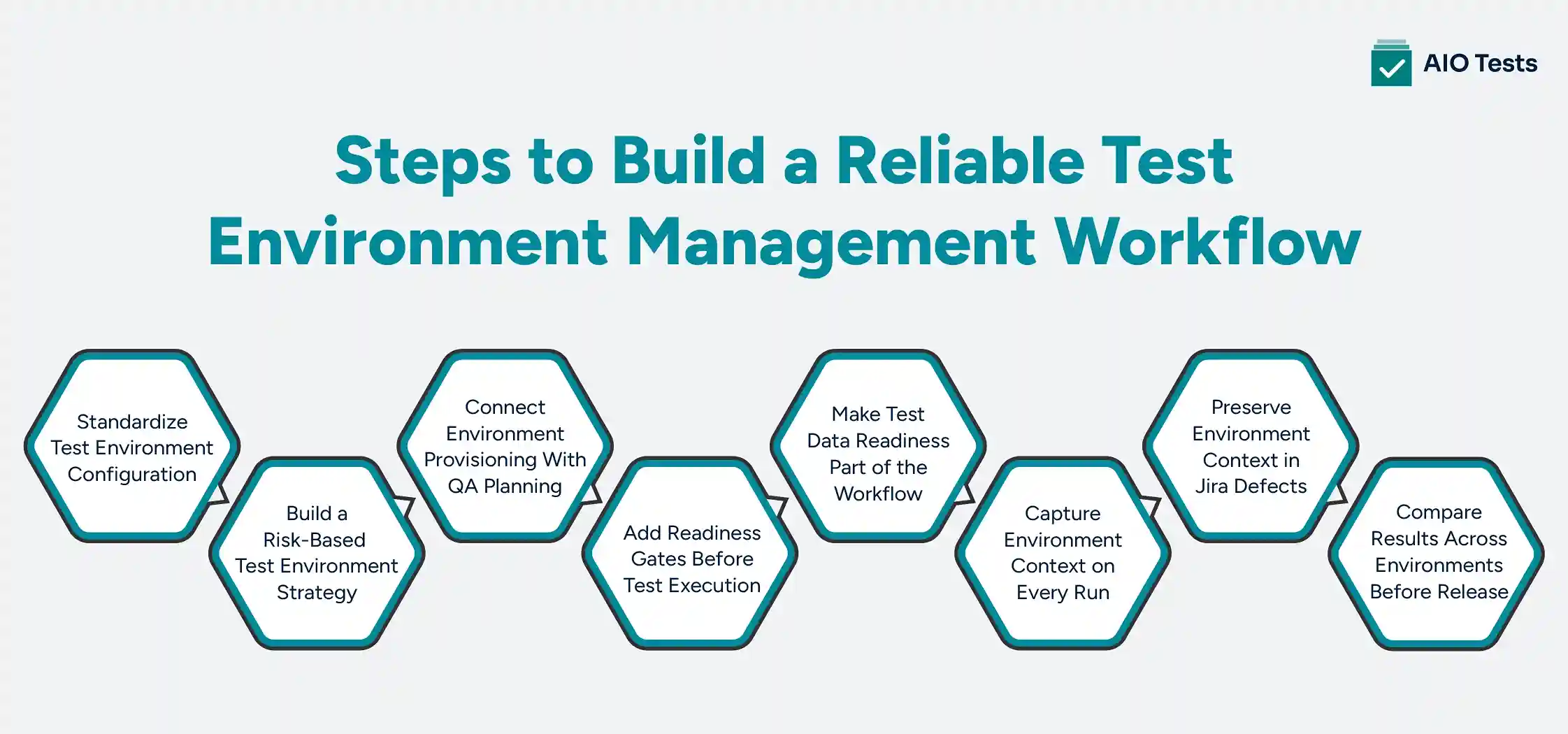
1. Standardize Test Environment Configuration Before Execution Begins
Start by deciding which environment details matter enough to capture every time.
- Environment
- Application build
- Release or version
- Browser and device
- Operating system
- Database or dataset
- API or service version
You do not need to capture every technical property of the environment. Record only the details needed to reproduce failures, filter results, and compare executions later.
If one team records UAT, another records UAT1, and automation reports uat-new, filtering and comparison become unnecessarily difficult.
How the Platform Handles This
- Create custom fields for Cases, Sets, Cycles, and Runs so environment data sits at the level where it belongs.
- Use the Single Select List type and define the allowed values, so testers pick from a fixed list instead of typing. Set a default value where one environment is the norm.
- Bring in an existing Jira field instead of building a second list. The Jira Field type supports single choice and multiple choice fields, along with Sprint.
- Component and Release are built-in Cycle fields and pull directly from the connected Jira project.
- Match the field to the change. Details shared by the whole cycle sit at Cycle level. Details that vary run to run, such as browser and device, sit at Run level.
2. Build Your Test Environment Strategy Around Releases and Testing Risk
Running every test in every environment may sound thorough, but it quickly increases execution time and maintenance effort.
A better strategy defines what runs where, based on the risk of each release.
- Run smoke tests after deployment.
- Run integration tests where dependent services are available.
- Run regression tests in QA or staging.
- Run business acceptance tests in UAT.
- Repeat selected tests across browsers and devices where configuration differences matter.
Make coverage a choice, not a habit. A payment-related change may require broader regression and configuration coverage than a minor content update. Give every environment a clear objective and exit condition.
Where the Tool Fits In
- Reusable Sets let teams group Cases for smoke or regression testing and add those Sets to relevant Cycles as needed. The same Set can feed many cycles without duplicating the underlying cases.
- Cycles organise the actual test execution. Objective, Component, and Release are built-in Cycle fields, so each cycle can carry its own purpose rather than being a generic container.
- Cycles sit in folders, the same way Cases do, so release or environment groupings stay tidy as the number of cycles grows.
- Assign testers early. Assign people to Cases in the Cycle one by one, in bulk, or by ticking Assign to Case Owner to route each case to whoever owns it.
- To repeat a suite across browsers or devices, copy the cycle and change the environment field rather than rebuilding it.
3. Connect Environment Provisioning With the QA Execution Plan
Creating an environment and declaring it ready for QA are two different events.
Environment provisioning is typically handled by cloud platforms, infrastructure-as-code tools, and CI/CD pipelines. Those systems create resources, deploy builds, and configure services.
QA still needs to confirm whether the environment is ready for testing.
- Expected build deployed
- Required services available
- Dependencies reachable
- Test data available
- Owner or window assigned
An environment can be provisioned successfully and still fail one of these readiness checks.
What the Platform Adds
- A Cycle is a structured execution record. Objective, Owner, Component, Release, Start Date, and End Date are all built-in fields, so the last check on that list has a home already.
- Execution context stays with the Cycle. Add Cases, custom fields, and linked Jira issues to the same Cycle. Cycle-level attachments hold deployment notes, configuration files, or readiness sign-offs.
- The Execution Planner turns cycle dates into a daily plan. Click Create Plan on the cycle, confirm the start and end dates, and it works out how many cases need running each day. Enter a number of assignees and it calculates how long the cycle will take.
- Plans stay honest as scope changes. Add new cases to the cycle and the Create Plan icon flags that the plan needs regenerating.
- Teams get notified when execution falls behind the plan, so slippage surfaces during the cycle rather than at the end of it.
- Cycle history records changes to cycle details and to which cases were added or removed, which gives you an audit trail when a release or component changes mid-cycle.
4. Add Readiness Gates Before Testing Moves Forward
QA teams can waste significant time when execution begins before essential prerequisites are confirmed.
- Environment selected
- Correct build deployed
- Release or version recorded
- Browser or device identified
- Test data confirmed
- Environment owner identified
These checks stop one missing prerequisite from turning into dozens of blocked tests.
Recording environment details helps. Requiring them helps more.
How the Tool Enforces This
The platform gates at three different moments, and each one catches something different.
- At cycle creation. Field Configurations makes built-in Cycle fields mandatory, so nobody opens a cycle without recording Release, Component, or Owner. This is the only gate that fires before testing starts.
- At result capture. Run-level custom fields can be marked required, and you choose which execution statuses trigger the validation. A tester cannot mark a run Passed without recording the browser and build it. Note that statuses of the Not Run type cannot trigger validation, so this gate catches results, not setup.
- Around operations. Workflow Manager runs rules against three entities, Cases, Cycles, and Batches, using a trigger, condition, action model.
- Rules fire pre-event or post-event. Pre-event rules run before the action takes effect, so they can block or validate it. Post-event rules run after, which suits notifications and follow-up steps.
- Conditions are built at field level and are optional. Choose a field, an operator, and a value, then decide whether all conditions must match or any one is enough.
5. Make Test Data Management Part of Environment Readiness
An environment can appear healthy from an infrastructure perspective and still be unsuitable for testing.
A checkout test may require a specific customer account, a permissions scenario may need users with different roles, and negative tests may depend on deliberately invalid data.
When those conditions are missing, tests fail for reasons unrelated to the code. That is why test data management should be part of environment readiness.
Where production-like data is not appropriate, use synthetic or masked data instead.
Where the Platform Helps
- Prerequisites live in the Case. Preconditions record the setup a test needs before it can run, and they appear on screen during execution rather than sitting buried in the case detail.
- Steps carry their own Data column next to the expected result, so the input a step needs travels with the step.
- Custom fields capture additional data context. Add them at whichever level the requirement belongs to, whether that is the Case, the Cycle, or the Run.
- Data-driven testing runs one Case against multiple datasets, so you are not duplicating cases for every data combination. Parameters go in the step text inside angular brackets, and the dataset supplies the values.
- Predefined parameters are set once at project level and reused across cases, which keeps test data values consistent the same way a controlled list keeps environment names consistent.
- Every dataset runs as its own execution with its own status, comments, and linked defects. When a test fails, you can see which data combination caused it rather than just that the case failed.
6. Capture Environment Context on Every Manual and Automated Run
A pass rate only means something when the executions behind it are trustworthy.
For every meaningful Run, teams should be able to answer the following questions:
- Where it ran
- Which build
- Which browser or device
- Manual or automated
- Who executed it
- What evidence exists
Where that information lives depends on the test. If an entire Cycle runs against the same UAT deployment, capture the shared environment information once at the Cycle level. If a Case runs across Chrome, Firefox, and mobile, tie that detail to individual Runs.
How the Tool Captures This
- Multiple Runs per Case. Keep separate execution records without duplicating the underlying Test Case.
- Evidence attaches at run level and at step level, so a screenshot sits next to the step that produced it rather than at the bottom of the case.
- Automated executions populate the same run custom fields manual testers use. In the Playwright reporter config, a fixed value records the environment, and the $project token pulls the browser straight from the Playwright project name.
- For that mapping to work, the AIO field must be a single select list and its values must match your Playwright project names. This is where the controlled values from step one earn their keep.
- Running browsers as parallel Playwright projects needs the master build setting, so the parallel runs share one cycle instead of each creating its own.
- Playwright is not the only route. Results can also arrive as JUnit or Cucumber reports, or through the REST APIs called from Playwright hooks.
- The REST APIs cover Cases, Sets, Cycles, and execution results, and work with automated tests written in any language.
7. Preserve Environment Context When a Failed Test Becomes a Jira Defect
Checkout failed in UAT" is not enough information to debug anything.
A developer investigating that defect may still have questions. Which build? Which browser? What was expected? Is there a screenshot? Did the same test pass elsewhere?
A useful failure record should preserve as much relevant execution context as possible.
- Test Case and Run
- Environment and build
- Browser or device
- Expected and actual result
- Screenshots and logs
That context helps the team determine whether it is dealing with an application defect, a test data problem, an environment issue, or an automation failure.
What the Platform Preserves
- During execution, teams record results, log defects, add comments, and attach evidence without leaving the testing workflow.
- Defects and evidence attach at step level as well as run level, so the bug sits against the step that actually failed rather than the case as a whole.
- An existing Jira bug can be linked to a run instead of creating a new one. When the same failure appears in staging and UAT, both runs point at one defect rather than two duplicates.
- Defects can also be created as a sub-task of a parent Jira issue where your team works that way.
- Execution History keeps previous Runs and the defects reported in each of them, so a later passing run does not erase the earlier failure.
- Cycle exports carry actual results, defects, attachments, run custom fields, and run comments, and image attachments embedded directly in the exported PDF.
- The Defect Impact report shows which cases and requirements a given defect touches, which answers whether a failure is isolated or spread across environments.
8. Compare Execution Results Across Environments Before Release
Capturing environment data only creates value when teams use it to understand execution patterns and support release decisions. When details such as environment, browser, device, or configuration are stored in structured Run-level fields, QA leaders can ask questions like:
- Why does a test pass in QA but fail in UAT?
- Which browser has the highest number of failures?
- Which environment has the most blocked tests?
- Is a failure isolated to one environment or occurring across multiple environments?
These questions change the release conversation. Instead of simply saying, "80% of tests passed," teams can see whether the remaining failures are concentrated in a particular environment or configuration.
How the Tool Closes the Loop
- The Run Distribution Report analyzes Cycle data across multiple criteria, including custom fields defined at the Run level. This can help teams identify execution patterns when environment information is captured in those fields.
- The Multi Cycle Execution Comparison Report lets teams compare the execution results of test cases across multiple Cycles, including their current status and associated defects.
- The Execution Summary Report provides a detailed view of a single Cycle, including execution status, estimated and actual effort, and defect information.
Dynamic filters can automatically select Cycles that match defined criteria each time a supported report is run. Reports can also be exported to PDF or Excel when stakeholders need an offline copy.
When environment information is stored in structured fields, these reporting capabilities help teams look beyond individual failures and identify patterns that can inform release decisions.
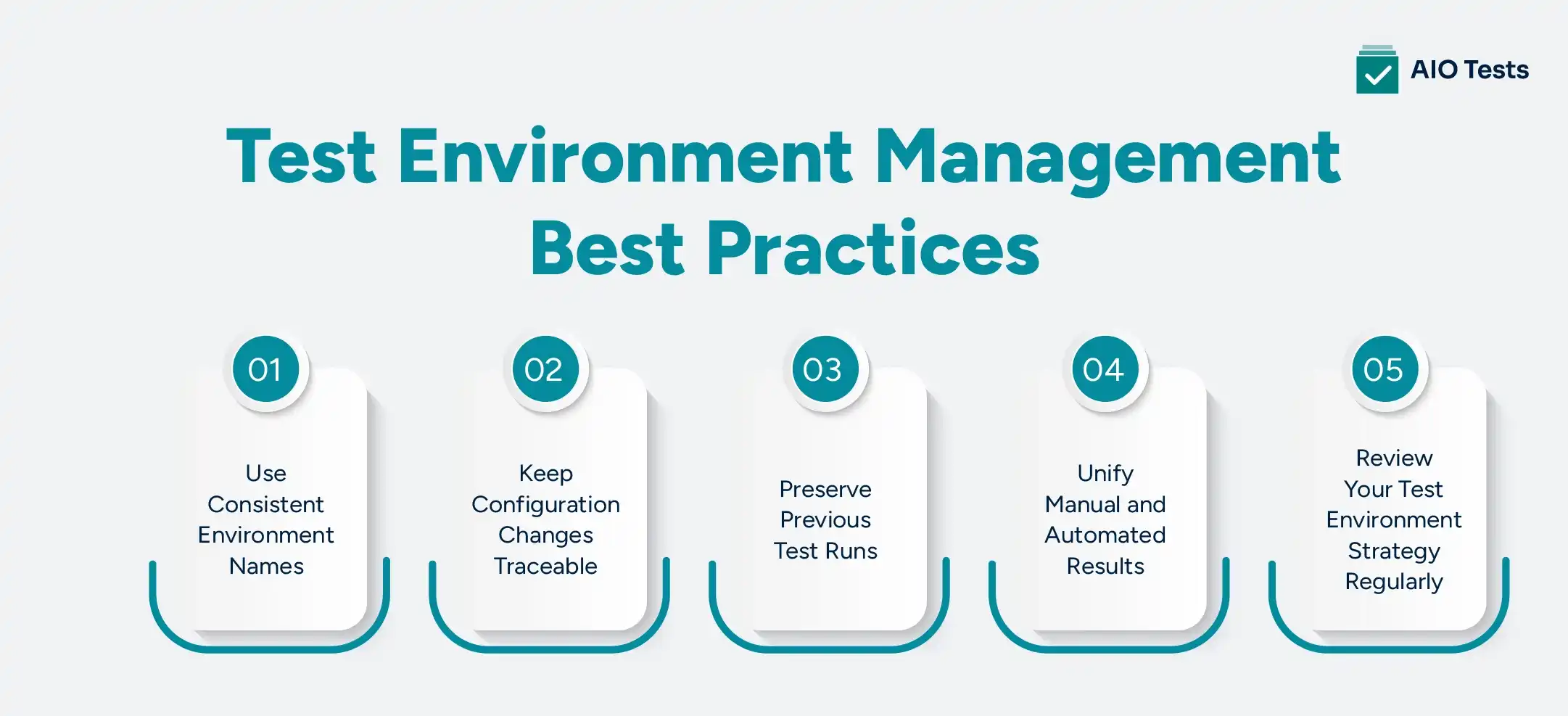
Test Environment Management Best Practices for Keeping the Workflow Reliable
A workflow can still become inconsistent over time. These practices help keep it useful as teams, applications, and environments change.
1. Use Controlled Environment Names Instead of Free Text
Choose one naming convention and use it consistently.
If one team records UAT, another records UAT1, and automation reports uat-new, filtering and comparison become unnecessarily difficult.
Where possible, use structured fields with controlled values rather than relying on testers to type environment names manually. The goal is not naming perfection. It is making sure the same environment is represented the same way every time.
2. Keep Configuration Changes Traceable
Environment behavior changes when its configuration changes.
If an API version, database configuration, dependency, feature setting, or browser version changes between Runs, that information may explain why the result changed.
Good Environment configuration management therefore means recording the configuration details that materially affect testing and keeping them aligned with the relevant release and execution records.
You do not need to duplicate your infrastructure configuration within the test management system. Capture enough context to explain the test result and link back to the appropriate source when deeper infrastructure detail is required.
3. Preserve Previous Runs Instead of Replacing the Latest Result
A final passing Run does not make earlier failures irrelevant.
Suppose a test failed in UAT, the environment configuration was corrected, and the next Run passed. Keeping both Runs tells the team much more than replacing the original failure with “Pass.”
The platform preserves the Runs associated with a Case during Cycle execution, along with execution history and defect information.
Execution history helps teams determine whether a product fix, environment change, data correction, or other adjustment actually resolved the issue.
4. Keep Manual and Automated Results Under the Same Testing Model
Manual and automated testing should not produce two completely separate pictures of release quality.
Use consistent environment, release, and execution information wherever possible so QA leads can understand what has been covered regardless of how the test was executed.
The tool's APIs and automation integrations bring automated execution results into the same test management workflow used for manual testing.
That makes it easier to review the release as one testing effort instead of reconciling unrelated reports.
5. Review the Test Environment Strategy as the Product Changes
A good test environment strategy is not permanent.
Revisit it when:
- supported browsers or devices change;
- new integrations are introduced;
- application architecture changes;
- CI/CD workflows change;
- new environment types are added;
- release risk increases.
Update Test Sets, Cycles, custom fields, readiness rules, and reporting criteria when those changes affect how testing needs to run.
That ongoing review is one of the simplest test environment management best practices for preventing a once-useful process from becoming another outdated checklist.
Where Environment Orchestration Ends and Test Management Begins
Test environment management overlaps with infrastructure work, but the two should not be confused.
Environment provisioning creates the resources needed for testing. Environment orchestration coordinates how environments, dependencies, deployments, configurations, and lifecycle actions work together.
Those responsibilities normally sit with cloud platforms, CI/CD systems, infrastructure-as-code tooling, or dedicated environment-management products.
This Jira test management solution does not replace those systems.
Instead, the workflow can look like this:
Environment provisioning
→ Application deployment
→ Test Cycle in Jira
→ Manual + automated Runs
→ Jira defects
→ Reports
→ Release decision
The infrastructure tooling answers questions such as, “Is the environment deployed and running?”
The test management platform addresses a different set of questions: “What needs to be tested here? What ran? Under which conditions? What failed? Which Jira defect resulted from that failure? What does the execution data indicate about release readiness?”
The Jira test management solution supports Cases, Sets, Cycles, executions, automation integrations, reporting, and traceability.
That makes it the test-management and traceability layer around the team's existing software testing infrastructure, rather than the system responsible for operating that infrastructure.
Conclusion
Reliable infrastructure alone does not guarantee reliable testing. Teams also need a consistent record of where each test ran, which build and configuration it used, what happened during execution, and what changed when a failure was rerun.
Making environment context part of the test record helps teams reproduce failures, compare results across Runs, and make better-informed release decisions.
The platform brings Test Cases, Sets, Cycles, Runs, automation results, Jira defects, reporting, and traceability into the same Jira-based testing workflow.
Instead of managing the testing side of Test Environment Management through disconnected spreadsheets and execution logs, teams can build a workflow where environment context stays connected from planning through release review.

Frequently Asked Questions
1. What is a test environment in software testing, and why is it important?
A test environment in software testing is the combination of the application build, infrastructure, dependencies, configuration, test data, browser or device, and other conditions used to execute a test. It matters because a result is much easier to trust and reproduce when the team knows the exact conditions under which it was produced.
2. What are the key components of test environment management?
Test Environment Management typically includes environment provisioning, environment configuration management, test data management readiness checks, ownership, execution tracking, defect context, and reporting. The goal is to keep these activities coordinated so teams can understand how the environment affected each test result.
3. What should a test environment strategy include?
A test environment strategy should define which environments support each testing objective, what coverage must run in each one, who owns readiness, and which configuration and test-data details need to be captured. It should also define how manual and automated results will be tracked and what must pass before the release progresses.
4. What are the best practices for managing test environments?
Key test environment management best practices include standardizing environment names, validating readiness before execution, keeping configuration changes traceable, preparing test data deliberately, preserving Run history, and comparing results across environments. These testing environment best practices help teams distinguish genuine product defects from failures caused by data, configuration, or environment conditions.
5. How can AIO Tests help streamline test environment management?
The platform supports the test-management side of the workflow through reusable Cases and Sets, Cycles, custom fields, Workflow Manager, multiple Runs, manual and automated execution, Jira defect linkage, and reporting. It does not provision infrastructure; instead, it keeps testing and environment context connected inside Jira.
6. How can teams manage test data and environment configurations efficiently?
Standardize the environment and configuration details that need to be recorded, define required test data before execution begins, and keep those prerequisites close to the relevant Test Case or Cycle. When configurations or datasets change, preserve the resulting Runs so the team can compare outcomes rather than losing the history behind the latest result.


.svg)

