The fix for most release failures isn't more testing. It's connected testing.
When requirements, test cases, executions, and defects exist as disconnected artifacts, coverage gaps are invisible until they become production incidents:
A Requirements Traceability Matrix (RTM) solves this by giving your QA, development, and product teams a single, authoritative map: every requirement linked to its test cases, every execution tied to its result, every defect traceable back to the requirement that triggered it.
In this guide, you'll learn what an RTM is, why native Jira falls short of providing one, and how to build a complete, maintainable requirements traceability matrix in Jira step by step using AIO Tests as the test management layer that makes it all work.
A Requirements Traceability Matrix (RTM) is a structured document or a dynamic view that maps every software requirement to the artifacts that validate it: test cases, test execution results, and any defects discovered during testing.
Its purpose is to answer one fundamental question at any point in the development cycle: 'Are all our requirements actually being tested?'
In a Jira context, the RTM links Epics and Stories (requirements) to the test cases written to validate them, the test cycles in which those cases were executed, and any Jira bugs that were raised when they failed.
Rather than a static spreadsheet, an RTM in Jira should be a living, navigable chain of linked artifacts that updates as your team works.
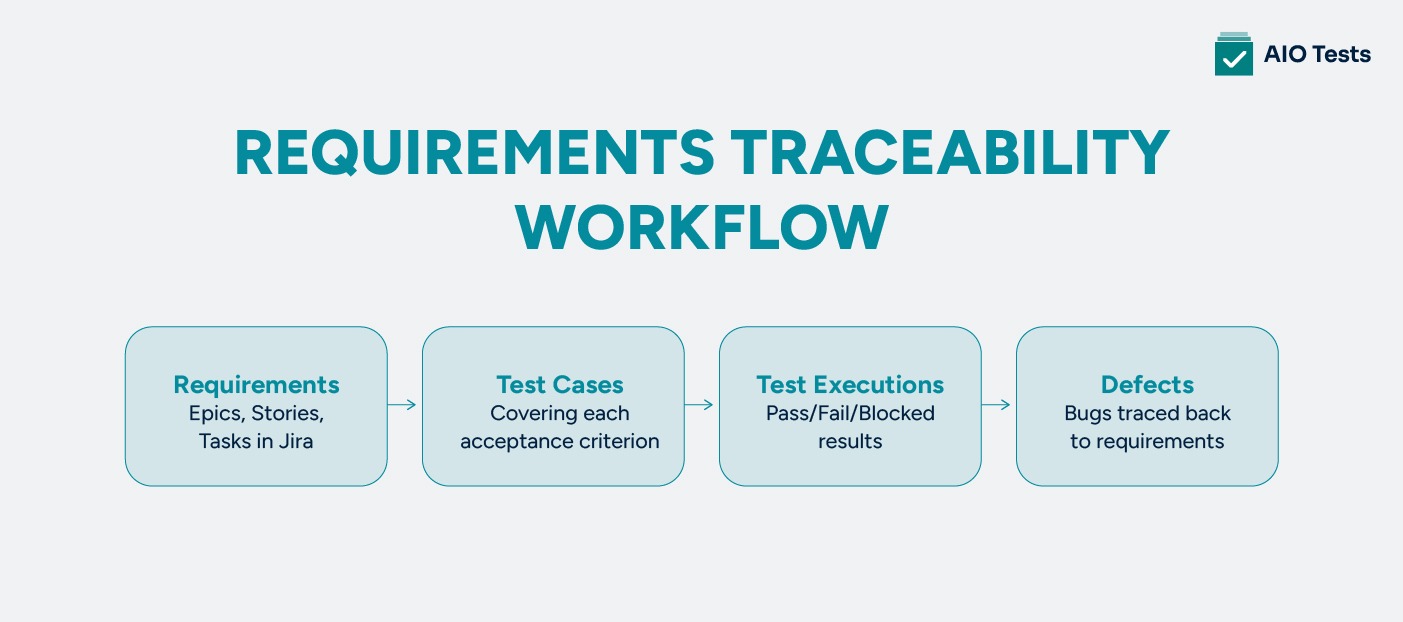
At its core, a traceability workflow follows a four-stage chain.
Each stage must be explicitly connected to the next to enable effective traceability analysis and ensure the matrix is complete.
Before building your RTM, it is important to understand which direction of traceability your team needs.
There are three types, each serving a distinct purpose:
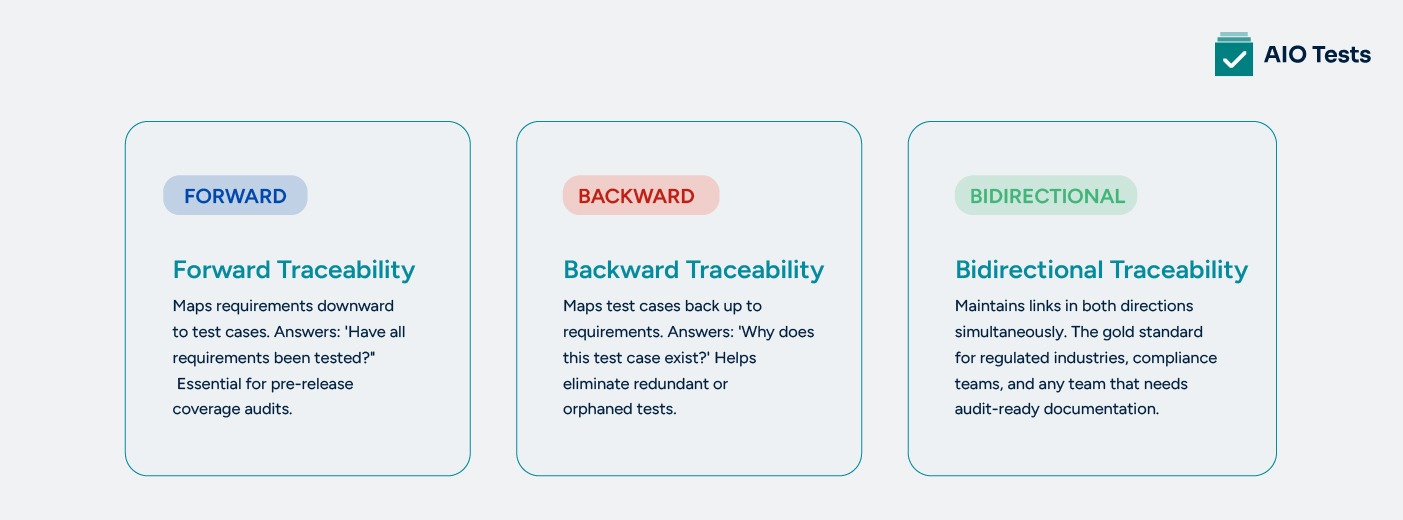
💡 Which type should you use? For most QA teams, bidirectional traceability delivers the most value. It's the only approach that gives complete visibility when requirements change mid-sprint, making it easy to identify which test cases need to be updated alongside the requirement.
The short answer is partially. Jira is a powerful project tracking and issue management platform, but it was not designed as a complete Jira test management tool.
Its native capabilities offer a foundation for traceability, but they stop well short of what QA teams need for structured, scalable requirements management in Jira.
While the above is useful for lightweight workflows, native Jira traceability breaks down quickly as project complexity grows:
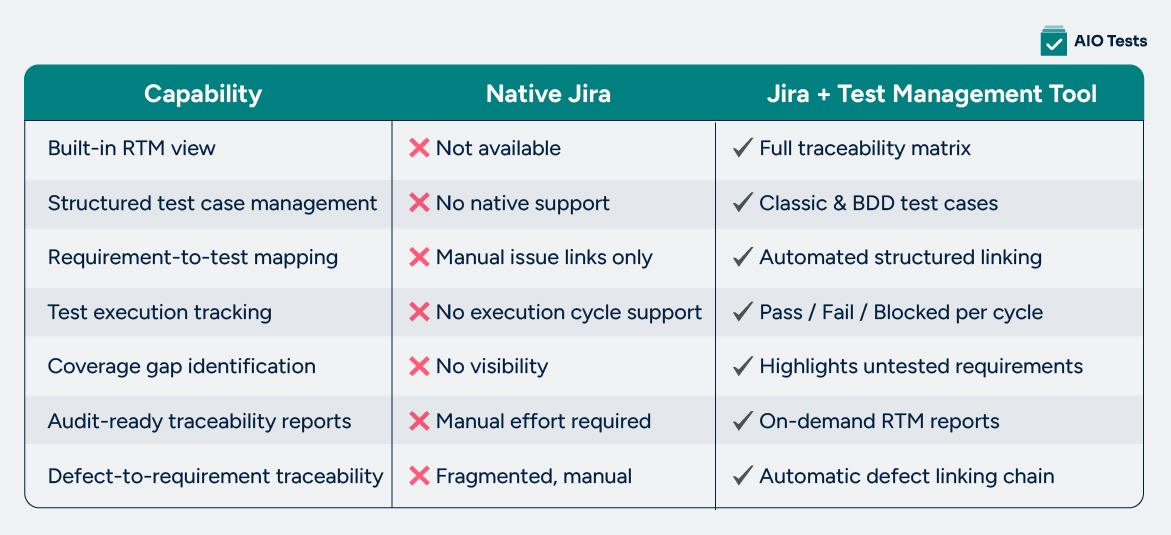
⚠️ Common mistake: Many teams attempt to simulate an RTM using Jira labels, custom fields, or linked issue reports. This technically works at a small scale but breaks down easily as requirements grow, leading to stale links, missed coverage, and unreliable pre-release gates.
To bridge the gap between Jira's project management strengths and the structured test management that QA teams need, most organizations add a Jira-native test case management tool.
These tools sit inside Jira, use the same issues and workflows, and add a structured linking, execution tracking, and reporting layer that makes a complete Jira requirements traceability matrix achievable without maintaining a separate system.
The following six steps walk through the complete process of building a maintainable Jira requirements traceability matrix from scratch using AIO Tests as the test management layer inside Jira.
Every traceability effort starts with well-structured requirements. In Jira, requirements typically live as Epics (high-level features), Stories (user-facing functionality), and Tasks (technical requirements). How you write and structure these directly determines the quality of your traceability downstream.
Key practices when structuring requirements:
💡 AIO Tests note: AIO Tests reads your Jira issues directly. Well-written acceptance criteria in your Stories can be used by AIO Tests' AI to auto-generate relevant test cases in the next step, so the quality of your requirements writing directly accelerates your test design phase.
With requirements defined, you create and manage test cases for each one inside AIO Tests. Because AIO Tests is natively embedded in Jira, test case creation happens within your existing workflow, no context switching, no separate login, no data duplication.
AIO Tests supports two formats for test case creation:
For teams looking to accelerate test design, AIO Tests includes AI-powered test case generation. Point it at a Jira Story, and it generates structured test scenarios based on the description and acceptance criteria, a significant time saver for large feature sets or regression suites.
💡 AIO Tests note: Use the Rovo Assistant integration for even richer test generation, which pulls context from related Jira issues, attachments, and comments, not just the Story text, producing more comprehensive test cases without starting from scratch each time.
This is where the actual requirement-to-test-case mapping in Jira happens. In AIO Tests, you link test cases directly to Jira issues (Stories, Epics, Tasks), establishing the traceability chain that powers the entire RTM.
How linking works in practice:
This bidirectional linking eliminates the manual spreadsheet maintenance that plagues most teams trying to maintain an RTM without a dedicated tool. When a requirement changes, you can immediately see every test case affected without searching through issue links or comment threads.
💡 Best practice: Maintain a one-to-one mapping, where possible, one test case per specific acceptance criterion. For requirements with multiple criteria, create a separate test case per criterion to prevent coverage ambiguity in your reports.
Linking requirements to test cases establishes the plan. Test execution is where that plan meets reality. In AIO Tests, you organize executions into Test Cycles, grouping test cases by sprint, release, or environment, and testers record Pass, Fail, or Blocked results for each case.
Defect management within the traceability chain:
AIO Tests also integrates with popular automation testing tools and frameworks, including JUnit, TestNG, Cucumber, Cypress, and Playwright, as well as CI/CD pipelines such as Jenkins and Azure DevOps. Automated test results push directly into your AIO Tests cycles, giving you a unified RTM that spans both manual and automated testing in a single view.
💡 AIO Tests note: With CI/CD pipeline integration, every automated test run in Jenkins or Azure DevOps automatically updates your traceability coverage so your RTM reflects the latest execution state without any manual result entry.
With requirements linked and executions underway, AIO Tests provides a real-time view of requirement coverage. The percentage of requirements that have at least one associated, executed test case through its traceability dashboards.
What you can monitor from the coverage dashboard:
This live coverage view is the dynamic version of your Requirements Traceability Matrix — it updates automatically as executions are logged and results change, without requiring manual refreshes or report reruns.
The final step is turning live traceability data into shareable, structured documentation. AIO Tests offers two dedicated traceability reports, each designed for a different stakeholder need:
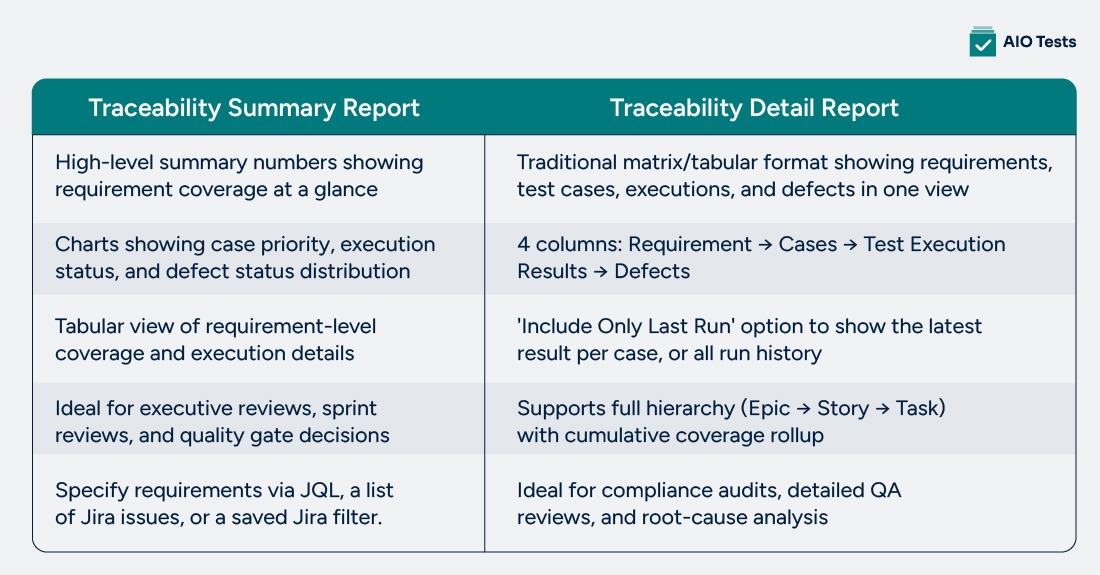
A particularly powerful feature of the Summary Report is its merge strategy: when a test case has been run in multiple cycles, you can choose between 'Last Run' (showing only the most recent result) and 'All Runs' (which considers every execution to determine the final status).
This distinction matters significantly for compliance scenarios if a case failed in cycle 1 but passed in cycle 2, 'Last Run' would show a false green, while 'All Runs' correctly surfaces the prior failure.
💡 Best practice: Run a Traceability Summary Report at the start of every testing cycle, not just at the end. Catching coverage gaps during sprint planning is dramatically cheaper than discovering untested requirements at release time.
Traceability isn't just a documentation exercise; it's the mechanism that turns testing into evidence. Here's what that means in practice for QA teams.
Together, these factors make traceability a non-negotiable practice, not a nice-to-have.
These are the five most common obstacles and why they compound each other:
Teams rely on spreadsheets or ad-hoc Jira links that break down as requirements change, creating an illusion of coverage that doesn't hold up under scrutiny.
Without a dedicated software qa tool, connecting Jira Stories to test cases requires manual workarounds that are time-consuming and error-prone at scale.
Coverage data lives across separate tools, test results in one system, requirements in Jira, bugs in another tracker, making complete visibility impossible without manual aggregation.
Teams cannot quickly answer 'which requirements haven't been tested?', especially painful under release pressure when there is no time to manually cross-reference issue lists.
Maintaining requirement validation in Jira, manually updating links after requirement changes, regenerating qa testing reports, and chasing status consume QA bandwidth that should go toward actual testing.
AIO Tests is a Jira-native test management tool that integrates seamlessly with existing automation frameworks, providing a structured, centralized approach to managing both manual and automated tests without leaving Jira.
It fills the traceability gap between requirements, test execution, and defect tracking, giving every stakeholder, QA managers, ops teams, and compliance leads complete end-to-end visibility.
AIO Tests automatically links test cases to Jira requirements and connects execution results and defects back through the same chain. Requirements-to-test mapping that previously required manual effort is handled automatically, keeping your RTM accurate without extra work.
Generate classic or BDD-style test cases directly from Jira Story descriptions and acceptance criteria using built-in AI. The AIO Tests Rovo Assistant integration pulls broader context from related issues and comments for more comprehensive coverage
Generate 20+ reports, including test execution reports, covering test case creation through execution, defects, and outcomes. Dashboard gadgets show end-to-end traceability, execution progress, pass/fail rates, and defect trends. Two dedicated traceability reports, Traceability Summary and Traceability Detail, are available on demand. Reports can be scheduled, exported as PDF or Excel, and shared with stakeholders.
AIO Tests is built natively inside Jira. Test cases, execution cycles, defect reports, and traceability dashboards all live within your existing Jira environment, no separate login, no tool switching, no duplicate data entry.
AIO Tests provides complete end-to-end traceability from requirements to test cases, test executions, defects, and release readiness. Teams can instantly verify requirement coverage, identify testing gaps, and understand the impact of changes without manually maintaining spreadsheets or separate traceability matrices. This creates a single source of truth for QA, development, and business stakeholders throughout the release cycle.

Setting up your traceability infrastructure is just the beginning. Keeping it accurate, useful, and maintainable over time requires discipline and a few consistent habits.
Map each test case to one specific requirement or acceptance criterion. Broad, multi-requirement test cases make it impossible to determine whether a specific requirement is truly covered when some tests pass, and others fail.
Generate a Traceability Summary Report at the beginning of each sprint or testing cycle — not just at the end. Finding untested requirements in sprint planning is far cheaper than discovering them at release time.
Before every release, confirm via a Traceability Detail Report that all requirements have at least one passing test case and no open critical defects. Make this a formal gate, not an optional step, to protect release quality.
Agree on a consistent format for Jira Stories, including how acceptance criteria are written across all teams and projects. Inconsistent requirements produce inconsistent test coverage and unreliable traceability data.
Whenever a Story is modified mid-sprint, immediately review its linked test cases to confirm they still reflect the updated requirement. Stale links are worse than no links — they give a false confidence in coverage that isn't real.
Use AIO Tests' AI for test case generation, CI/CD integrations to push automated results, and REST APIs to import test data from external tools. Every manual step eliminated is a consistency improvement and a time saving for your QA team.
The six-step process in this guide gives your team a structured, repeatable approach: define requirements clearly, create and map test cases, execute with defect linking, monitor coverage, and generate RTM reports for stakeholders and auditors.
With AIO Tests handling the Jira integration, AI-powered test case generation, automation framework integration, and reporting, maintaining that traceability adds minimal overhead to your existing workflow.
Whether you are preparing for a compliance audit, scaling your QA team, or simply trying to reduce defect leakage into production, a well-maintained Jira Requirements Traceability Matrix is one of the highest-leverage investments your QA process can make.

Requirements traceability in Jira ensures every feature is tested before release. It connects requirements to test cases, execution results, and defects, giving QA, development, and product teams a shared view of coverage. Without it, teams risk shipping untested functionality and failing compliance audits.
AIO Tests generates structured test cases directly from a Jira Story's description and acceptance criteria using built-in AI. The Rovo Assistant goes further by pulling context from related issues, attachments, and comments for broader coverage.
Jira has no native RTM view, so teams must build traceability manually, which breaks when requirements change. Common pain points include: manual links that go stale, no visibility into untested requirements, fragmented data across tools, and no built-in audit-ready reporting. These issues compound quickly at scale.
AIO Tests offers two dedicated reports. The Traceability Summary provides high-level coverage, ideal for sprint reviews and managers. The Traceability Detail shows a complete matrix of requirements, linked test cases, execution results, and defects in a single table. Both are generated on demand via JQL, an issue list, or a saved filter, and are updated in real time.
Bidirectional traceability lets you navigate in both directions from a Jira requirement to its test cases and results, and from any test case back to the requirements it covers. In AIO Tests, this link is created automatically when a test case is associated with a Jira issue. So when a requirement changes, you instantly see affected tests, and when a test fails, you see the requirements at risk.


.svg)

