


Summarize Blog
Quick Summary
Sanity testing is a subset of regression testing used to verify that specific code changes or bug fixes work as intended. Unlike smoke testing (which checks the whole build), sanity testing is narrow and deep. A structured workflow ensures Agile teams don't waste time testing "broken" builds.
Sanity testing is one of those checks teams tend to rush or skip, until a small change breaks something important. In Agile environments where builds move fast, this quick verification step helps confirm that core functionality still works after code updates.
It prevents unstable builds from reaching deeper testing stages and consuming sprint time unnecessarily. Within software quality assurance, sanity testing acts as an early control point. It helps QA teams decide whether a build is worth testing further or needs to go back for fixes.
This blog walks through a practical sanity testing workflow for Agile teams and shows how test management app support consistent checks without adding manual overhead.
What is the Role of Sanity Testing in Software Testing
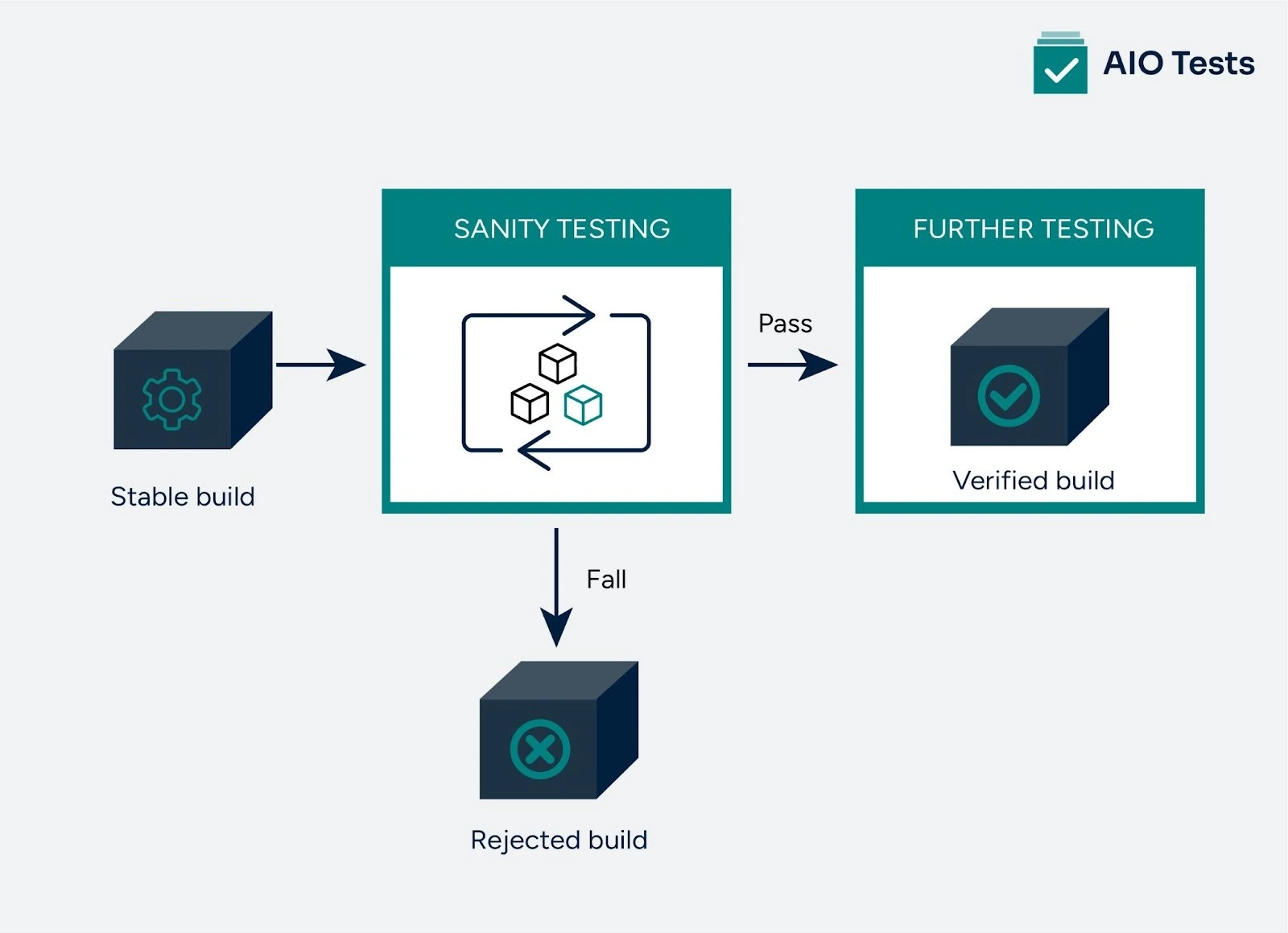
Sanity testing is a quick, focused check that happens after a developer completes a build. Its primary purpose is to verify that the application's core functionality works as expected before moving on to more detailed, extensive tests.
Among the different types of qa testing, sanity testing serves as an early decision point that helps teams determine whether a build is stable enough for further validation.
Think of it as a first-pass check to ensure the basic parts of the system aren’t broken after changes are made. It is a subset of regression testing in software testing, typically performed after the software successfully clears smoke testing.
Why It Matters:
- Quick Validation: Ensures the application is stable enough to proceed with further testing.
- Early Detection: Identifies critical issues early, before they become bigger problems in later testing phases.
- Saves Time: By confirming basic functionality first, sanity testing prevents unnecessary work if the build is flawed.
In Agile development, where time is critical and changes are frequent, sanity testing is a crucial practice to keep things on track.
If you’re unsure about how it differs from sanity and regression testing, here’s a simple table comparing smoke testing, sanity testing, and regression testing
What Is the Right QA Sanity Testing Workflow for Agile Teams?
Sanity testing helps Agile teams quickly verify that core functionalities work after each build or update. Using a structured workflow and an agile test case management tool, teams can run focused sanity checks without slowing down sprint execution.
1. Initial Setup and Test Environment Preparation
The first step in the sanity testing process is preparing the test environment to ensure that the application behaves as expected under real-world conditions. This involves:
- Deploying the latest build: The most recent version of the application, including any updates, patches, or new features, needs to be deployed in the test environment.
- Configuring the environment: This includes setting up databases, servers, and other systems the application interacts with. It’s crucial to replicate the production environment as closely as possible to detect any environment-specific issues.
- Validating the build: A quick smoke test (also known as a build verification test) should be performed to verify that the application launches properly and the core features are accessible.
Once the environment is prepared, the focus shifts to identifying the critical areas impacted by the recent changes, as these will be the primary focus of the sanity tests.
2. Test Case Selection and Focusing on Critical Features
In this phase, testers carefully select the most important test cases based on recent changes. Unlike full regression testing, which verifies all functionalities, sanity testing focuses only on the core components affected by updates, making it a critical step within software regression testing in Agile.
Key steps include:
- Identifying critical functionalities: These could include features such as payment processing, user authentication, or any other essential elements that are central to the application’s operation. This identification is often done by reviewing change logs, release notes, or consulting with developers.
- Creating concise test cases: A small set of test cases is created that directly corresponds to the areas of the application that are most likely to be affected. The goal is to quickly verify that these key features work as expected.
- Prioritizing high-impact areas: In Agile development, time is of the essence. By narrowing the focus to the most critical areas, teams can ensure that any major issues are detected early, preventing them from propagating through later testing phases.
3. Regression Checks and Reporting
After executing the selected test cases, the next step is to ensure that the application’s core features work and that no new defects have been introduced. This is where regression checks come into play.
- Regression checks: While sanity testing focuses on critical functionalities, it’s still important to verify that existing features haven’t been impacted by recent changes. Preparing these checks starts with writing test cases that target high-risk areas, ensuring that core functionality remains intact without running full regression tests.
- Documenting findings: Any issues, bugs, or discrepancies encountered during sanity testing should be logged and reported back to the development team for resolution. Clear communication is crucial at this stage to ensure that developers address the most pressing issues immediately.
4. Streamlining the Process with Automation
Many Agile teams use automated tests to handle sanity testing without relying on repeated manual checks. This is where test automation transforms QA workflows, reducing execution time and ensuring the same checks run on every build.
- Automated testing tools: With automated test software such as Selenium, TestComplete, or AIO Tests, teams can run predefined sanity test cases consistently. These tools help verify critical functionality after each build and reduce errors caused by manual execution.
- CI/CD Integration: CI/CD in automation testing enables automatic execution whenever a new build is available. This provides quick feedback to developers and prevents unstable builds from moving into deeper testing stages.
- Traceability and Scalability: Using a tool like AIO Tests ensures Requirement Traceability. Every sanity check is linked directly to a Jira user story or bug fix. This provides a clear audit trail, so managers can see exactly which code change was verified and why it passed.
How Do Agile Teams Integrate Sanity Testing into the Sprint Cycle?
In Agile development, each sprint introduces frequent code changes, which increases the risk of instability. This is where sanity testing in Agile acts as a control gate. Before teams move into deeper functional or regression testing, they need quick confirmation that the build is stable and usable.
The sanity testing process is usually triggered at the start of a sprint or immediately after a new build is deployed. Instead of testing everything, Agile teams validate only the most critical workflows impacted by recent changes.
Where Sanity Testing Fits in the Sprint
Agile teams typically run sanity tests:
- At the beginning of each sprint, after a new build is shared
- After bug fixes or hotfix deployments
- Before committing time to full regression or exploratory testing
Benefits of Running Sanity Testing Early in a Sprint
- Early issue detection: Critical failures are caught before they block downstream testing activities or development tasks.
- Build stability assurance: Teams gain confidence that core features are working and the build is ready for further validation.
- Faster sprint execution: Testers avoid wasting time on broken builds, helping the sprint stay on schedule.
Automating Sanity Testing in Agile Workflows
To keep up with short sprint cycles, many teams automate their sanity testing process.
- Automated execution: Sanity test cases run automatically on every new build, reducing manual effort and human error.
- CI pipeline integration: AIO Tests integrates seamlessly with Continuous Integration pipelines (e.g., Jenkins, GitHub Actions, Azure DevOps), enabling automated sanity tests to be triggered and their results captured as part of the build process.
- Consistent and scalable testing: Automation ensures the same critical checks run every time, even as the application and team scale.
When sanity testing is embedded into the sprint workflow, it becomes a safeguard rather than an afterthought. Agile teams can move faster with confidence, knowing that only stable builds progress through the rest of the testing cycle.
Conclusion
A structured sanity testing workflow is essential for Agile teams to catch critical issues early, preventing bugs from reaching later stages of the development cycle.
By focusing on key functionalities after every build, teams can quickly verify that the most important features are intact, saving time and reducing the risk of defects propagating. Sanity testing remains a key practice in Agile methodologies, and integrating tools like AIO Tests can further streamline the process, ensuring faster, more consistent results.
For teams looking to enhance their testing efforts, book a demo with AIO Tests today to explore how it can simplify and accelerate your testing workflow.

FAQs
- What is sanity testing?
Sanity testing is a focused check performed after a new build or code change to confirm that core functionality works as expected. It helps teams decide whether a build is stable enough for further testing.
- How is sanity testing different from regression testing?
Sanity testing validates only the areas affected by recent changes, while regression testing checks the entire application to ensure existing features still work. Sanity testing is quick and selective, whereas regression testing is broader and more time-consuming.
- Can sanity testing be automated?
Yes. Sanity testing can be automated using automated test software to run critical test cases on every build. Automation helps teams get consistent results faster, especially when integrated into CI/CD pipelines.
- When should sanity testing be performed?
Sanity testing is typically performed after a new build, bug fix, or code update, and before starting detailed functional or regression testing. In Agile teams, it is often run at the beginning of a sprint or immediately after a build is shared.


.svg)
