


Summarize Blog
Quick Summary
Struggling with scattered test cases and endless spreadsheet updates? This guide explains why teams use Jira for test case writing, how AIO Tests supports AI-assisted creation, versioning, and reusable cases, and the steps to create classic and BDD test cases directly within Jira.
Remember the last time you tried to track test cases manually? You probably started with a neatly organized spreadsheet, but as the project grew, so did the chaos. Scattered updates, endless back-and-forth between teams, and the constant struggle to stay aligned quickly turned what should’ve been a simple task into a full-time headache.
Software testing shouldn’t be this complicated. Managing your test cases should be effortless, enabling you to create, track, and execute with ease while maintaining high software quality across every release.
That’s where AIO Tests comes in - an AI-powered test management tool built to simplify the chaos. No more juggling spreadsheets or switching between tools. Everything lives in one platform, streamlining your workflow and improving test efficiency from start to finish.
In this blog, we’ll show you how the platform makes creating test cases in Jira faster, more consistent, and easier to scale.
What Is a Test Case in Jira?
A test case in Jira is a structured set of steps, conditions, and expected outcomes used to verify that a feature functions correctly. While standard Jira issues (like Stories or Tasks) track development work, a test case defines how to validate that functionality during QA.
Key components of a Jira test case include:
- Preconditions: System setup or requirements needed before testing.
- Test Steps: Sequential instructions guiding execution.
- Test Data: Specific inputs, variables, or credentials used.
- Expected Results: The targeted behavior determining a Pass or Fail result.
- Traceability: Direct links to linked user stories and logged defects.
Unlike temporary tasks, test cases in Jira remain permanent, reusable assets executed across multiple sprints and product releases.
Why Is Jira Used to Write Test Cases?
Yes. Teams can write and manage test cases within the Jira environment, although Jira itself is primarily designed for issue and project tracking. Dedicated test management apps add the structured fields, execution workflows, reporting, and traceability QA teams typically need.
Jira is widely used to write test cases because it offers a centralized platform that integrates test management seamlessly with development workflows. This allows teams to create, organize, and track test cases alongside user stories, bugs, and other issues in one place, improving collaboration and visibility across the project lifecycle.
Additionally, Jira’s flexibility and extensive plugin ecosystem enable teams to customize test case management to their specific needs. With integrations for automation tools and support for Agile and DevOps methodologies, Jira helps streamline testing, ensures traceability, and speeds up release cycles, making it an ideal choice for many software teams.
While Jira provides a powerful platform for test case management, using a dedicated test management tool can enhance your testing process even further.
How AIO Tests Enhances Test Case Management in Jira
Jira serves as a robust platform for issue tracking and project workflows. However, it falls short when it comes to built-in features tailored specifically for comprehensive test case management
This is where AIO Tests seamlessly integrates with Jira to bridge these gaps, offering a dedicated solution for QA teams. The platform enhances Jira's capabilities by introducing advanced test management features such as AI-assisted test case creation, support for both manual and automated testing, and comprehensive reporting tools. Key features include:
- Centralized Test Case Management: Jira test management tool helps you keep all your test cases, defects, and their execution status in one place inside Jira. It supports creating both traditional step-by-step test cases and BDD-style cases, and you can easily import existing test cases from files like Excel or CSV.
- Custom Test Case Grouping and Execution Cycles: You can group related test cases into sets based on features, workflows, or testing needs. These groups make it easier to plan test runs and quickly spot any problems caused by new changes.
- Test Execution and Defect Logging: You can run your tests and log defects directly inside Jira without switching tools. The tool tracks how long each test takes and lets you add comments or attachments to bug reports for faster issue resolution.
- Reporting and Dashboards: The platform offers 19+ reports to help you track testing progress, see which tests passed or failed, and monitor defects. You can schedule these essential qa test report updates to be sent automatically, keeping everyone up to date.
- Automation and Integrations: The tool works well with automation setups and supports popular frameworks like Jenkins and Cucumber. It also makes it easy to import automated test results into Jira to keep everything organized.
- AI-Assisted Test Case Creation:The tool can automatically generate test cases based on your project needs, significantly accelerating the test design process. It also offers templates and intelligent suggestions to help you write test cases faster and with higher accuracy that enhances your overall software quality assurance efforts.
Compared with standalone test case writing tools, a Jira-native approach keeps test design, requirements, executions, and defects connected within the same workflow.
Jira Test Cases vs. Jira Issues: What's the Difference?
Standard Jira issues, such as Epics, User Stories, Tasks, and Bugs, track project management workflows and software development progress. In contrast, a Jira test case is a specialized quality assurance artifact built specifically to validate that a feature functions according to defined requirements.
While both reside within the Jira environment, they fulfill fundamentally different operational roles across the software development lifecycle.
Key Features
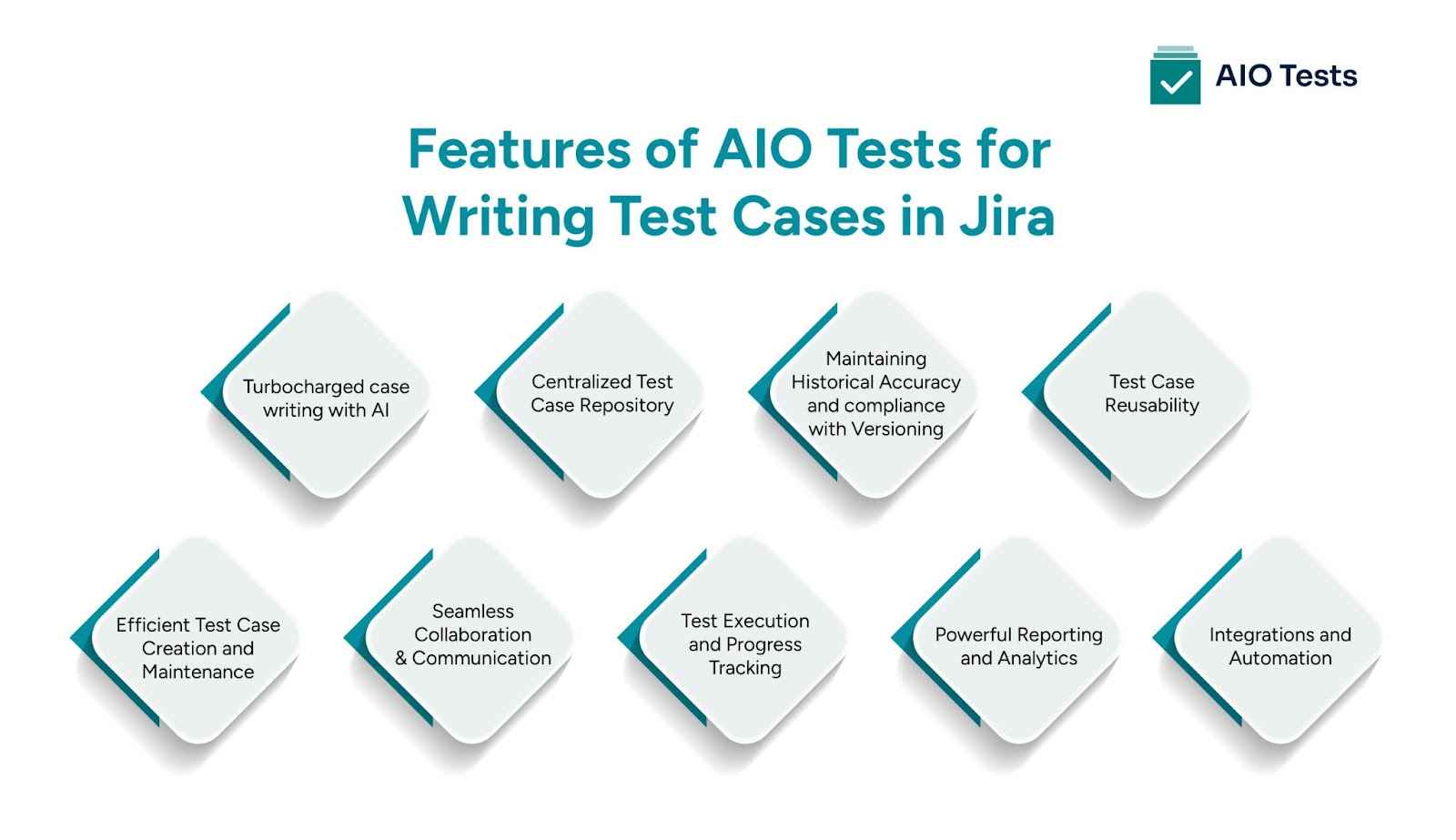
The test management platform offers a wide range of features that make it the ultimate solution for managing and writing test cases in Jira. Let’s explore the key functionalities that set it apart:
1. Turbocharged case writing with AI
AIO’s AI Assistant allows effortless test case creation directly from a Jira Story view or user stories. AI-generated cases can be reviewed, refined, and saved in a seamless workflow.
Not just with generation, but AIO helps with AI-powered recommendations to add new steps or improve test coverage, ensuring your cases are as robust as your product demands. You can enhance the readability and professionalism of your existing test cases with intelligent grammar corrections as well.
2. Centralized Test Case Repository
The test case tool provides a centralized repository for storing and organizing test cases. No more hunting through countless documents or spreadsheets to find the test case you need. With the platform, all test cases are easily accessible in one place. This gives QA teams one place to manage test cases in Jira, rather than maintaining separate spreadsheets, documents, or external repositories.
Organize them by folders, sets, or any custom categorization based on your different types of testing needs. This centralized approach saves time, enhances productivity, and ensures that the entire team has a clear overview of the test cases.
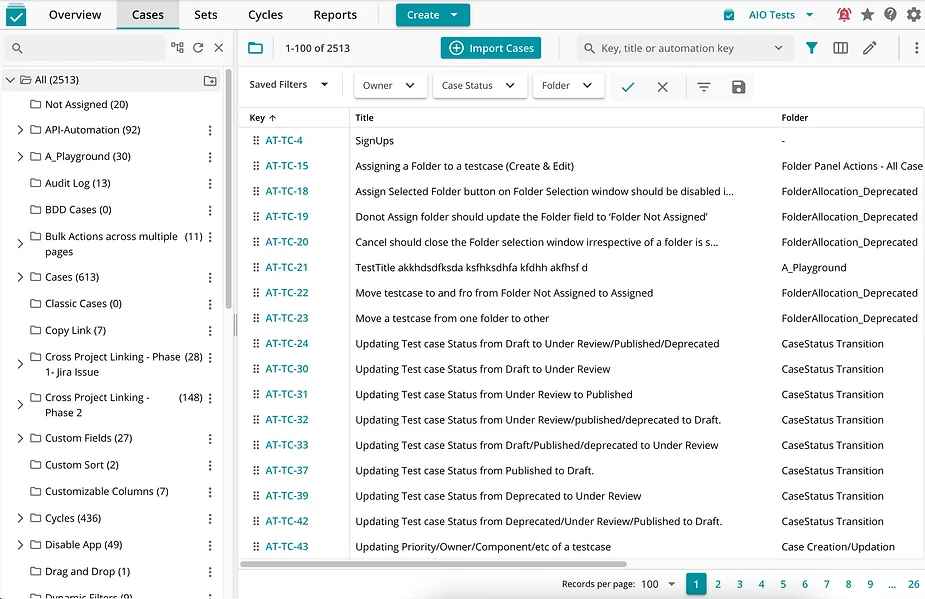
3. Maintaining Historical Accuracy and compliance with Versioning
Test case versioning is a fundamental practice in software testing that brings numerous benefits, from maintaining historical accuracy to ensuring compliance. Test case versioning provides a historical record of all the changes made to test cases, helping teams when debugging issues or analyzing test failures.
By examining previous versions of test cases, developers can trace back to the exact conditions under which a bug was discovered, making it easier to identify and resolve root causes.
Versioning is also crucial for regulation. In industries such as healthcare, finance, and aerospace, adhering to stringent regulatory standards are mandatory. Test case versioning ensures that test cases are executed consistently, with a clear audit trail that demonstrates compliance with industry standards and regulations.
4. Test Case Reusability
Case reusability promotes the reuse of test cases across different cases or product versions.
Cases can be linked as steps in other cases, which can percolate updated steps to all linked
cases, thus promoting efficiency.
This reuse reduces duplication of effort, accelerates the testing process, and ensures that best practices are consistently applied, all the while making maintenance of cases simpler.
5. Efficient Test Case Creation and Maintenance
Creating and maintaining test cases can be a laborious task. The tool simplifies this process by offering a user-friendly interface that enables intuitive test case creation. With data parameters, linked test cases and cross-project linking, you can quickly generate test cases, ensuring consistency and reducing manual effort.
Update and maintain test cases effortlessly, track changes, and keep the entire team in sync.
6. Seamless Collaboration and Communication
Effective collaboration is crucial for successful testing. The platform facilitates seamless collaboration among team members, allowing testers, developers, and stakeholders to work together seamlessly.
Collaborative features such as real-time commenting, task assignments, and notifications ensure smooth communication, fostering a collaborative testing environment. Testers can provide feedback, ask questions, and report issues directly within the test case, streamlining the feedback loop and accelerating issue resolution.
7. Case Options for Different Testing Scenarios
The test management tool provides flexibility by allowing users to generate both BDD-style and classic test cases. This adaptability ensures that test cases align with various testing approaches, making the platform suitable for different teams and industries, especially those focused on implementing BDD testing in Jira as part of their QA process.
- Classic test cases follow a structured step-by-step approach, which is suitable for traditional testing methodologies.
- BDD cases use a Given-When-Then format, making it easier to define expected software behavior from a user’s perspective.
8. Multi-language Support
The platform with its AI assistant and language customization enables users to generate test cases in multiple languages. Teams working across different countries can easily collaborate and execute test cases in their preferred language. Translating test cases to various languages ensures better clarity and accessibility for all stakeholders. For BDD cases based on Gherkin, AIO also supports the Gherkin keywords in all the languages supported by Gherkin.
This feature makes the tool a great choice for multinational software development teams.
9. Grammar and Translation Enhancements
Ensuring that test cases are clear, professional, and well-structured is crucial. This ensures that test cases are written in a professional manner, eliminating confusion and improving overall documentation quality. The tool provides:
Grammar correction – AI-powered improvements for clarity, readability, and accuracy.
One-click translations – Convert test cases into different languages effortlessly.
10. Case Improvement Suggestions
Writing effective test cases isn’t just about listing steps, it's about making sure they cover every possible scenario. AIO Tests uses the power of AI in software testing to suggest extra steps that might be missing. This smart feature helps teams keep improving their test cases so they stay thorough and up to date with changing software needs.
How to Create Test Cases in Jira with AIO Tests
Step 1: Click on the Create option in the top bar menu, then select Case from the dropdown list.

Step 2: The Create Case modal window will appear. Under the Details tab, enter the required information for your test case, such as title, description, priority, and other relevant details.

Step 3: Click the Add Steps button located at the top right corner of the modal to define the steps for the test case.
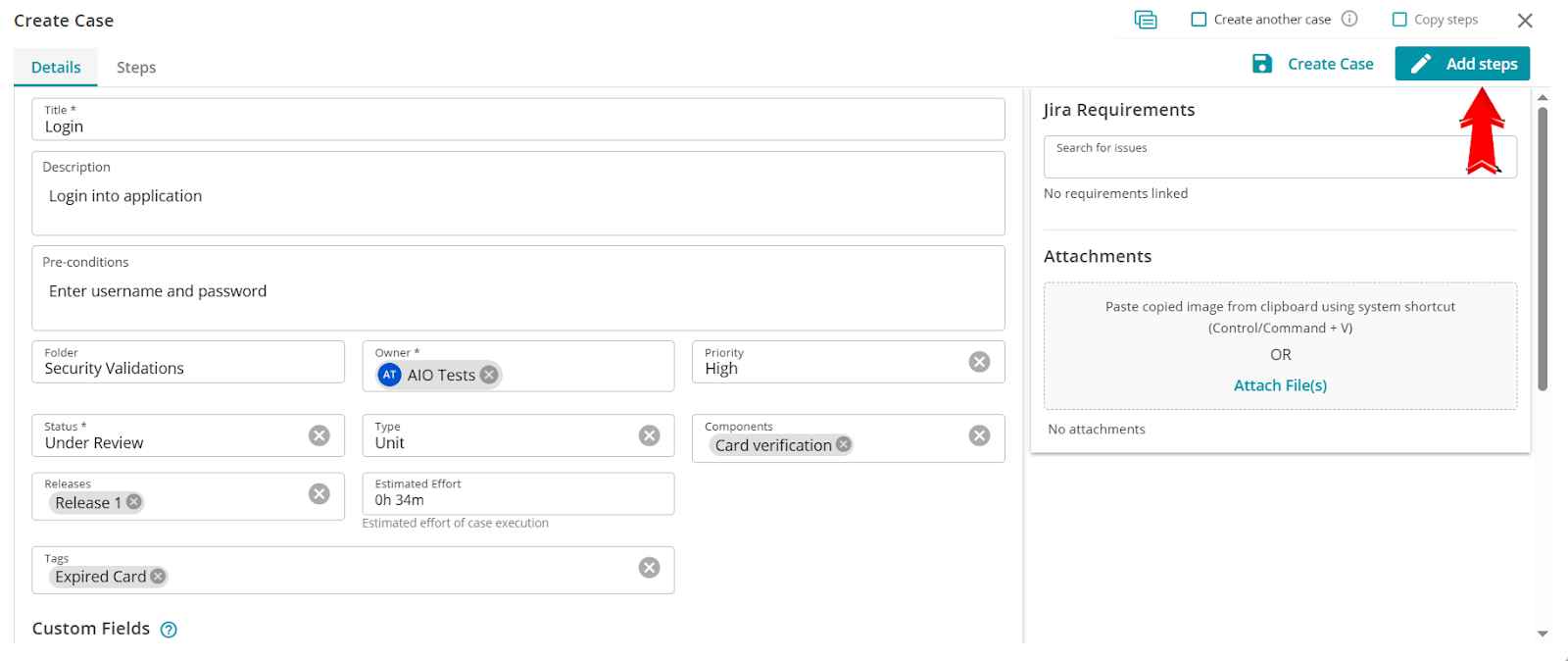
Step 4: Next is choosing the test case type. The platform offers two types of test cases to suit your testing needs.
- How to Write Manual Test Cases in Jira
If you’re writing manual test cases, choose the Classic Case format. It lets you document each test step along with the required test data and expected result.
- Classic Case:
This is a step-by-step approach where you can add detailed steps, including test data and expected results. These steps guide testers through the execution process.

- BDD Case (Behavior-Driven Development):
Use the Gherkin syntax to write your test steps using keywords like Given, When, Then, And, But,*. This format improves collaboration between technical and non-technical stakeholders. Learn more about BDD cases here.

Step 5: Once you have added all the necessary steps, click Save and Close to complete the test case creation.

Common Mistakes When Writing Test Cases
Writing clear, reliable test cases is essential for maintaining high software quality. However, QA teams often fall into predictable traps during test design that lead to execution delays, inconsistent results, and missed defects. Recognizing and avoiding these common mistakes helps ensure your test management process remains scalable and efficient.
- Vague Test Steps: Writing ambiguous instructions, such as "Test user login", forces testers to make assumptions, leading to inconsistent execution and unreliable test outcomes.
- Missing Preconditions and Test Data: Omitting specific setup requirements, environment configurations, or exact test inputs causes unnecessary delays while testers attempt to configure test environments manually.
- Overly Complex, Non-Atomic Steps: Bundling multiple end-to-end user actions into a single test case makes execution cumbersome and complicates root-cause analysis when a step fails.
- Tightly Coupled Test Cases: Creating test cases that depend heavily on the execution status or output of a previous test case creates fragile dependencies and disrupts parallel testing.
- Ignoring Test Case Maintenance: Failing to update test cases alongside changing software requirements leads to outdated test suites, false positives, and wasted QA effort.
To learn more about how to write test case in Jira using the tool please refer to the documentation. You can also book a demo or submit a ticket for any assistance.
Conclusion
AIO Tests is your ultimate test management tool in Jira, designed to simplify, optimize, and streamline your testing process. With its centralized repository, efficient test case creation and maintenance, seamless collaboration, comprehensive test execution, powerful reporting and analytics, as well as integrations and automation capabilities, Together, these capabilities help QA teams manage testing more consistently and deliver high-quality software with confidence.
Embrace AIO Tests and revolutionize your test case management today.

Frequently Asked Questions
1. Can you write test cases directly in Jira?
Yes. Jira can be customized to document test cases, but it does not offer a complete test management workflow out of the box. With AIO Tests, teams can create, organize, execute, and track Classic and BDD-style test cases directly in Jira.
2. How do you create a test case in Jira?
With AIO Tests, go to Create > Case, enter details such as the title, description, and priority, and select Add Steps. Choose either a Classic or BDD format, add test data and expected results, then save the case.
3. What should a Jira test case template include?
A well-structured Jira test case should include:
- Title and description
- Preconditions
- Test steps
- Test data
- Expected results
- Links to requirements or defects
4. How do you write effective manual test cases in Jira?
Keep each test case focused on a specific scenario. Write clear, actionable steps, include exact test data, and define expected results. Avoid vague instructions, and update reusable test cases whenever requirements or application behavior changes.
5. How can you manage and organize test cases in Jira?
Use folders and custom fields to keep test cases organized. Related cases can be grouped into reusable Sets and added to Cycles for execution. Linking cases to Jira requirements and defects also helps maintain traceability across the testing process.


.svg)

