


Summarize Blog
Quick Summary
Discover how autonomous software testing transforms modern QA by making testing smarter, faster, and more adaptive while structured test management keeps releases reliable, traceable, and under human control.
Software teams are releasing updates more frequently, but testing processes are not always keeping pace. Manual testing requires considerable coordination, while traditional automation depends on predefined scripts that can break when applications, interfaces, or requirements change.
These limitations are creating testing bottlenecks in Agile and DevOps environments. QA teams need an approach that can respond to change, prioritize critical tests, reduce repetitive work, and provide faster feedback without compromising human control.
Autonomous software testing represents the next stage of this shift. It uses artificial intelligence to support decisions such as what to test, which cases to run, how to maintain tests, and how to interpret failures.
However, autonomy alone is not enough. It must operate within a structured test management workflow that maintains planning, traceability, oversight, and release visibility.
Autonomous Testing vs Traditional Test Automation
Traditional test automation follows instructions written by humans. A tester or automation engineer selects a scenario, writes the script, defines the test data, and determines when the test should run. The automation framework then repeats those steps whenever it is triggered.
This approach is still valuable, especially for stable and repetitive regression tests. However, it has limited decision-making ability. When an application changes, a human must often update the script, repair locators, review failures, and decide which tests should be included in the next cycle.
Autonomous testing adds a layer of intelligence to this process. Instead of only executing predefined instructions, an autonomous system can use application context, historical results, code changes, and risk signals to recommend or perform testing activities.
This form of intelligent test automation can help teams:
- Identify which tests are most relevant to a code change
- Generate scenarios from requirements or user stories
- Detect gaps in existing test coverage
- Group similar failures
- Recommend likely causes of defects
- Adapt test execution based on risk
- Improve future decisions using past execution data
Traditional automation answers the question, “Can this script run again?”
Autonomous testing answers a broader question, “What should be tested now, and how should the process respond to what it finds?”
Why Modern Test Management Workflows Need Autonomous Testing?
Agile, DevOps, and continuous delivery have shortened the time between development and release. A feature may move from planning to production within days, while several teams are changing connected parts of the application at the same time.
This creates pressure across the test automation lifecycle.
QA teams must continuously:
- Review changing requirements
- Create and update test cases
- Organize tests into cycles
- Coordinate manual and automated execution
- Maintain regression suites
- Investigate failures
- Link defects with affected requirements
- Report release readiness to stakeholders
Manual coordination becomes difficult as the number of applications, environments, integrations, and release branches increases. The problem is not simply that teams need more automated scripts. They also need faster and more informed decisions about testing.
For example, running an entire regression suite after every code change may produce slow feedback and consume unnecessary resources. Running too few tests can allow critical defects to escape into production.
An autonomous test can help close this gap by using signals such as code changes, previous failures, requirement priority, and application risk to recommend the most relevant testing actions.
This makes autonomy especially useful in workflows where:
- Releases happen frequently
- Regression suites are large
- Applications change continuously
- Test maintenance consumes significant time
- Manual and automated results are stored separately
- Teams struggle to identify release risk
- QA managers lack real-time coverage visibility
Autonomy does not replace the test management process. It helps that process respond faster and more intelligently.
How Autonomous Software Testing Fits into Modern Test Management Workflows?

Autonomous capabilities can support nearly every stage of a test management workflow. However, the results still need to be reviewed, organized, executed, traced, and reported through a central test management system.
The following stages show how autonomy and structured test management work together.
Requirement Analysis and Test Planning
Every testing cycle begins with understanding what is being built and what could go wrong.
In a traditional workflow, QA teams manually review user stories, acceptance criteria, technical specifications, and historical defects. They then identify testable conditions and estimate the scope of testing.
AI can assist this stage by analysing requirement descriptions and recommending:
- Functional test scenarios
- Negative test conditions
- Boundary cases
- Integration risks
- Missing acceptance criteria
- Areas affected by requirement changes
- Existing test cases that may be reusable
It can also compare a new story with related requirements, previous defects, and existing test coverage.
For example, suppose a Jira story asks a development team to add multi-currency checkout functionality. An AI-assisted system could identify scenarios involving supported currencies, rounding rules, failed conversions, refunds, payment gateways, tax calculations, and unsupported locations.
The test manager still decides which scenarios matter, how much testing is appropriate, and whether the requirement is ready for validation. AI reduces the effort required to identify possibilities, but humans remain responsible for scope and risk.
Intelligent Test Case Generation
Once the testing scope is clear, teams must convert requirements into structured test cases.
AI can generate:
- Test titles
- Preconditions
- Test steps
- Expected outcomes
- Positive scenarios
- Negative scenarios
- Boundary-value cases
- BDD scenarios
- Suggested test data
This can reduce the time spent creating repetitive test documentation. It can also give testers a broader starting point when requirements contain several possible user paths.
Consider these simple QA testing examples for a password-reset feature:
- Verify that a registered user receives a reset link.
- Verify that an unregistered email address does not expose account information.
- Verify that an expired reset link cannot be reused.
- Verify that the new password meets security requirements.
- Verify that active sessions are handled according to the security policy.
- Verify that repeated reset requests are rate-limited
An intelligent system may generate these scenarios from the requirement and acceptance criteria. The QA engineer then removes irrelevant cases, corrects assumptions, adds product-specific details, and approves the final version.
Generated tests should never move directly into execution without review. Requirements may be incomplete, business rules may be undocumented, and generated steps may appear valid while missing important context.
The test management platform therefore becomes the controlled repository where generated cases can be reviewed, edited, versioned, linked with requirements, and assigned to the appropriate test cycle.
Autonomous Test Execution
Autonomous test execution goes beyond triggering a fixed collection of scripts.
It uses available signals to determine:
- Which tests should run
- When they should run
- Which environment should be used
- What priority each test should receive
- Whether failed tests should be retried
- Which results require human investigation
In a CI/CD workflow, a code commit can trigger automated validation. An intelligent selection system may examine the affected modules and run the tests most closely connected to those changes.
For example, a small update to account-notification preferences may not require the entire application regression suite. The system could prioritize user-profile tests, notification services, permission checks, and connected API validations.
Autonomous execution can also support:
- Smart regression selection: Choosing tests based on code changes, historical failures, requirement links, and risk.
- Parallel execution: Distributing tests across environments or agents to shorten feedback cycles.
- Risk-based execution: Running business-critical or frequently failing tests before lower-risk scenarios.
- Dynamic prioritization: Adjusting test order when an early failure indicates wider impact.
- CI/CD integration: Automatically returning execution results to the development and test management workflow
The execution framework performs the tests, while the test management system records the results and connects them with cases, requirements, defects, and releases.
This distinction matters. An execution engine may tell the team that a test failed. Test management provides the context required to understand what the failure affects and whether it should block the release.
Self-Healing Test Maintenance
Automated tests frequently fail because an application has changed, not because the underlying feature is broken.
A developer may rename an element, move a button, change a locator, or reorganize the page structure. A traditional script may treat that change as a functional failure, even when the user journey still works.
Self-healing test automation attempts to reduce this maintenance burden. When a locator no longer works, the system may examine alternative attributes, neighbouring elements, labels, or historical data to identify the intended component.
This can help teams:
- Reduce failures caused by minor interface changes
- Lower repetitive script-maintenance work
- Keep regression suites operationa
- Separate application defects from automation defects
- Improve the stability of frequent CI/CD runs
However, self-healing should be governed carefully. A test that silently adapts to the wrong element can produce a misleading pass.
Teams need visibility into:
- What changed
- Which locator was replaced
- Why the system selected the alternative
- Whether the repair was temporary or permanent
- Who reviewed and approved the change
Self-healing works best when it reduces obvious maintenance tasks while preserving an audit trail and human review.
Defect Detection and Analysis
Large test cycles can produce hundreds or thousands of failures. Reviewing each result individually can delay feedback and make it difficult to identify the underlying issue.
AI can support failure analysis by:
- Clustering failures with similar logs or symptoms
- Separating product defects from environment failures
- Identifying flaky tests
- Highlighting repeated error patterns
- Suggesting affected components
- Connecting a failure with previous defects
- Recommending a likely root cause
For example, 40 failed tests may initially appear to represent 40 separate problems. Analysis may reveal that 32 failures came from one unavailable authentication service.
This helps QA and development teams focus on the primary issue instead of creating duplicate defects or investigating each failure separately.
AI may also use execution history to identify tests that fail intermittently. These flaky tests can then be reviewed, isolated, or improved before they reduce confidence in the regression suite.
Reporting, Traceability and Release Readiness
Testing creates value only when teams can understand what has been tested, what failed, and what remains at risk.
Autonomous systems can produce large volumes of test cases, recommendations, and execution results. Without test management, that information can become fragmented and difficult to interpret.
A structured workflow should connect:
Requirement → Test case → Test cycle → Execution result → Defect → Release
Dashboards and reports can then show:
- Requirement coverage
- Passed, failed, blocked, and unexecuted tests
- Regression progress
- Defect severity and status
- Manual and automated execution results
- High-risk untested requirements
- Changes in pass rates
- Release blockers
- Test completion against the plan
AI can improve reporting by highlighting unusual trends, summarizing failure patterns, and identifying areas where coverage may be insufficient.
However, release readiness should not be reduced to a single AI-generated score. A high pass rate does not automatically mean the product is ready. One failed business-critical test may matter more than hundreds of passed low-risk tests.
Benefits of Autonomous Testing For QA Teams
Introducing autonomy into a controlled testing workflow can improve both delivery speed and testing quality.
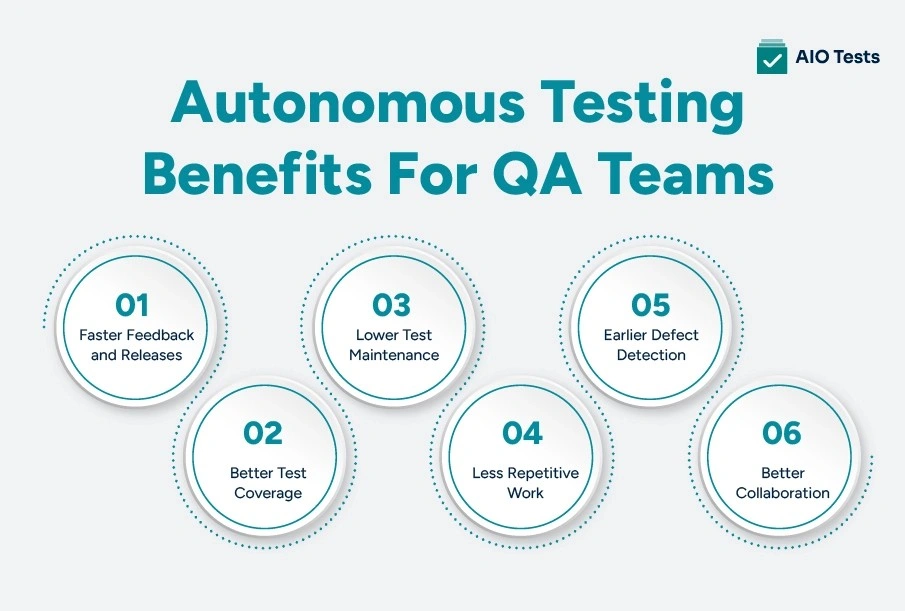
1. Faster Feedback and Releases
AI-assisted planning, test selection, and failure analysis can reduce the time between a code change and actionable feedback.
Teams do not always need to wait for an entire regression suite to finish before identifying a critical issue. High-risk tests can be prioritized, while relevant failures can be surfaced earlier.
2. Better Test Coverage
AI-powered software testing can identify scenarios that testers may overlook, including negative conditions, boundary values, uncommon combinations, and dependencies between features.
It can also highlight requirements that have few or no linked tests.
Better coverage does not come from generating the highest possible number of cases. It comes from finding the cases that expose meaningful product risk.
3. Lower Test Maintenance
Self-healing capabilities and change-aware recommendations can reduce repetitive updates to automated tests.
Automation engineers can spend less time repairing predictable locator failures and more time improving framework quality, test architecture, and high-value scenarios.
4. Less Repetitive Work
AI can assist with test documentation, scenario generation, failure grouping, reporting, and regression selection.
This allows testers to focus on activities that require judgment, such as exploratory testing, usability evaluation, risk assessment, and business validation.
5. Earlier Defect Detection
Intelligent planning and continuous execution can find defects closer to the stage where they are introduced.
Earlier feedback gives developers more context and makes issues easier to investigate than defects discovered late in a release cycle.
6. Better Collaboration
A shared workflow gives developers, testers, product managers, and stakeholders access to the same requirements, test cases, results, and defects.
AI-generated summaries may make testing information easier to consume, but the underlying data must remain connected and accessible.
Choosing The Right Autonomous Testing Tool For Modern QA Teams
The term autonomous testing tool is used broadly. Some products focus on test generation, while others specialize in execution, self-healing, visual validation, failure analysis, or test management.
Before selecting a platform, organizations should identify which part of the workflow they want to improve.
1. AI Capabilities
Evaluate what the tool can actually do.
Does it generate test cases, select regression tests, repair scripts, analyse failures, or summarize results? Does it assist testers, or does it perform actions automatically?
Teams should also examine whether recommendations can be reviewed, edited, accepted, or rejected.
2. Test Management
AI-generated cases and automated results need a structured system.
The platform should help teams:
- Organize test cases
- Maintain versions
- Create test cycles
- Assign execution work
- Record results
- Connect tests with requirements
- Track defects
- Measure release readiness
3. Jira Integration
For teams already using Jira, native integration can reduce duplicate entry and tool switching.
Requirements, test cases, defects, and execution records should remain connected to the development workflow
4. Traceability
The platform should provide a visible relationship between requirements, tests, executions, defects, and releases.
Traceability is especially important when AI is generating or modifying test assets because teams must know what each test validates.
5. CI/CD Support
Effective continuous testing automation requires execution results to flow automatically from CI/CD pipelines into the test management process.
Teams should evaluate support for their build tools, deployment pipelines, programming languages, and testing frameworks.
6. Security
Review permissions, data handling, access controls, audit history, and deployment requirements.
AI features should not expose sensitive requirements, test data, or application information without appropriate controls.
The right choice may not be a platform claiming complete autonomy. It may be a combination of intelligent testing capabilities, automation frameworks, CI/CD tools, and structured test management.
How AIO Tests Support Modern AI-Assisted Test Management?
Autonomous capabilities can improve test generation, selection, execution, and analysis. However, QA teams still need one place to manage the testing lifecycle and maintain control over the results.
AIO Tests provides a Jira-native foundation for organizing AI-assisted, manual, and automated testing workflows.
AI-Assisted Test Creation
AIO Tests can generate structured test cases from Jira requirements or user stories. Teams can use AI to create a starting point and then review, edit, and approve the cases before execution.
This supports faster case creation without removing tester judgment from the process.
Jira-Native Test Management
This tool is the best test management tool for Jira. Test cases, executions, requirements, and defects can be managed within Jira. Teams do not need to move between a separate test repository and their development workspace.
This gives QA and development teams a shared view of testing activity.
Requirement Traceability
AIO Tests links Jira requirements with test cases, execution cycles, results, and defects. Teams can identify untested requirements, failing coverage, and defects affecting release scope.
This traceability provides the governance required when test assets are being generated or updated more quickly.
Test Execution Management
Teams can organize cases into cycles, execute manual tests, record outcomes, and create Jira defects directly from failed executions.
Execution planning and status tracking help teams understand whether testing is progressing according to the release plan.
Automation Integrations
AIO Tests can bring automated results from frameworks and CI/CD workflows into the same test management environment.
It supports result reporting from tools and formats such as JUnit, TestNG, NUnit, Robot Framework, Cucumber, Newman, Playwright, Cypress, Katalon, and Postman-related workflows. REST APIs can also be used to manage cycles and report execution results.
This helps teams view manual and automated testing together instead of maintaining separate reporting systems.
Centralized QA Collaboration
By keeping requirements, cases, cycles, defects, automation results, and reports within Jira, AIO Tests gives QA, development, and product teams a common testing workflow.
AIO Tests should therefore not be viewed as a fully autonomous testing platform. Its role is to provide the management, traceability, collaboration, and reporting layer that helps teams adopt AI-assisted and automated testing in a controlled way.

Challenges of Adopting Autonomous Testing
Autonomous capabilities can improve testing, but successful adoption depends on the quality of the surrounding processes, data, and systems.
1. Legacy Systems
Older applications may have limited documentation, unstable interfaces, tightly coupled components, or outdated automation frameworks.
AI cannot automatically solve poor testability. Teams may need to improve application instrumentation, test environments, and existing automation before introducing more advanced autonomy.
2. Trust and Explainability
QA teams need to understand why a system generated a test, selected a regression case, repaired a locator, or classified a failure.
Recommendations that cannot be explained are difficult to validate, especially in regulated or business-critical environments.
3. Team Adoption
Testers may be concerned that autonomous systems will replace their roles. Others may rely on AI outputs without questioning them.
Leaders should present AI as a way to reduce low-value work while increasing the need for quality judgment, domain expertise, governance, and testing strategy.
Conclusion
Autonomous software testing is an evolution of software quality practices, not a replacement for test management or human expertise. It can make test creation, selection, execution, maintenance, and analysis more adaptive, but teams still need people to define risk, validate outcomes, explore unexpected behaviour, and make release decisions.
Modern QA therefore requires two connected layers: intelligent capabilities that reduce repetitive work and a structured test management system that preserves control, context, and traceability.
AIO Tests helps provide that foundation inside Jira by bringing AI-assisted test creation, manual and automated execution management, requirement linkage, defect tracking, and reporting into one workflow.
Teams exploring more intelligent testing practices can use AIO Tests to strengthen the test management processes needed to adopt them responsibly.

FAQs
1. What is autonomous software testing?
Autonomous software testing uses AI to support activities such as test generation, test selection, execution, maintenance, and failure analysis with less manual effort. It helps QA teams make testing more adaptive while still keeping humans responsible for validation and release decisions.
2. How is autonomous testing different from traditional test automation?
Traditional test automation follows predefined scripts created and maintained by testers. Autonomous testing can use AI to adapt to changes, prioritize tests, identify patterns, and recommend actions based on risk and previous results.
3. Can autonomous software testing replace manual QA testing?
No. Autonomous testing can reduce repetitive work, but human testers are still needed for exploratory testing, usability checks, business validation, compliance review, and complex risk decisions.
4. How does autonomous test execution work in CI/CD pipelines?
Autonomous test execution uses code changes, risk signals, and past test results to decide which tests should run during a CI/CD pipeline. It can prioritize critical tests, run selected tests in parallel, and send results back to the test management system.
5. What should you look for in an autonomous testing tool?
Look for AI-assisted testing capabilities, CI/CD support, traceability, reporting, security, scalability, and integration with your existing test management workflow. The tool should also provide human review and clear visibility into AI-generated decisions.


.svg)
