


Summarize Blog
Quick Summary
This blog covers acceptance testing types, acceptance test criteria, the testing process, UAT workflow, best practices, and how teams can manage acceptance testing in Jira.
A software product can pass functional and system tests and still fail to meet the needs of the people who will use it. A feature may work as designed, but if it does not support the expected business process or user workflow, it may not be ready for release.
Acceptance testing validates whether software meets defined business requirements, user needs, and acceptance criteria before it is accepted for use. It focuses on the question that technical testing alone cannot answer: Does the software do what the business and its users need it to do?
User acceptance testing (UAT) is one type of acceptance testing, alongside other forms used to validate business, contractual, regulatory, or operational requirements.
This guide explains the key types, acceptance test criteria, testing process, UAT workflow, and best practices.
What Is Acceptance Testing in Software Testing?
Acceptance testing in software testing is the process of evaluating whether a software product meets defined business requirements, user expectations, and acceptance criteria. It focuses on whether the system is suitable for its intended use, rather than only checking whether individual features work technically.
Acceptance testing is usually performed after the software has passed earlier levels of testing, such as functional, integration, and system testing. QA teams, business users, product owners, customers, or other stakeholders may participate depending on the project and type of acceptance testing.
For example, an e-commerce application may technically process payments correctly. Acceptance testing can verify whether a customer can complete the expected purchase workflow, receive an order confirmation, and see the correct order status. If the workflow meets the agreed requirements, stakeholders have stronger evidence that the feature is ready to be accepted.
This makes software acceptance testing an important validation step between technical quality and business readiness.
Why Is Acceptance Testing Important?
Acceptance testing helps teams verify that the software delivers what the business and its users actually expect. It can validate:
- Business requirements and critical workflows
- User expectations and acceptance criteria
- Key scenarios that affect customers or internal teams
- Whether important defects remain before release
- Whether stakeholders have enough evidence to make a Go/No-Go decision
By connecting test results to agreed requirements, teams can make release decisions based on actual acceptance results rather than assumptions.
What Are the Different Types of Acceptance Testing?
The acceptance testing types used by a team depend on what the software needs to satisfy before release. Some tests focus on user needs, while others validate business, contractual, regulatory, or operational requirements.
User Acceptance Testing (UAT)
User acceptance testing is one of the most common forms of acceptance testing. It checks whether the software supports the workflows and outcomes expected by its intended users. Business users, product owners, or customer representatives typically perform or participate in UAT, with QA teams often supporting test preparation, execution, and defect tracking.
For example, before releasing a new expense management feature, users may verify that they can submit expenses, attach receipts, route claims for approval, and view the correct status.
Acceptance Testing vs UAT
Acceptance testing is the broader category used to determine whether software meets agreed requirements for acceptance. UAT testing is one specific type that focuses on whether the product works for its intended users and business workflows.
In other words, UAT is acceptance testing, but not all acceptance testing is UAT. A team may also perform business, contractual, regulatory, or operational acceptance testing depending on what the release needs to satisfy.
What Are Acceptance Test Criteria?
Acceptance test criteria define the conditions software must meet for a requirement to be considered acceptable. They translate business or user requirements into clear, testable outcomes that teams can verify during acceptance testing.
Good acceptance criteria should be:
- Clear: Written in language that business and technical teams can understand.
- Testable: Each condition can be verified through a specific test.
- Specific: They describe the expected outcome without leaving room for interpretation.
- Relevant: They focus on the behavior or outcome required by the business or user.
- Measurable: Where possible, they use observable results to determine whether a requirement passes or fails.
Acceptance criteria can come from product requirements, user stories, business rules, contracts, or regulatory requirements.
For example, consider an e-commerce requirement:
Requirement: Customers must be able to complete an online purchase.
Acceptance criteria:
- A valid payment completes the order.
- The customer receives an order confirmation.
- A failed payment does not create an order.
- The order status reflects the correct payment outcome.
Acceptance criteria define what must be true for the requirement to be accepted. An acceptance test case defines how the team will verify it.
The relationship can be summarized as:
This connection helps teams validate requirements consistently and makes it easier to identify which requirements have been tested and accepted.
What Is the Acceptance Testing Process?
The acceptance testing process turns business requirements into testable scenarios and uses their results to determine whether software can be accepted.
While the exact workflow varies by team, most acceptance testing follows these steps:
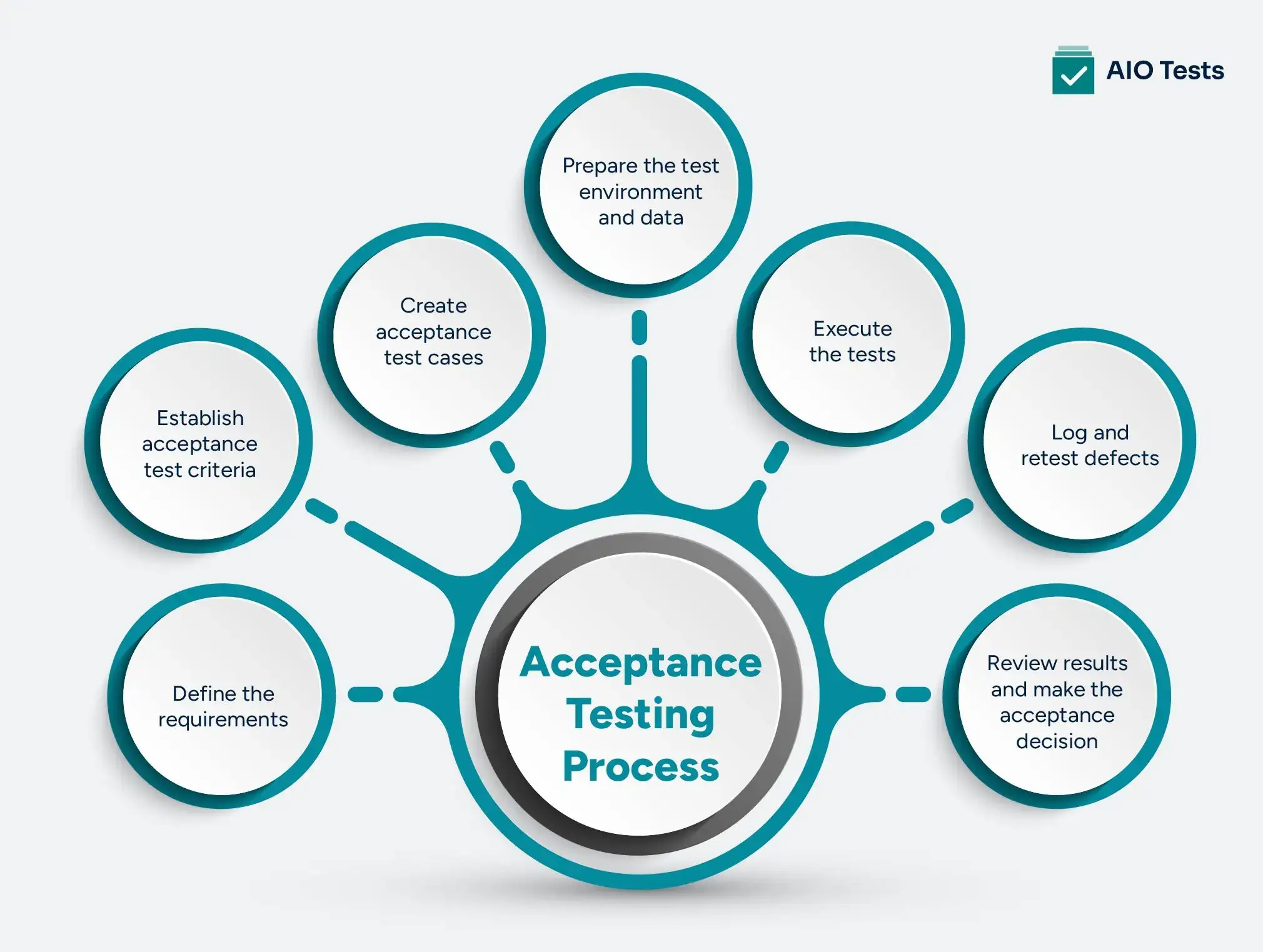
1. Define the requirements
Start by identifying the business requirements, user needs, and workflows the software must support. Requirements should describe the expected outcome clearly enough for both QA teams and business stakeholders to understand what needs to be validated.
2. Establish acceptance test criteria
Convert each requirement into specific, testable conditions. These criteria define what must happen for the requirement to pass acceptance testing. Avoid vague conditions that different stakeholders could interpret differently.
3. Create acceptance test cases
Create test cases that verify each acceptance criterion. Include the required steps, test data, expected results, and relevant requirements. Prioritize critical workflows and scenarios that could affect customers or business operations.
4. Prepare the test environment and data
Set up an environment that closely represents the conditions in which the software will be used. Prepare realistic test data and make sure required integrations, accounts, configurations, and permissions are available.
5. Execute the tests
Run the acceptance test cases and record the results. Each test should have a clear outcome, such as Pass, Fail, or Blocked. Capture relevant evidence when needed so stakeholders can review the results.
6. Log and retest defects
When a test fails, document the defect with enough information for the development team to investigate it. After the fix is available, retest the failed scenario and verify that the expected outcome is achieved.
7. Review results and make the acceptance decision
Once testing is complete, review the results against the acceptance criteria. Stakeholders can then determine whether the requirements have been met and whether the software is ready to move forward.
The overall software acceptance testing flow can be summarized as:
This workflow gives teams a structured way to connect what the business asked for with what was actually tested and delivered.
What Is a UAT Workflow?
A UAT workflow is the sequence teams follow to validate whether software meets the needs of its intended users before acceptance. It focuses on business and user workflows rather than technical implementation details.
A typical UAT workflow looks like this:
The process usually starts with business users or product stakeholders defining what the software needs to accomplish. QA teams can then translate those requirements into test cases, prepare the test environment, and coordinate execution.
During user acceptance testing, business users validate whether the workflows match their actual needs. If a test fails, the issue is recorded as a defect, assigned for resolution, and retested after the fix.
Once the agreed UAT scenarios pass and critical issues are addressed, stakeholders review the results and provide acceptance or identify further changes required before release.
A clear UAT workflow gives business and QA teams a shared view of what was tested, what failed, what was fixed, and what still requires attention.
What Are the Best Practices for Acceptance Testing?
Following acceptance testing best practices helps teams make acceptance decisions based on clear requirements and consistent test results. The most effective practices include:
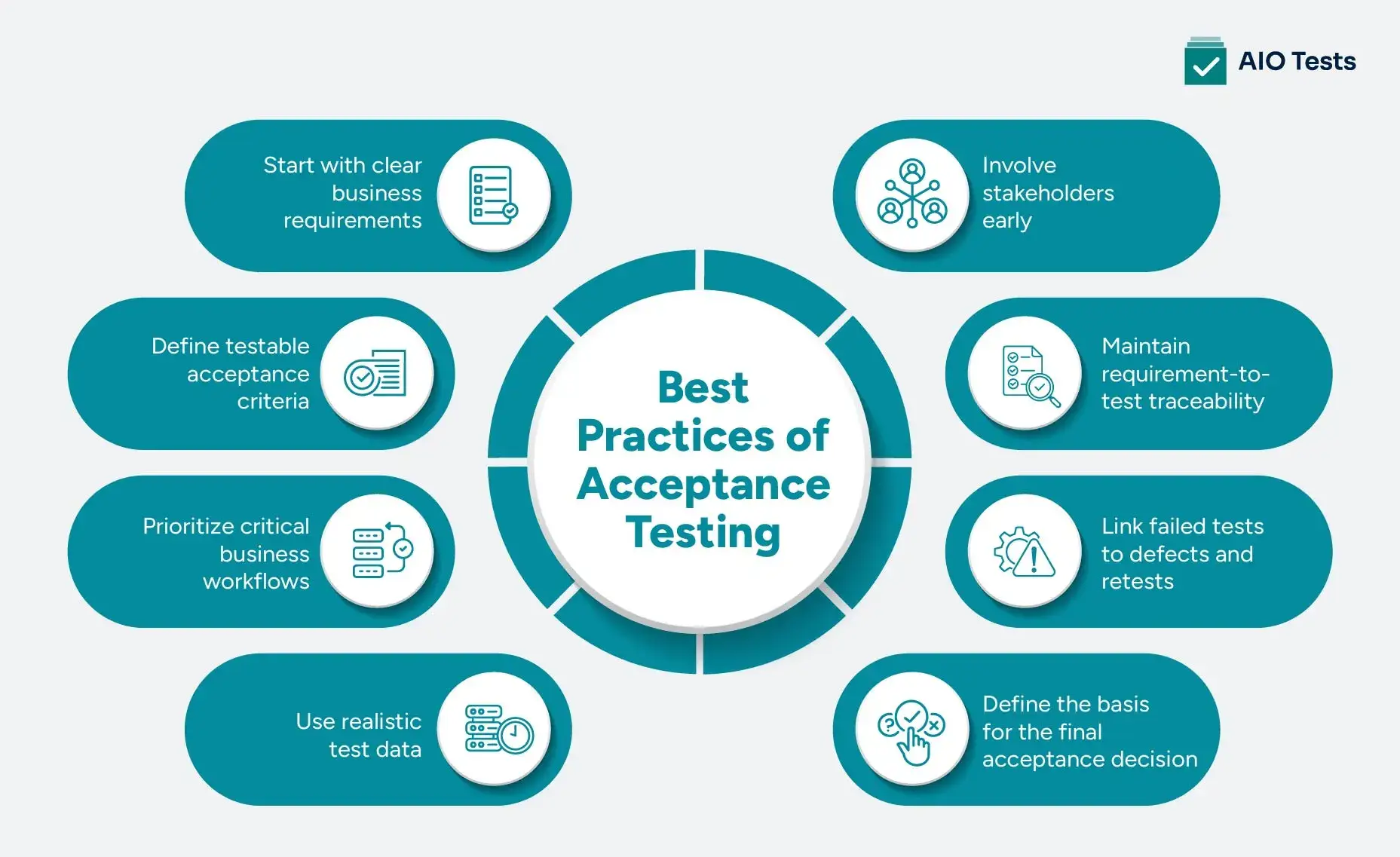
- Start with clear business requirements: Define what the software must accomplish before creating acceptance tests. Clear requirements give QA teams and stakeholders a shared basis for validation.
- Define testable acceptance criteria: Turn requirements into specific conditions that can be verified through testing. Avoid ambiguous criteria that can lead to different interpretations.
- Prioritize critical business workflows: Focus acceptance testing on workflows that directly affect customers, revenue, compliance, or core business operations.
- Use realistic test data: Test with data that reflects real usage scenarios. This helps uncover issues that may not appear with simple or artificial test data.
- Involve stakeholders early: Business users and product stakeholders should review requirements and acceptance criteria before testing begins. This reduces disagreements during final acceptance.
- Maintain requirement-to-test traceability: Link requirements to their acceptance criteria and test cases so teams can see what has been validated and what still needs testing.
- Link failed tests to defects and retests: Connect failed acceptance tests to the relevant defects and track them through resolution and retesting.
- Define the basis for the final acceptance decision: Agree on what constitutes acceptable results before execution begins, including how critical failures and unresolved defects will affect the release decision.
These practices make acceptance testing more consistent and give stakeholders clearer evidence when deciding whether software meets the agreed requirements.
How to Manage Acceptance Testing in Jira
Acceptance testing becomes harder to manage when requirements, test cases, executions, and defects are tracked across separate tools or spreadsheets. Teams can lose track of which requirements have been validated, which tests failed, and whether related defects have been resolved.
A Jira-based workflow can connect these activities in one place:
With this workflow, teams can:
- Link acceptance test cases directly to Jira requirements or user stories.
- Track test execution status and results against each requirement.
- Connect failed tests to defects and follow them through resolution.
- Retest failed scenarios after defects are fixed.
- Maintain requirement-to-test-to-defect traceability.
- Report on test coverage, execution status, defects, and acceptance progress.
This gives QA teams and stakeholders a clearer view of what has been validated and what still needs attention before a release decision.
AIO Tests is a Jira test management tool that helps teams manage test cases, executions, defects, and requirement-to-test traceability directly in Jira. It also provides reporting across test coverage, execution status, defects, and release readiness.
Conclusion
Acceptance testing validates whether software meets the business requirements, user expectations, and acceptance criteria agreed for a release. While user acceptance testing (UAT) is one common form, teams may also use other acceptance testing types based on business, contractual, regulatory, or operational needs.
A clear acceptance testing process connects requirements to acceptance criteria, test cases, execution results, defects, and retesting. Maintaining this traceability gives QA teams and stakeholders better visibility into what has been validated and what still needs attention.
For teams managing acceptance testing in Jira, AIO Tests brings test cases, executions, defects, and traceability into the Jira workflow, helping teams manage acceptance testing without switching between separate tools. Book a free demo to explore more!

FAQs
1. What is acceptance testing in software testing?
Acceptance testing in software testing is the process of checking whether software meets defined business requirements, user expectations, and acceptance criteria. It helps stakeholders determine whether the software is suitable for its intended use and ready to be accepted. It can include user, business, contractual, regulatory, or operational validation.
2. What is user acceptance testing (UAT)?
User acceptance testing (UAT) is a type of acceptance testing that validates whether software supports the needs and workflows of its intended users. Business users, product owners, or customer representatives typically participate in UAT, while QA teams may support test preparation, execution, and defect tracking.
3. How does acceptance testing help teams decide whether software is ready for release?
Acceptance testing provides evidence that agreed requirements and acceptance criteria have been met. Teams can review test results, failed scenarios, unresolved critical defects, and stakeholder feedback to determine whether the software meets the conditions for acceptance and whether it can proceed toward release.
4. What are the different types of acceptance testing?
Common acceptance testing types include User Acceptance Testing (UAT), Business Acceptance Testing (BAT), Contract Acceptance Testing (CAT), Regulatory Acceptance Testing (RAT), and Operational Acceptance Testing (OAT). Alpha and beta testing can also be used to assess product readiness in controlled or real-world conditions.
5. What is the acceptance testing process?
The acceptance testing process typically involves defining requirements, establishing acceptance criteria, creating test cases, preparing test data and the environment, executing tests, logging and retesting defects, and reviewing results for the final acceptance decision.


.svg)

