

.webp)
Summarize Blog
Quick Summary
Without a clear testing use case, QA and product teams risk missing critical bugs and shipping unreliable software. This guide breaks down what they are, why they matter, and how to implement them in your workflow.
You've seen it happen. A release goes out, and within hours, a critical user flow breaks in production. The checkout doesn't complete. The login throws an error. The API returns a blank response. And the worst part? Everyone assumed someone else had tested it.
This is what happens when product and QA teams aren't aligned on what actually needs to be tested.
A testing use case is the bridge between a requirement on paper and real-world validation. It captures exactly how a user interacts with your system, and what the system should do at every step.
By the end of this guide, you'll know exactly what a testing use case is, how to write one, and how to plug it into your QA process so nothing critical falls through the cracks again.
What Is a Use Case?
A use case is a description of how a user interacts with a system to accomplish a specific goal. It's not about how the system works internally; it's about what the user does and what the system does in response.
Think of it this way. A use case answers three simple questions: Who is doing something? What are they trying to achieve? And how does the system respond?
- Use cases are written from the user's perspective, not the system's. They define functional requirements in plain, human-readable language that developers, testers, business analysts, and product managers can all understand and agree on.
- In software development, use cases are typically created during the requirements phase. They serve as the foundation for everything that follows: design, development, and testing.
What Is Use Case Testing?
Use case testing is a black-box software testing technique that validates whether a system behaves as expected across real user scenarios. It takes the use cases defined during requirements and turns them into structured test scenarios that cover the system from start to finish.
Instead of testing individual components in isolation, use case testing validates the full transaction, from the moment a user initiates an action to the moment the system delivers a result.
It's functional testing grounded in real-world user behavior. The goal is to make sure the quality assurance software doesn't just work in theory; it works the way actual users will use it.
Use case testing helps teams catch integration defects, workflow gaps, and edge cases that unit tests or component tests typically miss. It's one of the most effective ways to validate that a product delivers on its promises before it reaches end users.
Testing Use Case vs. Test Case: What's the Difference?
This is one of the most common points of confusion for QA and product teams. A testing use case and a test case are related, but they're not the same thing.
Here's the simplest way to think about it.
A test use case states, "A registered user should be able to log in with valid credentials." A test case says "enter username: test@email.com, password: Test@123, click Login, verify the dashboard loads."
Use cases define the scenario. Test cases validate it. One comes before the other, and skipping the use case step is exactly why test cases often miss critical flows.
Why Testing Use Cases Matter in Software Development
Skipping use cases doesn't save time. It costs it.
When teams jump straight from requirements to test cases without defining use cases, they end up testing features in silos. Individual components pass. But the end-to-end user flow breaks. Edge cases go untested. And bugs that should have been caught in QA make it to production.
The business impact is real. According to the Systems Sciences Institute at IBM, the cost of fixing a bug found in production is 4 to 5 times higher than fixing it during the testing phase, and up to 100 times higher than catching it in the requirements phase.
- Use cases bring structure to testing before a single line of test code is written, strengthening overall software quality assurance.
- When testing use cases are defined clearly, the benefits are direct: fewer post-release defects, faster release cycles, and a significantly lower cost of quality across the board.
- And it's not just QA that benefits. Everyone on the team wins.
- QA leads get better test coverage with less guesswork. Product managers can validate that features work as intended.
- Developers get a clear picture of expected system behavior before they build. Business analysts can confirm that what's being built aligns with what was actually requested.
- Testing use cases creates a shared language across all of these roles. That alignment is what separates teams that ship with confidence from teams that ship and hope.
Key Components of a Strong Testing Use Case
A well-written testing use case has six core components. Each one plays a specific role in making the use case complete, testable, and useful across both QA and product teams.
Here's what every strong testing use case should include:
Most teams write the main flow and stop there. That's the mistake. Alternate flows and exception flows are where the real bugs hide. A use case without them gives you false confidence in your test coverage. Moreover, to make your work more efficient, you can try different types of software testing and select the one that is best for your business.
How to Write Testing Use Cases: A Step-by-Step Guide
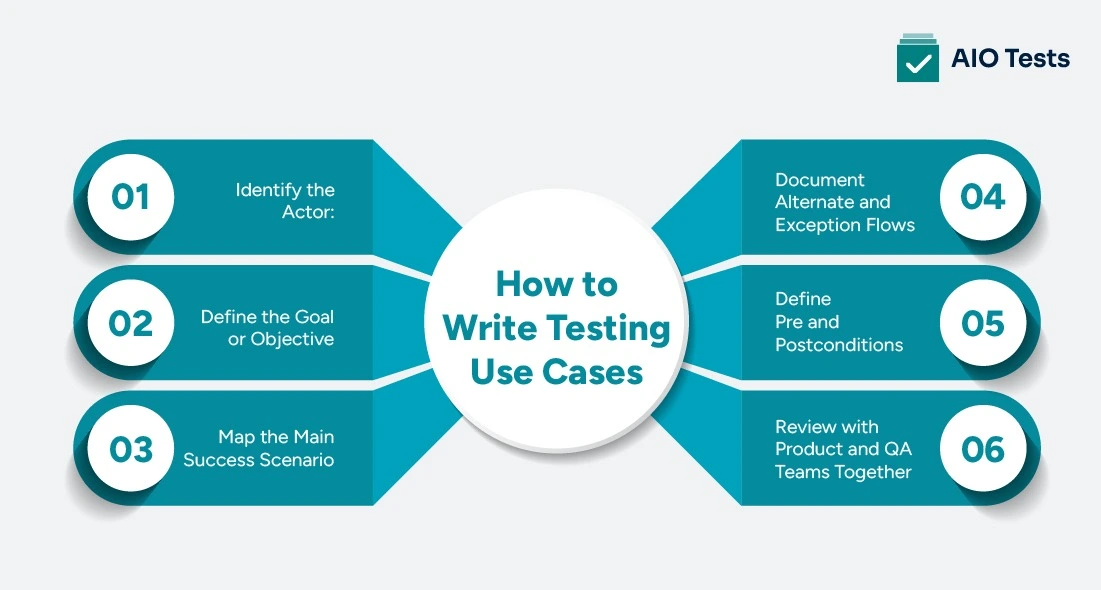
Writing a testing use case does not have to be complicated. Follow these six steps, and you'll have a clean, complete use case your entire team can work from.
- Step 1: Identify the Actor: Start by defining who is performing the action. Is it a registered user? A guest? An admin? An external system? Be specific. The actor shapes every step that follows.
- Step 2: Define the Goal or Objective: What is the actor trying to achieve? Keep it user-focused. "The user wants to log into their account." Not "the system should authenticate credentials." The goal should always be framed from the user's perspective.
- Step 3: Map the Main Success Scenario: Write out the primary flow step by step, the sequence of actions the actor takes when everything works as expected. This is the happy path. Be clear, sequential, and specific at each step.
- Step 4: Document Alternate and Exception Flows: What happens if the user takes a different but valid path? What happens if something goes wrong? Document alternate flows for valid variations and exception flows for errors, invalid inputs, or system failures. This is where most teams cut corners, but don't.
- Step 5: Define Pre and Postconditions: Specify what must be true before the use case starts and what the expected state of the system is after it ends. Preconditions prevent false test results. Postconditions confirm that the system reached the right end state.
- Step 6: Review with Product and QA Teams Together: Before finalizing the use case, review it with both the product and QA teams. Product confirms it matches the intended feature behavior. QA confirms it's complete and testable. This step closes the alignment gap that leads to production bugs.
Use Case Testing Examples: Real Scenarios for QA Teams
Here are three practical use case testing examples that QA and product teams work with regularly. Each one is written in the full structure: Actor, Precondition, Main Flow, Alternate Flow, and Postcondition.
Example 1: User Login Flow (Web App)
- Actor: Registered user
- Precondition: User has a valid account and is not currently logged in
- Main Flow: User navigates to login page → enters valid email and password → clicks Login → system authenticates credentials → user is redirected to dashboard
- Alternate Flow: User enters valid credentials but has 2FA enabled → system prompts for OTP → user enters correct OTP → access granted
- Postcondition: User is authenticated and lands on their account dashboard
- Exception Flow: User enters incorrect password → system displays error message → login is denied → account is locked after 5 failed attempts
Example 2: E-commerce Checkout Process
- Actor: Logged-in customer
- Precondition: Customer has at least one item in their cart and a saved payment method
- Main Flow: Customer navigates to cart → reviews items → clicks Proceed to Checkout → confirms shipping address → selects payment method → clicks Place Order → system processes payment → order confirmation is displayed
- Alternate Flow: Customer applies a discount code at checkout → system validates code → updated total is displayed → customer proceeds to payment
- Postcondition: Order is created, payment is processed, and a confirmation email is sent to the customer
- Exception Flow: Payment fails due to insufficient funds → system displays payment error → order is not created → customer is prompted to use a different payment method
Example 3: API Authentication Use Case
- Actor: External application or API client
- Precondition: Client has valid API credentials (client ID and secret)
- Main Flow: Client sends authentication request with valid credentials → system validates credentials → system generates and returns an access token → client uses token to make authorized API calls
- Alternate Flow: Token expires mid-session → client sends refresh token request → system validates refresh token → new access token is issued
- Postcondition: Client holds a valid access token and can make authorized requests within the defined scope
- Exception Flow: Client sends invalid credentials → system returns 401 Unauthorized error → no token is issued → client request is rejected
Top 3 Software For QA Testing
Choosing the right QA test management tool makes use case testing faster, more organized, and easier to scale. Here are three tools QA teams rely on:
1. AIO Tests

AIO Tests is a Jira-native test management app built for QA teams that need full visibility into their testing process. It lets you create, organize, and execute test cases directly in Jira, keeping your use-case testing aligned with your development workflow.
Features of AIO Tests:-
- Create classic or BDD-style test cases using built-in fields targeting different test scenarios.
- Generate test cases from scratch using Gen AI capabilities.
- Seamlessly import existing test cases from Excel, CSV, and BDD feature files.
- Write and update test case steps using AI suggestions, helping teams edit test cases faster with AI.
2. Selenium

Selenium is one of the most widely used open-source test automation frameworks for web applications. It supports multiple programming languages, including Java, Python, and JavaScript, making it a strong choice for teams automating use case flows across browsers.
3. Appium

Appium is the go-to open-source framework for mobile application testing. It supports both Android and iOS, allowing QA teams to automate use case testing for native, hybrid, and mobile web apps from a single codebase.
What Are The Best Practices for Use Case Testing
Having use cases is a good start. Using them well is what makes the real difference. Here are the practices that separate high-performing QA teams from the rest.
- Keep use cases user-goal-focused, not system-feature-focused: Write from the perspective of what the user wants to achieve, not what the system does technically. Use cases written around system features tend to miss real user behavior.
- Always include negative and edge-case flows: the main success path is only part of the story. Always document what happens when users enter invalid data, encounter errors, or take unexpected paths. These flows surface the bugs that matter most.
- Involve product managers and business analysts in the review: Use case testing works best when conducted collaboratively. Product managers ensure the use case reflects the intended feature. Business analysts confirm it aligns with business requirements. QA ensures it's fully testable.
- Automate high-frequency use cases first: Not every use case needs to be automated, but the ones your users perform most often should be. Login flows, checkout flows, and core API interactions are strong candidates for automation because they need to be validated with every release.
- Version-control your use case documentation: Products change. Features evolve. If your use cases aren't kept up to date, your testing will drift away from reality. Store use case documentation in a version-controlled system so your team always tests against the current product, not a previous version.
Conclusion
Testing use cases are the backbone of a meaningful, user-focused QA process. They transform vague requirements into structured, testable scenarios that reflect how real users interact with your product.
When QA and product teams align on use cases from the start, everything downstream gets better. You catch bugs before they reach production. You eliminate the guesswork from test design. You build a QA process that's grounded in real user behavior — not assumptions.
The result is faster releases, fewer post-launch fires, and a team that ships with confidence instead of crossing their fingers on release day.
Ready to bring structure to your QA process? Book a free demo with AIO Tests and see how teams are managing use case testing at scale.

Frequently Asked Questions
1. What is the difference between a use case and a test case in software testing?
A use case describes use case testing in the QA process, a complete user interaction, and the system's response. A test case verifies a specific condition within that interaction. Use cases define the scenario; test cases validate it. One is written from the user's perspective, the other from the tester's.
2. Who is responsible for writing testing use cases, QA, or the product team?
Both. Use cases are typically defined by product managers or business analysts during the requirements phase. QA teams then review, refine, and use them as the basis for writing test cases. The best use cases come from collaboration between the two teams, not from one working in isolation.
3. What is a use case in software testing?
A use case in software testing is a structured scenario that describes how a user interacts with a system to achieve a specific goal. It defines the actor, the steps taken, and the expected system response, giving QA teams a clear, user-focused foundation for building test cases.
4. What are software testing use cases?
Software testing use cases are real-world scenarios used to validate that a system behaves as expected from the end user's perspective. They cover the main success flow, alternate paths, and exception flows, ensuring QA teams test the full range of user interactions, not just the happy path.
5. What tools can help manage and execute testing use cases efficiently?
Tools like AIO Tests are built specifically for test case management and work well for organizing and executing use case-based tests. For automation, Selenium and Appium are widely used to execute use case flows at scale.


.svg)
