


Summarize Blog
Quick Summary
Learn how to centralize session based testing in Jira by connecting test charters, time-boxed sessions, test notes, evidence, defects, results, and coverage. This guide covers the Jira workflow, tool evaluation criteria, best practices, and how AIO Tests helps keep testing activity and results connected.
Session-based testing gives QA teams the freedom to explore software, follow unexpected findings, and investigate risks beyond predefined test steps. The challenge starts when the session record is scattered across spreadsheets, documents, screenshots, and Jira issues. Test notes, evidence, defects, and results can lose their connection to the requirement or feature being tested.
Teams can centralize session-based testing in Jira by defining a test charter, creating a time-boxed session, recording test notes and evidence, logging defects against relevant Jira issues, capturing session results, and reviewing coverage and findings from one connected test management workflow.
This gives QA teams a complete view of what was tested, what was found, which defects were raised, and what still needs attention without maintaining a separate testing record outside Jira.
Why Session-Based Testing Becomes Difficult to Manage
Session-based testing works well when testers need room to investigate a feature, follow unexpected behavior, and explore different scenarios. But without a structured way to record the work, the information produced during each session can quickly become difficult to manage.
Common challenges include:
- Session details are stored in different places: Testers may keep the charter, session scope, tester details, and duration in spreadsheets or documents instead of Jira.
- Test notes and evidence lose context: Observations, screenshots, videos, and logs can become difficult to connect to the requirement or feature being tested.
- Defects lack testing context: A defect logged in Jira may show what went wrong but not the session, finding, or evidence that led to it.
- Coverage areas are difficult to track: QA leads may struggle to see which areas were explored, which were skipped, and where risks remain.
- Results require manual consolidation: Teams may need to combine session sheets, defect reports, and test notes to understand the overall testing outcome.
- QA visibility is limited: Managers need a clear view of session progress and findings without asking testers to prepare separate reports.
The challenge is not conducting the testing. It is keeping the testing record connected and accessible after the session. A centralized Jira workflow can keep the session, findings, defects, evidence, and results tied to the same testing context.
What Should a Centralized Session-Based Testing Workflow Include?
A centralized session-based testing workflow should keep the information created before, during, and after a test session connected. Instead of treating notes, evidence, defects, and results as separate records, teams can maintain them as part of the same testing flow.
When these components stay connected to the relevant Jira work items, QA teams can trace a finding from the test session to its evidence, defect, requirement, and final result.
This is also a useful checklist when evaluating a session based testing tool. The tool should support the complete workflow, rather than only provide a place to record that a session took place.
How to Centralize Session-Based Testing and Test Results in Jira
Centralizing session-based testing in Jira means connecting the testing activity with the Jira work items, results, and defects that already form part of the development workflow. The process can be organized into the following steps.
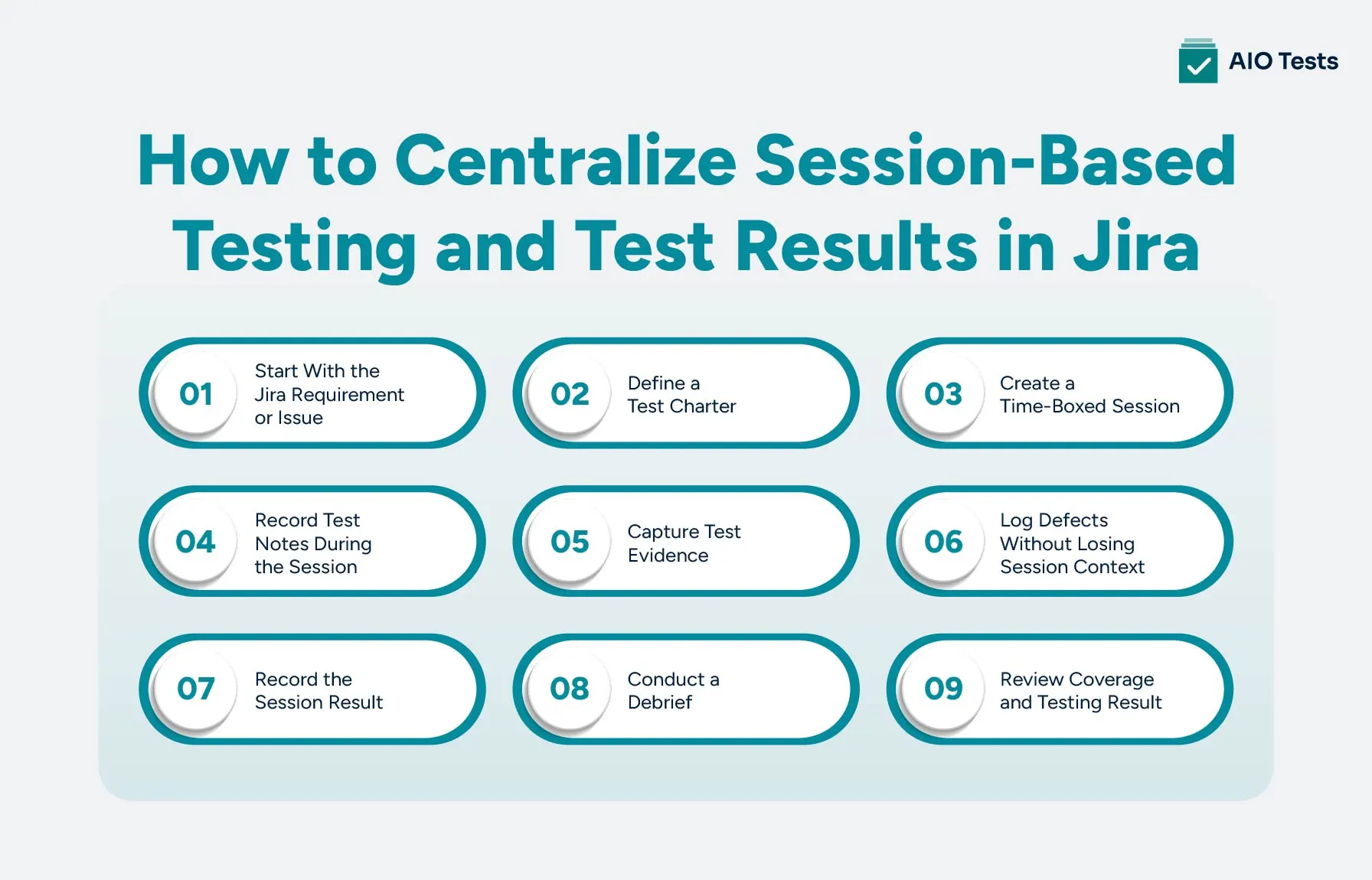
1. Start With the Jira Requirement or Issue
Begin with the Jira story, requirement, bug, or feature you want to investigate. Linking the session to this work item gives the testing activity a clear context and makes it easier to trace findings back to what was being tested.
2. Define a Test Charter
Create a test charter that gives the tester a clear mission without prescribing every test step. It should define the scope, risks, areas to explore, and the questions the session should answer.
For example:
Charter: Explore checkout behavior when payment methods fail, time out, or return unexpected responses.
A focused charter keeps the session purposeful while allowing the tester to follow useful findings as they emerge.
3. Create a Time-Boxed Session
Set up the test session with the information needed before execution:
- Tester
- Environment or build
- Session duration
- Testing scope
- Priority
- Related Jira issue
A time-box gives the session a defined boundary without limiting the tester to a fixed list of steps. The appropriate duration can vary based on the feature, risk, and testing objective.
4. Record Test Notes During the Session
Test notes should capture what the tester observes and learns while exploring the software. Useful notes can include unexpected behavior, questions, test ideas, areas explored, and potential risks.
Keeping these notes with the session makes them easier to review later and provides context for findings or defects raised during testing.
5. Capture Test Evidence
Add evidence when it helps explain or reproduce a finding. Screenshots, videos, logs, and other supporting information can provide useful context that written notes alone may not capture.
The important part is keeping the evidence connected to the relevant session or finding instead of storing it separately where it can lose its context.
6. Log Defects Without Losing Session Context
When the session reveals a defect, log it in Jira and maintain its connection to the testing activity. The defect should ideally be traceable through:
This gives developers and QA leads more context when reviewing the issue and helps preserve the reason the defect was raised.
7. Record the Session Result
At the end of the session, record the outcome rather than relying only on individual test notes. Include what was tested, what was discovered, defects raised, areas that were not explored, open questions, and remaining risks.
A clear session result helps QA leads understand the outcome without reconstructing the session from multiple sources.
8. Conduct a Debrief
A short debrief turns the session record into a useful summary for the wider team. Review the important findings, risks, questions, and follow-up actions.
Teams following the PROOF debrief approach can use the session information to summarize what was tested, what was observed, what risks were identified, and what should happen next.
9. Review Coverage and Testing Results
Finally, review the collected results across sessions. Look at the coverage areas explored, testing progress, defects discovered, unexplored areas, and remaining risks.
With this information connected in Jira, QA teams and leads can see more than whether testing was completed. They can understand where the team tested, what it found, and what still needs attention.
Session-Based Testing vs. Scripted Testing in Jira
Session-based testing and scripted testing serve different purposes. Scripted testing follows predefined steps and expected results, while session-based testing gives testers a charter and the freedom to investigate based on what they discover during the session.
In Jira, teams do not have to choose between the two. Session-based testing can help uncover unexpected issues and risks, while scripted tests can validate known scenarios consistently. Managing both within the same test management workflow gives QA teams a connected view of exploratory findings and repeatable test results.
What to Look for in a Session-Based Testing Tool
A session based testing tool should do more than record the start and end of a testing session. It should help QA teams keep the charter, testing activity, findings, evidence, defects, and results connected to the Jira workflow.
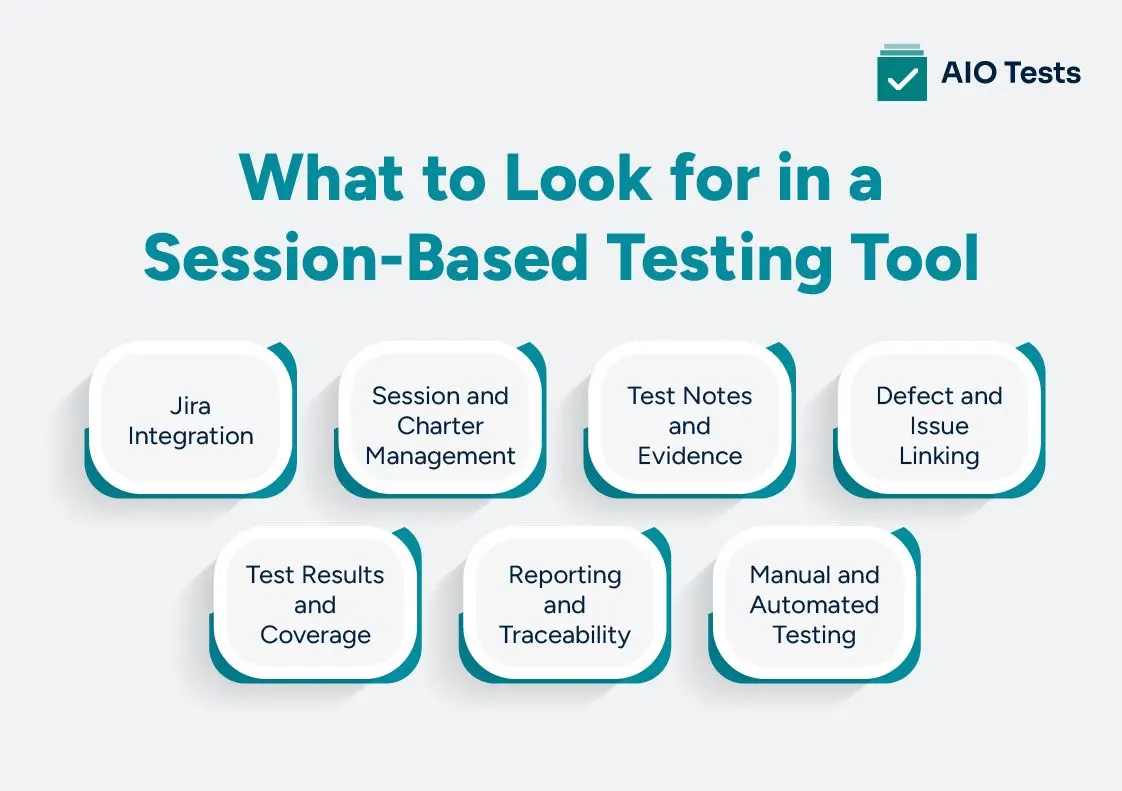
Before choosing a tool, consider these capabilities:
Jira Integration
Testers should be able to connect testing activity with Jira requirements, stories, bugs, and other work items without maintaining a separate workflow.
Session and Charter Management
The tool should support test charters and test sessions with details such as scope, tester, test environment, duration, and session status.
Test Notes and Evidence
Testers should have a practical way to capture observations, findings, screenshots, videos, logs, and other evidence during testing.
Defect and Issue Linking
Findings should be traceable to the relevant Jira defects and requirements. This preserves the context behind each issue and makes follow-up easier.
Test Results and Coverage
QA leads should be able to see session outcomes, coverage areas, testing progress, unexplored areas, and remaining risks without manually combining information from different sources.
Reporting and Traceability
The tool should connect requirements, tests, sessions, defects, and results so teams can understand testing status and release risks from a single workflow.
Manual and Automated Testing
Session-based testing should fit alongside scripted and automated testing. A tool that supports different testing approaches helps teams manage exploratory findings and repeatable test results in the same Jira environment.
Manage Session-Based Testing and Test Results With AIO Tests
AIO Tests is a Jira test management tool that brings test case management, execution tracking, defect management, traceability, and reporting into Jira. This gives QA teams a central place to manage testing alongside their existing Jira workflow.
Keep Testing Connected to Jira
The tool works within Jira, allowing teams to manage test cases, executions, and defects without switching between separate platforms. Requirements, test cases, execution results, and defects can be connected for end-to-end traceability.
Connect Tests, Executions, and Defects
Teams can link test cases and execution results with the Jira issues they relate to. The tool also supports creating bug reports directly in Jira from test execution and carrying relevant test details into the defect.
Capture Results and Evidence
This platform lets testers execute test cases, record results, log defects, and attach supporting evidence. This keeps execution details and related information within the testing workflow.
Track Coverage and Progress
This test management tool for Jira provides reports and dashboard views for execution progress, test coverage, pass/fail rates, defects, and traceability. QA teams can use these views to understand testing progress and identify coverage gaps.
Bring Manual and Automated Testing Together
AIO Tests supports both manual and automated testing. Teams can execute manual test cases in Jira while integrating automated results from frameworks and tools such as Cucumber, TestNG, JUnit, Playwright, Cypress, and others.

Best Practices for Managing Session-Based Testing in Jira
A structured approach helps teams get useful results from each session without turning exploratory testing into a rigid scripted process.
- Write focused test charters: Define a clear testing mission, scope, and risk areas so testers know what they need to investigate.
- Use time-boxed sessions: Give each session a defined duration while allowing testers to change direction when they uncover useful findings.
- Record meaningful test notes: Capture observations, questions, unexpected behavior, and areas explored rather than documenting every action.
- Capture evidence for important findings: Add screenshots, videos, logs, or other evidence when it helps explain or reproduce an issue.
- Link defects to the session and requirement: Preserve the connection between the finding, testing session, defect, and Jira work item.
- Separate findings from assumptions: Clearly distinguish observed behavior from questions or conclusions that still need validation.
- Record unexplored areas: Note what the session did not cover so the team has a clearer view of remaining risk.
- Conduct a short debrief: Summarize important findings, risks, questions, and follow-up actions after the session.
- Review coverage after sessions: Look across sessions to identify tested areas, gaps, recurring issues, and remaining risks.
- Combine testing approaches: Use session-based testing alongside scripted regression and automated testing where each approach adds value.
Conclusion
Session-based testing gives QA teams the flexibility to explore software and follow findings as they emerge. But when test charters, test notes, evidence, defects, and results are spread across different places, it becomes harder to understand what was tested and what risks remain.
A centralized Jira workflow keeps the testing record connected:
With the right Jira test management workflow, teams can manage session-based testing alongside scripted and automated testing while maintaining traceability from requirements to results.
AIO Tests brings these testing activities into Jira, giving QA teams a central place to manage tests, executions, defects, results, and coverage.

FAQs
1. What is session-based testing?
Session-based testing is an exploratory testing approach where testing is organized around a defined mission or test charter and conducted within a time-boxed session. Testers record notes, findings, evidence, and results so the work can be reviewed and traced after the session.
2. What is session-based test management (SBTM)?
Session-based test management (SBTM) is a structured way to manage exploratory testing through test charters, time-boxed sessions, session notes, findings, and debriefs. The approach is associated with James Bach and helps teams add documentation and visibility to exploratory testing without prescribing every test step.
3. What is a test charter?
A test charter defines the mission and scope of a test session. It typically identifies what to explore, why it matters, relevant risks, and the areas the tester should investigate while leaving room to adapt based on findings.
4. How long should a test session be?
There is no universal session length. A test session should be long enough to investigate its charter meaningfully while remaining focused and manageable. Teams can choose the duration based on the testing objective, feature complexity, risk, and available testing time.
5. What is the difference between session-based testing and exploratory testing?
Exploratory testing gives testers freedom to learn, design, and execute tests at the same time. Session-based testing adds structure to that approach by organizing the work into defined sessions with a charter, time-box, notes, results, and debrief.
6. What should a session report include?
A session report should summarize the test charter, tester, environment, time-box, areas explored, test notes, findings, defects, evidence, unanswered questions, and remaining risks. A short debrief can then highlight the most important results and recommended follow-up.


.svg)
