

Summarize Blog
Quick Summary
Build a Jira QA workflow that gives QA and engineering teams complete visibility from requirements to release. Learn how unified test management improves traceability and release confidence.
A Jira ticket moving to “Done” does not always mean a feature is ready to ship.
For many software teams, development tracking happens smoothly in Jira, but QA processes remain scattered across spreadsheets, separate testing tools, and manual reports. Test cases get disconnected from requirements, execution results are difficult to track, and release decisions often rely on incomplete visibility.
As releases become more frequent and products become more complex, teams need more than Jira issue tracking. They need a Jira QA workflow that connects requirements, test cases, executions, defects, and releases in one continuous process.
A unified QA workflow helps teams understand what has been tested, identify risks earlier, and make release decisions based on real testing evidence. By bringing the entire QA lifecycle inside Jira, teams can improve traceability, reduce manual effort, and deliver higher-confidence releases without managing disconnected systems.
What Does an Effective Jira QA Workflow Look Like?
An effective Jira QA workflow creates a clear connection between development requirements and quality validation. It ensures that every feature is tested, every defect is traceable, and every release decision is supported by testing evidence.
A complete end-to-end testing workflow typically follows this path:
Each stage plays an important role in the QA lifecycle.
However, many teams struggle when they try to manage this entire process using only Jira issue statuses.
Limitations of Managing QA Only Through Jira Statuses
Jira workflows are excellent for tracking the movement of work items. A development ticket can move from:
But QA requires more detailed information than a status change.
Common limitations include:
Limited test case organization
Jira issues can represent testing activities, but they are not designed to manage large repositories of reusable test cases, test steps, or test scenarios.
Lack of requirement-to-test traceability
Teams need to know whether every requirement has been validated. Without proper linking, it becomes difficult to understand test coverage across releases.
No structured test execution history
A completed Jira ticket does not show:
- Which tests were executed
- When they were executed
- What passed or failed
- Who performed the testing
Difficult regression management
As products grow, teams need reusable regression suites. Managing repeated testing through Jira tickets alone becomes inefficient.
Manual release reporting
QA teams often spend hours collecting information from different sources to answer:
- Are all critical tests complete?
- Which defects remain open?
- Is the release ready?
A Jira ticket marked Done does not always mean the feature has been fully validated.
This is where Jira test management capabilities become important. Teams need a structured way to manage testing activities alongside their existing Jira workflows.
How to Build a Jira QA Workflow From Requirements to Release
Building an effective Jira QA workflow requires connecting every stage of the QA lifecycle. Instead of treating testing as a separate activity after development, teams should create a continuous workflow where requirements, test cases, executions, defects, and releases remain connected.
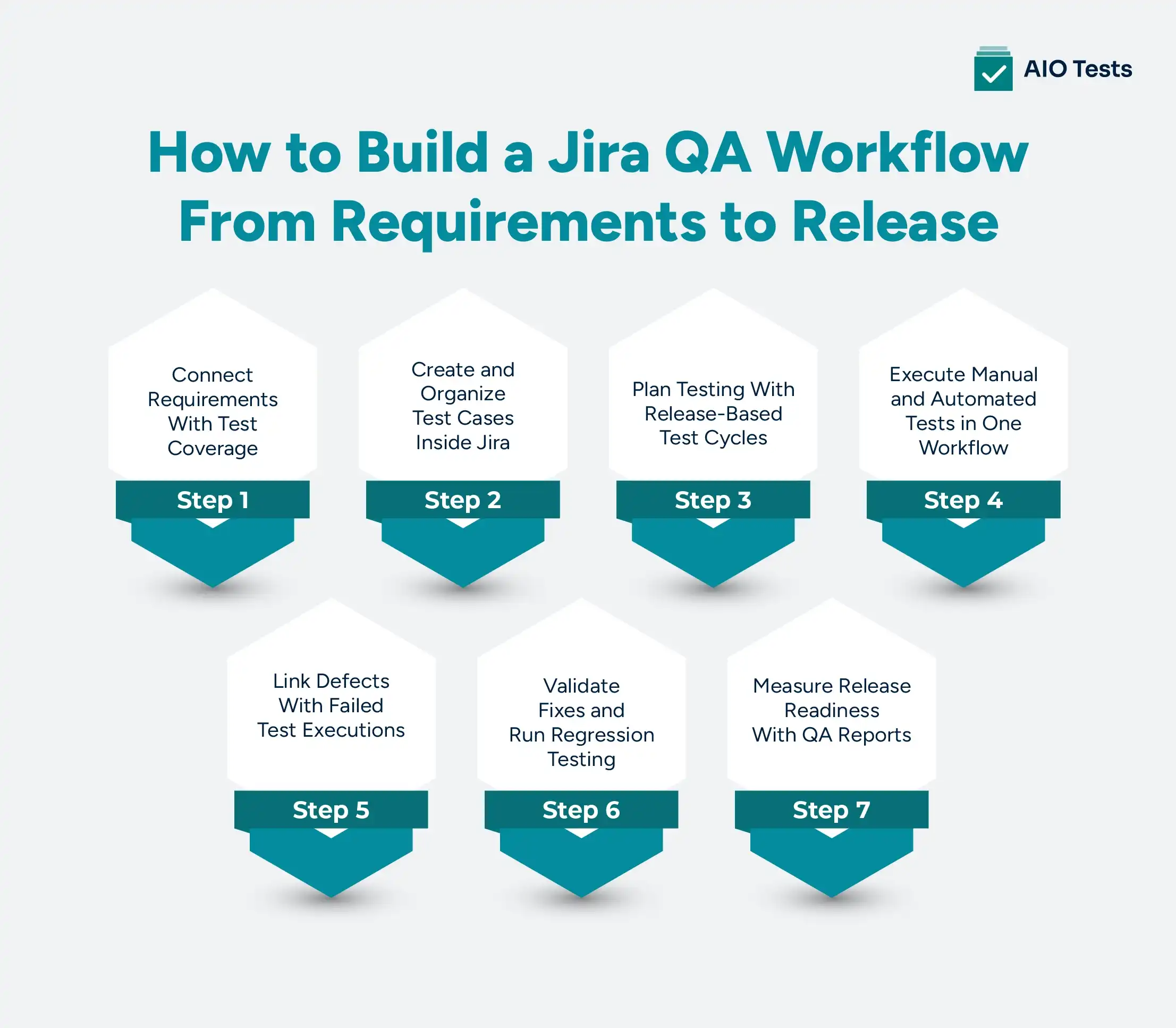
Step 1: Connect Requirements With Test Coverage
A strong QA process starts before testing begins.
Requirements should clearly define:
- Expected functionality
- Acceptance criteria
- Business requirements
- User scenarios
- Possible edge cases
This creates a foundation for a requirements to testing workflow, where every feature has a clear validation path.
Without this connection, teams may complete development work without knowing whether the feature has adequate test coverage or whether critical scenarios have been validated.
For example:
A product team creates a Jira story for a new payment feature.
Instead of moving directly into development, QA teams can identify:
- Required test scenarios
- Edge cases
- Integration points
- Expected outcomes
These test cases can then be linked directly back to the requirement, creating visibility between what needs to be delivered and how it will be validated.
A Jira test management tool helps teams connect requirements with test cases, allowing QA teams to maintain traceability throughout the testing lifecycle.
This creates a connected flow:
Step 2: Create and Organize Test Cases Inside Jira
Once requirements are defined, teams need a structured way to create and manage test cases.
Many organizations still maintain test cases in spreadsheets because they are easy to create initially. However, as testing volume increases, spreadsheets create challenges such as:
- Duplicate test cases
- Limited ownership visibility
- Difficult version control
- Missing execution history
- Manual maintenance effort
A scalable Jira testing workflow requires reusable test cases that teams can organize, update, and execute across multiple releases.
A well-structured test case should include:
- Test scenario
- Preconditions
- Test steps
- Expected results
- Priority
- Related requirement
- Execution status
A test management tool for Jira enables teams to manage test cases directly inside Jira through structured testing capabilities, including:
- Test Cases
- Test Sets
- Centralized test repositories
- Custom fields
- Test organization
This allows teams to maintain testing assets within Jira instead of managing QA documentation separately.
Reusable test cases also make future regression testing easier because teams can execute existing validation scenarios across different releases and environments.
Step 3: Plan Testing With Release-Based Test Cycles
Testing should be planned around releases, not only development sprints.
A common mistake is assuming:
Sprint completed = Testing completed
However, testing activities often continue across:
- Feature validation
- Regression testing
- User acceptance testing
- Production verification
Test cycles help teams organize testing based on specific goals, releases, or features.
For example:
Release 5.0 Testing Cycle
Includes:
- New feature tests
- Regression tests
- Integration tests
- Smoke tests
A Jira-native test management solution helps teams organize and track testing activities for specific releases, features, or testing objectives.
This improves test execution visibility by helping teams understand:
- What has been tested
- What remains pending
- Which tests have failed
- Current testing progress
Connecting test planning with execution helps teams improve release management by ensuring every release has a defined testing scope.
Step 4: Execute Manual and Automated Tests in One Workflow
A complete Jira QA workflow should support both manual and automated testing without creating separate reporting systems.
Many teams use automation to speed up repetitive testing while relying on manual testing for exploratory checks, usability validation, and complex scenarios.
However, when these results are stored separately, QA teams lose a complete view of product quality.
A unified testing workflow should allow teams to track:
- Tests that have not started
- Tests currently in progress
- Passed test cases
- Failed test cases
- Blocked executions
- Automation results
For example, a team may run automated regression tests through a CI/CD pipeline while QA engineers execute manual acceptance tests. Both results should contribute to the same release quality view.
The platform supports integrations with popular automation frameworks and CI/CD tools, allowing teams to bring automated testing results into their Jira-based testing workflow.
Instead of reviewing:
- Automation results in one tool
- Manual testing reports in another tool
- Defects separately in Jira
Teams can maintain a connected testing process:
This improves visibility into testing progress and helps teams identify release risks earlier.
Step 5: Link Defects With Failed Test Executions
Defect management becomes more effective when bugs are connected directly to the testing activity that discovered them.
A traditional defect workflow often looks like this:
While Jira is effective for tracking bugs, teams may still lack important testing context, such as:
- Which requirement failed
- Which test case identified the issue
- What test steps caused the failure
- Expected vs actual results
- Testing evidence
- Previous execution history
A stronger defect tracking workflow connects failed test executions with defects.
A test management tool for Jira allows teams to maintain testing context throughout the defect lifecycle by linking failed executions, test cases, and Jira issues together.
For example, when a checkout test fails, the team should be able to understand:
- The affected requirement
- The failed test scenario
- The execution where the failure occurred
- The related defect
- The retest status after fixing the issue
The workflow becomes:
This improves collaboration between QA and development teams because developers receive more than a bug report. They get the information needed to understand the impact and resolve issues faster.
The platform supports defect logging from failed test cases, allowing teams to create Jira bugs with relevant testing details and maintain better visibility throughout issue resolution.
Step 6: Validate Fixes and Run Regression Testing
Fixing a defect does not complete the QA process.
After developers resolve an issue, QA teams need to verify:
- Whether the original problem is fixed
- Whether related functionality still works
- Whether the change introduced new issues
This makes regression testing an essential part of the QA lifecycle.
A scalable regression process requires:
- Reusable test cases
- Previous execution history
- Clear ownership
- Visibility into impacted areas
Without structured test management, teams often rebuild regression lists manually for every release. This increases testing effort and creates the risk of missing important scenarios.
A Jira testing workflow supported by reusable test cases helps teams quickly identify which scenarios should be executed after a change.
For example:
A payment feature update may require regression testing across:
- Checkout flow
- Payment gateway integration
- Order confirmation
- Refund processing
By maintaining reusable test cases and organizing them into logical groups, teams can create repeatable regression cycles for different releases.
A Jira test management tool helps teams organize reusable test assets through features such as test sets and execution cycles. Teams can group important scenarios, add them to cycles, and track results across releases.
Step 7: Measure Release Readiness With QA Reports
The final stage of a Jira QA workflow is determining whether a release is ready.
A completed Jira sprint or release does not automatically indicate product quality.
Before deployment, teams need answers to questions such as:
- Are all critical requirements tested?
- How many test cases passed?
- Which tests failed?
- Are unresolved defects affecting the release?
- Has regression testing been completed?
- Is automation coverage sufficient?
This requires clear QA reporting.
Important release metrics include:
- Test coverage
- Execution progress
- Pass/fail status
- Defect status
- Regression completion
- Automation results
A test management platform for Jira helps teams track testing progress through connected QA data instead of manually combining information from multiple sources.
The platform provides reports for:
- Requirement traceability
- Test execution progress
- Defect impact
- Automation coverage
- Test cycle performance
This helps teams evaluate release readiness based on testing evidence rather than assumptions.
How AIO Tests Helps Build a Unified Jira QA Workflow
A complete QA workflow requires more than tracking Jira issues. Teams need visibility across requirements, test cases, executions, defects, and release readiness.
AIO Tests helps teams manage the QA lifecycle inside Jira by connecting testing activities in one workflow instead of managing them across disconnected tools.
Key capabilities include:
- Jira-Native Test Management: Manage test cases, organize testing activities, track execution results, and link testing with Jira issues without leaving the Jira environment.
- Requirement-to-Test Traceability: Connect requirements with test cases, executions, and defects to understand test coverage and validate that features are properly tested.
- Test Cases, Sets, and Cycles: Create reusable test cases, group scenarios using Test Sets, and plan release-based testing with Test Cycles for feature, smoke, regression, and release validation.
- Manual and Automated Testing Support: Execute manual tests and integrate automated test results from popular frameworks and CI/CD tools to maintain a complete testing view.
- Defect Tracking and Reporting: Link failed executions with defects, maintain testing context, and use QA reports to monitor coverage, execution progress, and release readiness.
- AI-Assisted Test Creation: Generate test cases and steps faster from requirements, helping teams reduce manual effort during test planning.
With these capabilities, the platform helps teams build a connected Jira QA workflow that improves traceability, collaboration, and confidence before every release.

Jira Workflow vs Jira QA Workflow: What Is the Difference?
Many teams confuse a Jira workflow with a QA workflow.
Although they work together, they solve different problems.
A Jira workflow answers:
“Where is this work item in the development process?”
A Jira QA workflow answers:
“Has this functionality been properly tested and is it ready for release?”
For example:
A developer may complete a user story and move it to Done.
However, QA teams still need to know:
- Were all test cases executed?
- Did regression testing pass?
- Are there critical defects?
- Is the release safe?
This is why organizations often combine Jira workflows with Jira test management capabilities to create a complete quality process.
Conclusion
A Jira workflow helps teams track development progress, but a complete QA workflow requires visibility into the entire testing lifecycle.
Connecting requirements, test cases, executions, defects, and releases allows teams to move beyond simple task completion and make release decisions based on quality evidence.
A unified Jira QA workflow helps organizations create better traceability, improve collaboration, and reduce the risks associated with complex software releases.
AIO Tests helps teams build this connected QA process directly inside Jira by bringing together test management, execution tracking, defect visibility, automation support, and reporting in one platform.

FAQs
1. What is a Jira QA workflow, and how does it support the QA lifecycle?
A Jira QA workflow is a structured process that connects requirements, test cases, test execution, defects, and releases inside Jira. It helps teams manage the complete QA lifecycle by improving traceability, collaboration, and visibility into testing progress.
2. How can teams connect requirements to testing in Jira?
Teams can connect requirements to testing in Jira by linking user stories with test cases, defining acceptance criteria, and tracking test execution results. A Jira test management solution like AIO Tests helps maintain visibility between requirements and validation activities.
3. How does Jira test management improve the testing workflow?
Jira test management helps teams organize test cases, plan test cycles, track executions, manage defects, and generate QA reports. It provides better visibility than managing testing through Jira tickets alone.
4. How can Jira help manage test execution and defect tracking in one workflow?
Jira can manage defects and development tasks, while Jira test management tools connect those defects with failed test executions. This helps teams maintain context between test failures, bugs, fixes, and retesting.
5. How can teams build an end-to-end QA workflow from requirements to release in Jira?
Teams can build an end-to-end QA workflow by connecting requirements, test cases, test cycles, executions, defects, regression testing, and release reporting. A Jira-native test management tool helps maintain this complete workflow without moving QA processes outside Jira.


.svg)
