

Summarize Blog
Quick Summary
AI strengthens test coverage analysis by comparing release requirements with existing test cases, execution results, and defects. It helps QA teams spot missing scenarios, untested requirements, and incomplete executions before deployment, while keeping testers responsible for validating recommendations and deciding whether the release has enough coverage.
A passing test suite can create a false sense of confidence. Every planned test may have passed, yet an acceptance criterion, negative path, or recent requirement change may never have been tested.
This is where test coverage analysis becomes important. It looks beyond the number of tests executed and examines whether the release scope is adequately covered by relevant test cases, execution results, and defect information. The goal is to identify what remains untested before it becomes a production issue.
AI can support this process by analysing requirements, suggesting overlooked scenarios, and drawing attention to incomplete coverage. When combined with traceability and QA analytics, it gives teams a clearer view of release risk.
A Jira-native test management platform can take this further by keeping AI-assisted test creation, requirements, execution cycles, automation results, and defects connected in one testing workflow.
What Does Test Coverage Analysis Actually Measure?
Test coverage analysis evaluates how thoroughly testing addresses the requirements, changes, risks, and workflows included in a software release. It helps teams determine whether their testing provides enough evidence to support a release decision.
Code coverage is one part of this assessment, but it cannot provide the full answer. A test may execute a function without verifying the correct result. A user story may have a linked test while one of its acceptance criteria remains uncovered. Similarly, a test may exist in the repository but never be included in the current release cycle.
A meaningful analysis should consider several forms of coverage:
- Requirement coverage: Are all user stories and acceptance criteria connected to relevant tests?
- Scenario coverage: Are positive, negative, boundary, exception, and recovery paths tested?
- Change coverage: Do the tests address recently added or modified behaviour?
- Execution coverage: Were all planned tests completed for this release?
- Risk coverage: Did critical business processes receive an appropriate level of testing?
- Environment and data coverage: Were important configurations, platforms, and datasets included?
- Defect coverage: Were failed tests and unresolved defects considered during the release review?
Together, these dimensions provide a more reliable picture of release quality than a single coverage percentage.
Why Traditional Coverage Checks Miss Pre-Release Risks
Traditional coverage checks often rely on spreadsheets, code coverage reports, and manually maintained traceability matrices. Each source may be useful, but examining them separately makes it difficult to understand the complete testing status of a release.
Code coverage can show that certain lines or branches were executed. It cannot confirm that the tests contain meaningful assertions or validate the correct business outcome. Manually maintained test repositories can also fall behind when requirements change frequently.
Other gaps appear when:
- Requirements and test cases are stored in separate systems.
- Existing cases no longer reflect the latest acceptance criteria.
- Edge cases depend on a tester remembering to add them.
- Manual and automated results are reported in different tools.
- Important regression tests are excluded from the release cycle.
- Blocked or unexecuted tests are discovered close to deployment.
- Large repositories make duplicate, outdated, and missing cases difficult to identify.
Effective test coverage analysis tools must connect these signals. Teams need to see not only which tests exist, but what they validate, whether they were executed, what failed, and which requirements still require attention.
How AI Identifies Test Coverage Gaps Before a Release
AI works best as an analysis and test-design assistant. It can examine testing context at a scale that becomes difficult to manage manually and surface areas that deserve human review.
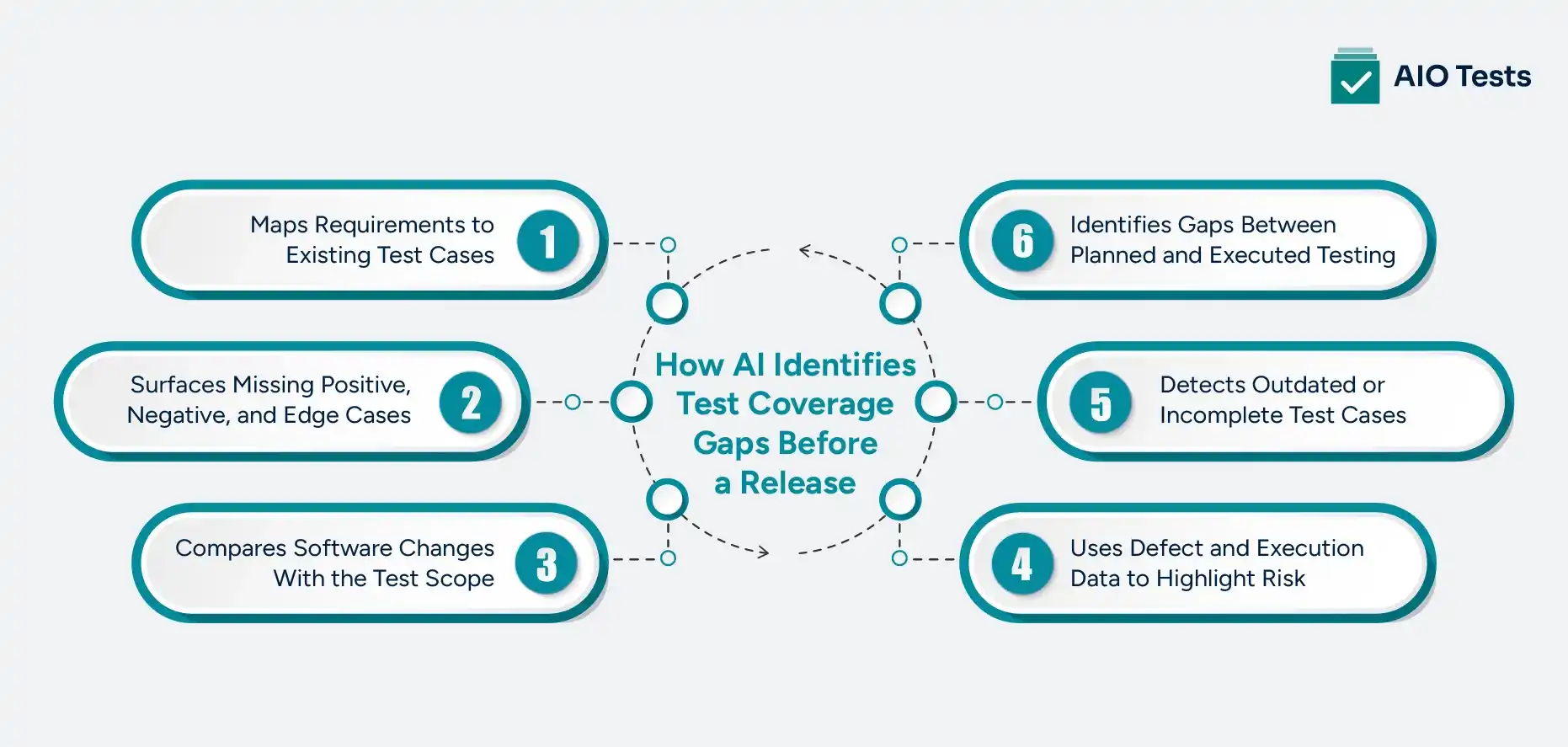
1. Maps Requirements to Existing Test Cases
Natural language processing can compare the meaning of user stories and acceptance criteria with the purpose, steps, and expected results of test cases. This can help surface requirements that have no related tests or appear to have only partial scenario coverage.
Consider a password-reset requirement. An existing case may confirm that the reset email reaches the user. However, the requirement may also state that the link must expire after 15 minutes and become invalid after one use.
A basic traceability check may show that the requirement has a linked test. A deeper test coverage analysis can reveal that important conditions within the requirement remain unverified.
This form of AI-powered test analysis depends on clear requirements and well-maintained test cases. If the acceptance criteria are incomplete, the AI will have limited information from which to identify potential gaps.
2. Surfaces Missing Positive, Negative, and Edge Cases
Testers frequently begin with the expected user journey. The less obvious conditions, such as invalid data, permission failures, timeouts, and interrupted transactions, require additional analysis.
AI can inspect a requirement and suggest:
- Valid and invalid input combinations
- Minimum and maximum values
- Empty or null inputs
- Permission and role restrictions
- Failed third-party dependencies
- Duplicate submissions
- Network interruptions
- Recovery and rollback behaviour
- Alternate end-to-end paths
These suggestions can help teams improve test coverage without depending entirely on individual memory.
Generated scenarios still require review. QA professionals must confirm that each case is relevant, technically possible, and aligned with the intended business outcome. AI can suggest that a timeout should be tested, but it may not know the correct recovery behaviour unless the requirement defines it.
3. Compares Software Changes With the Test Scope
Coverage needs to change with the product. When a user story, workflow, or integration is modified, the tests associated with that area should be reviewed.
AI-assisted analysis can help connect changed Jira issues, updated requirements, and affected product areas with the current test scope. It can draw attention to functionality that has changed without a corresponding test update or identify related workflows that may require regression testing.
For example, a change to a payment retry rule may affect more than the primary checkout test. It may also influence duplicate-payment prevention, failed authorisation handling, transaction status updates, and customer notifications.
This analysis depends on accurate traceability. If changes, requirements, and tests are disconnected, AI has less reliable context. It should also not be confused with automatic source-code impact analysis unless the selected tool specifically supports that capability.
4. Uses Defect and Execution Data to Highlight Risk
Coverage gaps often become visible through test history. A component with repeated regressions, unresolved defects, or a high number of blocked tests may require more attention than its current test count suggests.
QA analytics can bring together signals such as:
- Repeated failures in the same workflow
- Critical tests that remain unexecuted
- Defects affecting several test cycles
- Tests blocked by environment or data issues
- Requirements with failed cases
- Regression areas associated with previous production defects
AI can use these patterns to support coverage optimization by helping teams focus on higher-risk areas.
Historical patterns do not predict every future defect. A feature with no previous failures can still contain a serious problem. Defect and execution history should guide prioritisation, not replace broader risk analysis.
5. Detects Outdated or Incomplete Test Cases
A test can remain in the repository long after the requirement it was created for has changed. If the case still passes, the result may provide confidence in behaviour that is no longer relevant.
AI can compare updated requirements with existing case content and suggest additional steps or scenarios for review. Version history and requirement links then help testers understand when the case changed and whether its latest version matches the current scope.
This is especially useful for large regression repositories where manually reviewing every case after each requirement update is impractical.
However, AI should not update critical test assets without review. The tester still needs to verify the expected result, data requirements, dependencies, and downstream impact.
6. Identifies Gaps Between Planned and Executed Testing
A test passing in a previous cycle does not mean it was executed for the current release. Test coverage analysis must distinguish between four states:
- A test exists.
- The test is included in the release plan.
- The test has been executed.
- The result provides acceptable evidence.
AI-assisted reporting and QA analytics can help draw attention to planned cases that remain unexecuted, blocked, failed, or excluded from the release cycle. Teams can then investigate whether the omission is acceptable or represents an unresolved release risk.
This final step connects coverage analysis with the actual release decision. It prevents teams from treating the size of the test repository as evidence that the current build has been sufficiently verified.
A Practical AI-Assisted Test Coverage Analysis Workflow
AI delivers the most value when it supports an organised release workflow.
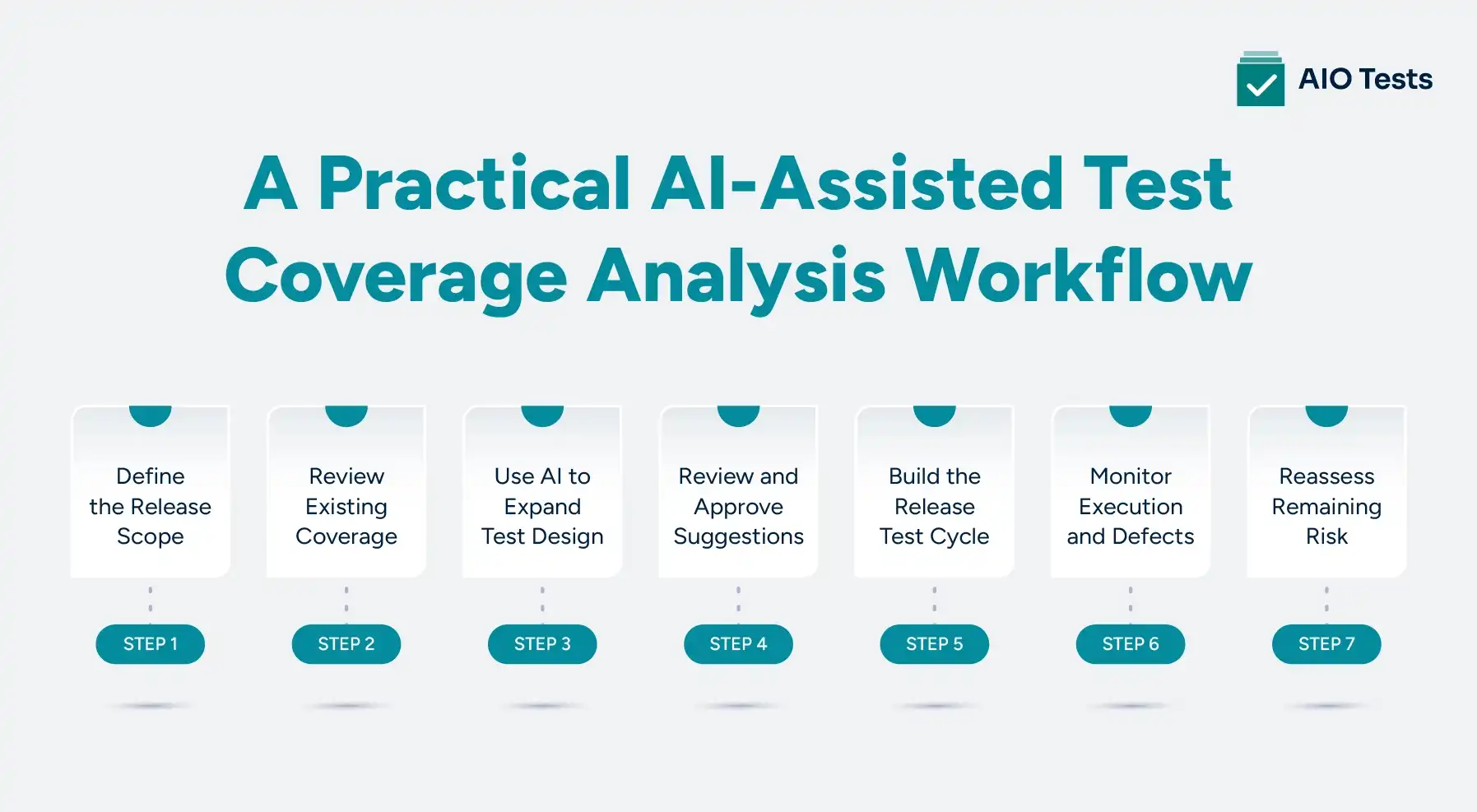
Step 1: Define the Release Scope
List the Jira requirements, user stories, defects, configuration changes, and affected workflows included in the release. Clear scope gives the coverage review a reliable starting point.
Step 2: Review Existing Coverage
Check which requirements have linked manual or automated cases. Look beyond the existence of a link and confirm whether the cases address every important acceptance criterion.
Step 3: Use AI to Expand Test Design
Ask AI to generate or suggest positive, negative, boundary, exception, and end-to-end scenarios. Use the requirement and related Jira context to make the output more relevant.
Step 4: Review and Approve Suggestions
Validate each proposed case against business rules, expected behaviour, dependencies, and test data. Remove duplicate or low-value suggestions before adding them to the repository.
Step 5: Build the Release Test Cycle
Combine new cases with the required smoke, regression, integration, and critical-workflow tests. Include both manual and automated testing where appropriate.
Step 6: Monitor Execution and Defects
Track passed, failed, blocked, and unexecuted cases. Review unresolved defects connected to critical requirements and workflows.
Step 7: Reassess Remaining Risk
Use traceability, coverage, execution, and defect reports to determine what remains unverified. Document accepted gaps instead of assuming that AI test coverage is complete.
How to Improve Test Coverage Without Adding Low-Value Tests
Increasing the number of cases is not always the best way to improve test coverage. A larger repository can create more maintenance work while repeatedly testing the same behaviour.
Better coverage optimization starts with the importance of what is being verified.
- Prioritise critical requirements, integrations, and user journeys.
- Add negative, boundary, exception, and recovery cases where they address a real risk.
- Consolidate duplicate tests that validate the same condition.
- Link each case to a requirement, acceptance criterion, or defined risk.
- Maintain reusable Sets for smoke, regression, and critical workflows.
- Review cases whenever their linked requirements change.
- Bring manual and automated results into the same coverage review.
- Examine escaped defects to understand which scenario or assertion was missing.
- Treat AI suggestions as review inputs rather than automatic additions.
- Run broader regression checks periodically to verify selective testing decisions.
Good test coverage tools should help teams determine which tests add confidence, not simply make it easier to create more of them. The objective is to cover the right behaviours and risks with tests that remain relevant, traceable, and executable.
How AIO Tests Helps Jira Teams Address Coverage Gaps
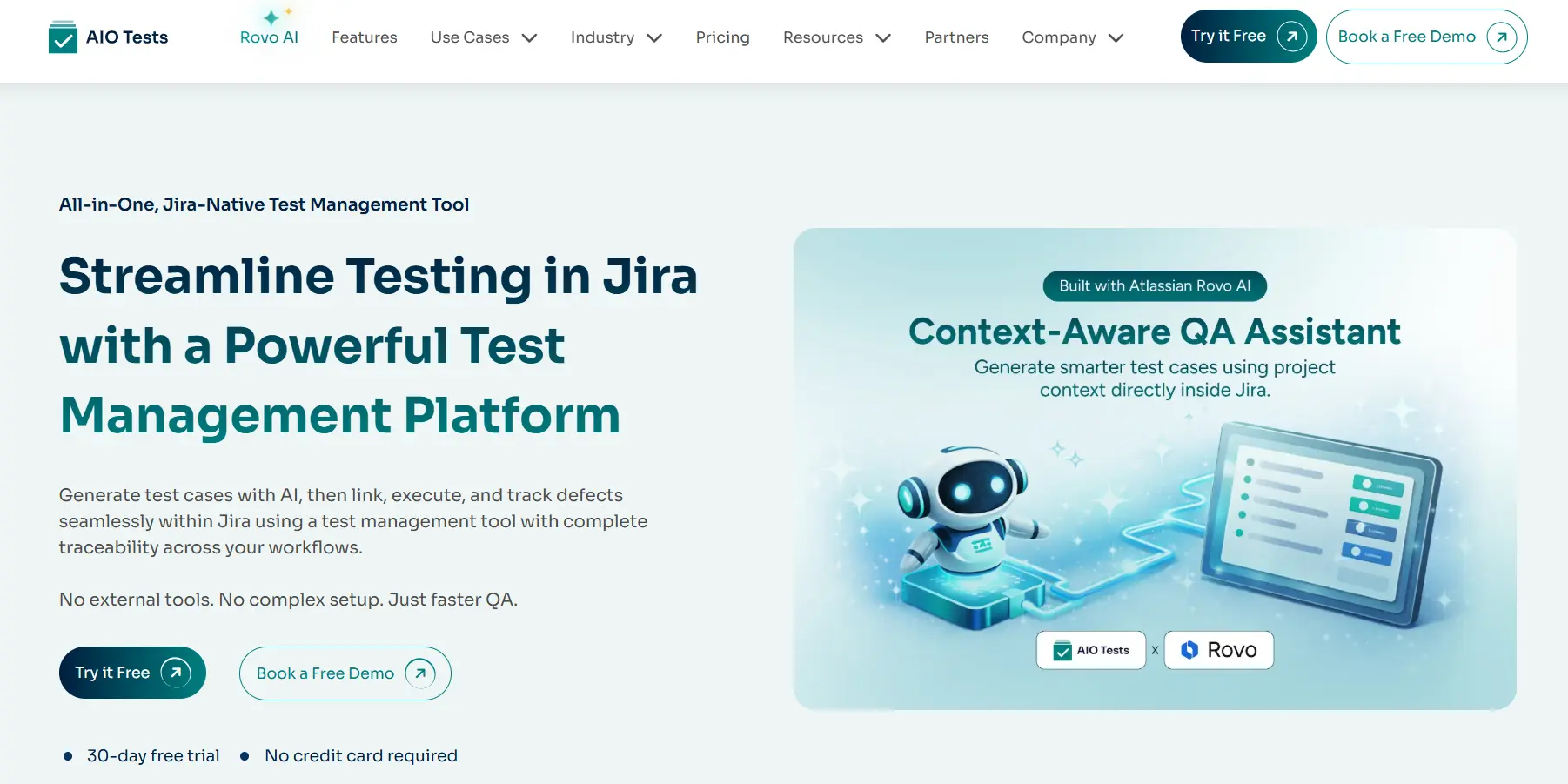
Finding a coverage gap is only useful when the team can act on it before release. AIO Tests brings AI assisted test creation, requirement traceability, execution results, automation reporting, and defects together inside Jira, helping QA teams turn coverage insights into verified tests and clearer release decisions.
Generate Context-Aware Tests From Jira Requirements
The platform can generate structured test cases from Jira user stories and requirements. Teams can create classic or BDD-style cases and request positive, negative, or end-to-end scenarios.
The AIO Tests Rovo Assistant adds a conversational test-design workflow. It automatically uses the current Jira issue and can pull context from related issues and epics. Testers can refine generated cases with follow-up prompts, switch between classic and BDD formats, and request additional edge cases.
After user confirmation, cases can be imported into the test suite and automatically linked to the relevant Jira requirement. The Rovo Assistant is a separate Atlassian Marketplace app that requires installation by a Jira administrator.
Maintain Requirement-to-Defect Traceability
The Jira test management tool connects requirements with test cases, execution cycles, results, and defects. This provides visibility into whether coverage has been designed, included in a cycle, executed, and verified.
When a case fails, testers can create a Jira defect directly from the execution and automatically populate the bug report with relevant test details. They can also attach supporting documents and comments, maintaining traceability from the requirement through the failed execution to the linked defect.
Standardise Release Coverage With Sets and Cycles
Reusable Sets allow teams to group smoke tests, regression cases, beta tests, core functionality, and critical workflows. These Sets can be added directly to execution Cycles, reducing dependence on individual testers to determine which cases should be included when certifying a release.
Cycles provide a central place to add and execute cases, record results, attach evidence, log defects, review cycle summaries, and track execution progress. The built-in execution planner can also set daily targets and notify teams when testing falls behind schedule.
Bring Manual and Automated Results Together
The platform brings manual testing and automated execution results into the same test management workflow. Its automation testing integrations include REST APIs, Jenkins, Playwright, Cypress, Cucumber, Katalon, Robot Framework, JUnit, TestNG, and Postman.
Depending on the integration, teams can report execution results, step-level outcomes, attachments, and comments. This creates a more complete view of manual and automated coverage without requiring separate release reports.
Use Coverage and Execution Reports for Release Reviews
Built-in reports and metrics provide visibility into requirement traceability, test coverage, execution progress, pass and fail rates, defects, defect trends, and automation metrics.
Reports can be added to Jira dashboards, exported as PDF or Excel files, and scheduled for delivery to stakeholders. These capabilities help teams review which requirements have linked tests, how much planned testing has been completed, what failed, and where further attention may be required before release.
What to Look for in Test Coverage Analysis Tools
The right test coverage analysis tools should support the full path from identifying a potential gap to verifying that it has been addressed.
Evaluate whether a platform provides:
- Integration with Jira or the team’s requirements system
- Requirement-to-test traceability
- AI-assisted scenario and test-case generation
- Positive, negative, boundary, and end-to-end test support
- Human approval before generated cases are stored
- Manual and automated result consolidation
- Test versioning and change history
- Reusable smoke and regression organisation
- Execution, evidence, and defect visibility
- Coverage and traceability reports
- CI/CD and automation framework integrations
- Custom fields, workflows, and permission controls
- Appropriate protection for requirement and testing data
Avoid choosing test coverage tools solely because they generate large numbers of cases. A useful platform should show how tests relate to requirements, whether they were executed, and which release risks remain unresolved.
Limits of AI Test Coverage Analysis
AI can strengthen coverage visibility, but it cannot establish that a release is free from defects.
The quality of AI test coverage depends on the information available to the system. Incomplete requirements, vague acceptance criteria, missing test links, and inconsistent execution data can all produce weak recommendations.
Generated cases may also be repetitive, irrelevant, or based on an incorrect interpretation of the requirement. AI may identify that an error condition needs testing without knowing the correct business response.
QA teams must therefore review:
- Test relevance
- Preconditions and dependencies
- Expected results
- Security and compliance requirements
- Business risk
- Duplicate coverage
Critical releases may still require exploratory testing, specialist review, and periodic full regression runs. AI improves test coverage analysis by helping teams find areas that deserve attention. QA professionals remain responsible for deciding whether the available evidence supports the release.
Conclusion
A passing test suite cannot reveal scenarios that were never included. Effective test coverage analysis looks at requirements, risks, planned cases, execution results, and defects together.
AI can help surface missing scenarios, outdated tests, incomplete requirement coverage, and execution gaps before deployment. Traceability and reporting then turn those suggestions into evidence teams can use during release reviews.
AIO Tests connects AI-assisted test creation with test organisation, execution, automated results, coverage reporting, and Jira defects. This gives QA teams a practical way to identify what has been tested and what still requires attention before release.

Frequently Asked Questions
1. What is test coverage analysis?
Test coverage analysis evaluates how thoroughly testing addresses a release’s requirements, scenarios, risks, and changes. It considers not only whether tests exist, but also whether they were included, executed, and connected to the expected behaviour.
2. How can AI identify gaps in test coverage?
AI can analyse requirements and existing testing information to surface missing scenarios, incomplete requirement mappings, outdated cases, and unexecuted tests. Its suggestions should be reviewed by QA professionals before being added to the release scope.
3. What are the benefits of AI-powered test coverage analysis?
AI-powered analysis can reduce manual review effort, surface overlooked edge cases, and help teams focus testing on areas that may carry greater release risk. It also supports faster test design when requirements change.
4. How do test coverage tools improve software quality?
Test coverage tools connect requirements, test cases, execution results, and defects so teams can see what has and has not been verified. This visibility helps QA teams address important gaps before they affect production.
5. Can AI improve test coverage without increasing the number of test cases?
Yes. AI can help identify duplicate or low-value cases and suggest improvements to existing tests. Better coverage comes from testing the right requirements, scenarios, and risks, not simply increasing the size of the repository.
6. When should teams perform test coverage analysis before a release?
Teams should review coverage throughout development and conduct a final analysis once the release scope and test results are available. This final review should examine requirement coverage, incomplete executions, failed tests, blocked cases, and unresolved defects.


.svg)
