


Summarize Blog
Quick Summary
Modern software testing trends focus on continuous feedback, shared ownership of quality, and automation that balances speed with reliability. From AI-assisted testing to shift-left strategies and observability-driven checks, these trends ensure teams catch issues early while keeping deployments stable and predictable.
DevOps teams ship more often now. Way more often. Release cycles are shorter, deployments happen continuously, and the room for mistakes keeps shrinking.
This shift puts software quality assurance under real pressure. When teams release more frequently, testing cannot fall behind. If quality does not keep pace, teams are not moving faster; they are releasing problems more often.
Here are the software testing trends modern DevOps teams need to focus on to keep software quality assurance aligned with frequent releases and stable delivery.
Why Software Testing Looks Different In DevOps Teams Now
DevOps changed the shape of delivery. Smaller changes. More frequent merges. Faster releases. And the old testing model, where teams build for weeks and test at the end, simply doesn’t hold up anymore.
That shift forces teams to rethink the types of software testing they rely on. End-of-cycle testing breaks for a few predictable but painful reasons:
- Feedback arrives too late: You find problems after the code is already merged, maybe already deployed.
- Releases get flaky: The same areas keep breaking because you never tightened the checks around them.
- Hotfixes become normal: Not because the team is careless. Just because the system moves faster than the safety net.
So what does “modern software testing” mean in practice?
- Continuous feedback, not one final QA phase
- Shared ownership, not “QA will catch it.”
- Automation where it helps, and smart manual checks where it matters
- Testing connected to delivery, monitoring, and incident learning
And yes, people searching for “software testing trends for DevOps” usually want stuff they can apply next sprint, not theory. So that’s what this is.
What Are the Key Software Testing Trends to Watch in 2026
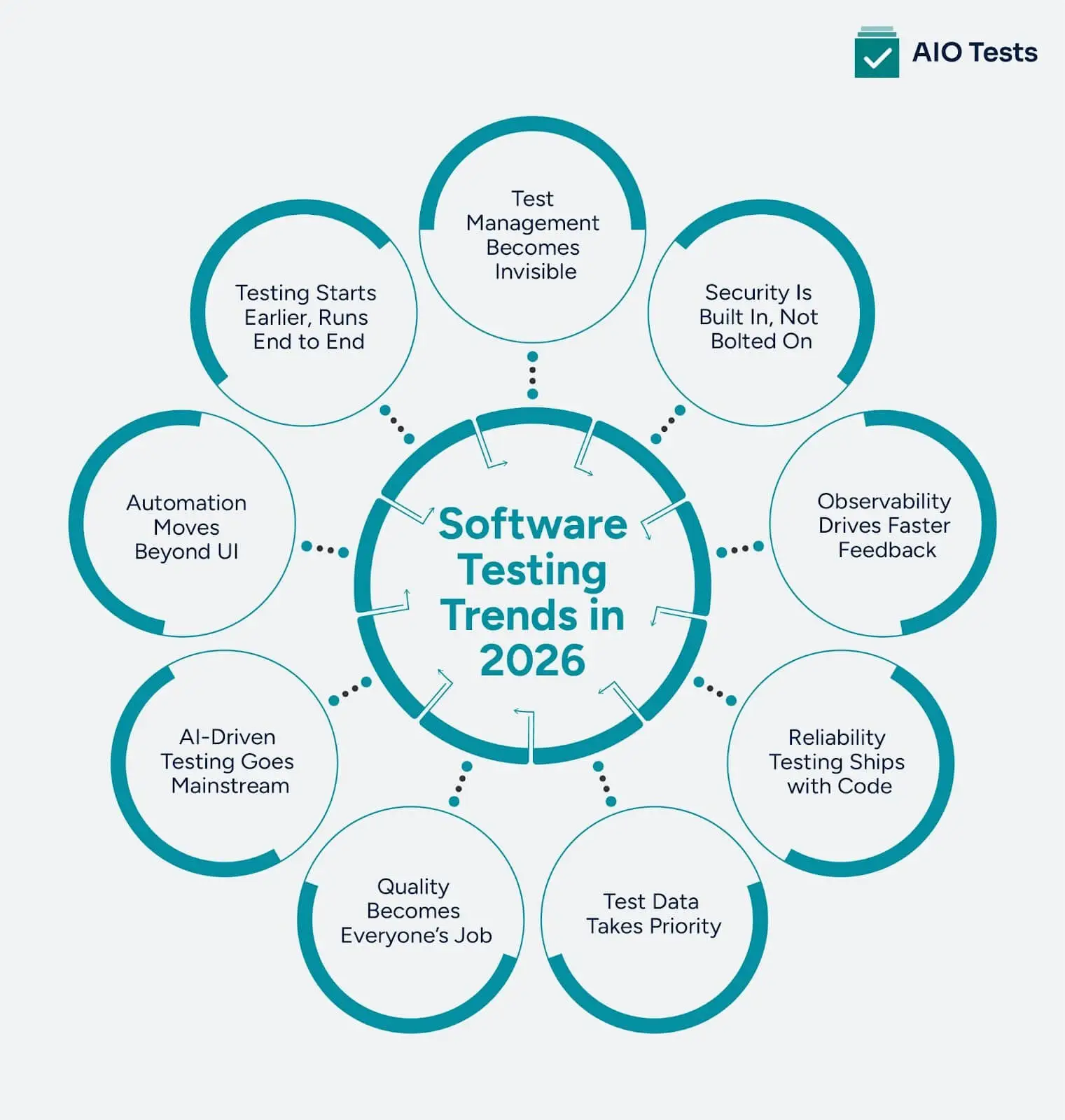
Trend #1: Testing Shifts Left (But Also Shifts Right)
Shift left is old advice, but the way teams do it now is more specific. It’s less “test earlier” and more “make the work testable from the start.” Real shift left focuses on building verifiable work from day one, improving software quality in software testing instead of pushing defects downstream.
Shift Left In Real DevOps Teams
It looks like:
- Clear acceptance criteria before coding starts
- Stories written so they can be verified (not just “improve performance”)
- Fast unit and component tests that run in minutes
- PR checks that block bad merges, not just warn about them
A simple day-to-day example:
- Dev opens PR
- Pipeline runs
- Unit tests
- Linting
- Component checks
- Contract tests (if needed)
- The reviewer looks at the code and test changes together
- Merge only happens if the change is verifiable
Shift Right Is The Other Half That People Ignore
Shift right means you keep testing after release, using real signals:
- Monitoring and alerting tuned to user impact
- Feature flags so you can disable risky behavior quickly
- Canary releases to limit blast radius
- Rollback drills so teams can actually roll back under pressure
And honestly, shift right is where teams learn what their tests missed.
Where Teams Get Stuck
The most common failure mode is this:
- “Shift left” turns into “QA owns everything earlier.”
That’s not shift left. That’s just moving the bottleneck. Real shift left means:
- Devs write and maintain core automated checks
- QA focuses on risk, coverage, edge cases, and test design
- The product helps define what “correct” means
Trend #2: Test Automation Trends Move Beyond UI Scripts
A lot of teams start test automation with UI tests because they feel closest to the user experience. That choice often blurs the line between manual vs automated testing and leads teams to automate what they used to click through by hand.
While UI tests are important for high-visibility user flows, they tend to be slower and more prone to failure. By focusing on API and component tests, teams can achieve more stable, faster automation testing that delivers more value in the DevOps pipeline.
UI only automation does not scale because:
- UI runs are slow
- Selectors break all the time
- Small layout changes cause false failures
- Debugging is harder because failures are noisy
More teams are putting most automation effort into:
- API tests
- Component tests
- Contract tests between services, which help catch breaking changes before they hit staging.
- A smaller set of critical UI flows
This is basically the automation pyramid, but taken seriously.
What To Automate First In A DevOps Pipeline
If you are deciding where to invest next, this order usually works:
- Unit tests for logic and edge cases
- Cheap, fast, great for preventing regressions.
- Component tests for service behavior
- Validate modules with realistic inputs, without the full UI.
- API tests for key endpoints
- Stable and fast, good coverage.
- Contract tests for microservices
- Catch breaking changes before they hit staging.
- UI tests for only the flows that must never break
- Keep this small and meaningful.
When UI Automation Still Matters
- UI tests are still worth it for:
- Checkout and payment flows
- Onboarding
- Login and account recovery
- Core user journeys that are tied to revenue or retention
- Accessibility checks (some can be automated, some still need people)
Trend #3: AI-Assisted Testing Becomes Normal
AI-assisted testing is now a practical tool, not just a concept. It has proven its worth in streamlining testing processes and improving efficiency.
For instance, AI testing tools have helped teams by reducing the time spent on triaging bugs by automating the process of identifying the root cause based on historical data. Beyond test creation and triage, AI is increasingly improving qa reporting by summarizing failures, risks, and trends without manual effort.
How AI Helps in Software Testing Today
AI tools are increasingly used to:
- Suggest test cases based on user stories or pull request diffs, speeding up the test creation process.
- Prioritize tests based on risk, helping teams decide what to run first and avoid unnecessary tests.
- Cluster flaky tests by pattern, enabling teams to address recurring issues efficiently.
- Analyze logs and triage failures, significantly reducing the time spent manually searching for errors.
- Summarize incidents, guiding the team on what to focus on in future tests to avoid missing critical bugs.
Where AI in Software Testing Faces Challenges
Despite its benefits, AI still comes with AI testing challenges in software testing:
- Understanding business intent: AI can analyze text and data, but it doesn’t fully grasp what the customer experience should be or what specific user behaviors are most critical.
- Handling domain-specific edge cases: AI in software testing often struggles with complex rules such as tax calculations, billing scenarios, or compliance checks that depend on deep business context.
- Validating correctness: While AI can generate expected results, those results may not always align with actual business outcomes, making it important to verify its suggestions thoroughly.
Best Practices for Integrating AI Testing
To make the most of AI in your testing workflow, consider these guidelines:
- Always have a team member review outputs from AI test case generation to ensure test cases are valid and relevant.
- Keep records of when AI contributes a test case and evaluate whether it effectively catches issues later on.
- Attach relevant evidence, such as requirements, screenshots, and logs, to tests to ensure full transparency and traceability.
- Don’t let AI automatically merge test modifications without review to prevent introducing faulty tests.
Don’t focus on the volume of tests created, like “400 tests generated this week.” Instead, measure how much value AI adds by improving test quality and reducing time spent on non-productive activities.
Trend #4: Quality Becomes Everyone’s Responsibility, Not Just QA’s
This is one of the biggest cultural changes in DevOps teams. Quality is no longer “the QA person’s job.”
What Shared Ownership Looks Like
In a modern DevOps environment, quality isn’t siloed with QA. It’s everyone’s job, and it shows in how teams work together.
- Devs write and maintain automated tests
- QA helps define coverage strategy and reviews high-risk areas
- The product clarifies acceptance criteria and user impact
- Everyone treats a broken pipeline as a team problem
This approach aligns with the software testing trends for 2026, where quality is integrated from the very start of the development process, not tacked on at the end.
Shared Quality Practices That Actually Work
Here are a few proven practices to ensure quality is maintained throughout the DevOps cycle:
- Test reviews in PRs
- Code review includes “how is this verified?”
- Pair testing
- Dev and QA test together for 30 minutes on risky changes.
- Bug bashes
- Short sessions where the team explores new features.
- Three amigos
- Dev, QA, and product review stories before implementation.
Metrics That Help (And Ones That Mislead)
Focusing on the right metrics is crucial for tracking quality across the development pipeline. Here's what to look at:
Helpful Metrics:
- Lead time to detect: Measures how quickly issues are detected. Faster feedback means faster fixes.
- Change failure rate: Tracks how often changes break the build or cause incidents.
- Escaped defects (especially by severity): Identifying the defects that make it to production, especially those with high impact.
- MTTR (Mean Time to Restore Service): Measures how quickly issues are resolved after they occur.
Misleading Metrics:
- Test cases executed: Just counting tests doesn’t indicate the quality or effectiveness of testing.
- Number of bugs filed: This can be misleading unless you measure the severity and impact of the bugs.
- Percent automated: A high percentage of automated tests doesn’t necessarily correlate with confidence in test quality or comprehensive coverage.
How To Make It Stick
- Define “done” clearly: Ensure that “done” includes testing, monitoring, telemetry, and rollback strategies, so there’s no ambiguity about when a task is truly finished.
- Keep pipelines fast: Slow pipelines kill discipline and make it harder to maintain continuous quality.
- Make feedback visible: Use tools like Slack alerts, Jira automation, and dashboards to ensure that feedback is always visible and acted upon quickly.
Trend #5: Test Data Management Gets Serious
Test data used to be an afterthought in software testing, but as DevOps and modern software development continue to evolve, it has now become a major bottleneck.
Why Test Data is a Bottleneck
As development practices shift toward more frequent releases, the management of test data has become a critical issue. Here's why:
- Microservices need consistent data across boundaries
- Privacy rules limit copying production data
- Parallel CI runs need isolated datasets
- Flaky data leads to flaky tests
What’s Changing in Test Data Management
To address these challenges, modern DevOps teams are embracing new approaches for managing test data:
- Synthetic data generation: Using AI and algorithms, teams are creating realistic yet artificial data for testing purposes, which can replace sensitive production data.
- Masked production snapshots: Sensitive data is masked or anonymized, allowing teams to use real-world data without violating privacy regulations.
- Ephemeral test environments: Temporary test environments are spun up and torn down with each branch or pull request (PR), ensuring data integrity and minimal overhead.
Tactics That Work In Practice
- Data seeding scripts: Automate the creation of test data as part of your environment setup. This ensures that data is always fresh and relevant.
- Data contracts between services: Establish clear agreements on the type of data expected between services to reduce assumptions and increase test reliability.
- Clean-up jobs for test artifacts: Automatically clean up test data after tests complete to prevent conflicts and ensure that new tests have a clean slate.
- Per-branch or per-PR datasets: Isolate test data to each feature branch or pull request to prevent data collisions and ensure accurate, relevant testing.
- Tagging datasets by scenario and risk: Tag test data with scenarios (e.g., smoke, regression, billing) and risk levels, so teams can focus on the most important areas first.
Trend #6: Reliability And Resilience Testing Moves Into The Delivery Flow
Many lists of software testing new trends still focus only on functional testing. That misses a big reality. In distributed systems, reliability failures are product failures.
Modern systems break in different ways now:
- Dependency timeouts
- Third-party API failures
- Queue backlogs
- Partial outages that affect only some users
These issues rarely show up in happy-path tests. That’s why reliability testing is becoming part of the delivery flow in modern DevOps teams.
What Reliability Testing Looks Like Today
Teams are no longer waiting for production incidents to learn these lessons. Instead, they’re testing failure modes on purpose.
Common practices include:
- Small, controlled chaos experiments - Not “break everything.” More like killing one pod and observing system behavior.
- Load tests on key endpoints - Focus on paths tied to revenue, sign-ups, or critical workflows.
- Rate-limit and timeout testing - Many outages happen because timeouts were never tested.
- Rollback and failover drills - Practiced regularly, not guessed during an incident.
This shift reflects where software testing trends in DevOps are heading: testing how systems fail, not just how they work.
Make It Practical for DevOps Teams
On every build
- Lightweight checks
- Basic performance budgets
- Key endpoint response times
- Sanity checks for failures
On a schedule (nightly, weekly, pre-release)
- Longer load tests
- Chaos experiments
- Soak and endurance tests
This approach fits well with modern software testing, strengthens software quality assurance, and keeps feedback fast without compromising reliability.
Connect Testing to Incident Learning
When an outage happens, testing should evolve.
Every real incident should leave behind at least one of these:
- A new regression test
- A new monitoring alert
- A runbook update
Trend #7: Observability-Driven Testing Tightens The Feedback Loop
Tests tell you when something fails. Observability tells you why.
What’s Changing
Teams are now integrating observability into testing, not just treating it as ops tooling. This shows up in:
- Structured logs instead of random print statements
- Traces across services to track requests
- Metrics tied to user impact, not just CPU usage
Adding Observability to Test Suites
Test suites also need observability to improve debugging and test quality:
- Track flaky tests over time
- Identify the slowest tests
- Monitor failure patterns by service or team
- Keep an eye on pipeline health (queue time, retry rate, failure rate)
What to Implement
- Use correlation IDs across services and logs
- Implement structured logging with consistent fields
- Create dashboards for release health, error budgets, deployment frequency, and change failure rate
- Set alerts that route to the right owners
Outcome
- Faster debugging
- Fewer pipeline slowdowns
- Less confusion over “works on my machine” issues
Trend #8: Security testing gets embedded (without slowing delivery)
Frequent releases mean more chances to ship vulnerabilities. The key is spreading security checks throughout the workflow.
Modern Security Practices for DevOps
Security testing now fits into the DevOps cycle:
- SAST in PRs: Fast rules with high signal.
- Dependency scanning for known CVEs.
- Secrets scanning to catch tokens and keys.
- Targeted DAST for critical apps and endpoints.
Keep It Lean
Too much security testing can become noise. Focus on high-value checks:
- Prioritize high signal rules.
- Fail builds only on real risks (not minor warnings).
- Route findings to owners automatically.
- Provide a clear SLA for resolving issues based on severity.
Collaboration That Works
- Security sets policies and standards.
- Teams own fixes, with QA validating regressions and risky changes.
- This avoids the “security blocks releases but doesn’t fix anything” dynamic.
Trend #9: Test Management Becomes Lighter, Integrated, and Automation-Aware
Modern teams are moving toward Jira plugins for test management that keep test case management in Jira aligned with real workflows. A lightweight qa test management tool connects requirements, automation, and results without duplicating data or slowing teams down.
What’s Changing
- Less reliance on big test plan docs.
- More living documentation tied to:
- Stories
- Risks
- Releases
- Automation runs
What Modern Teams Need from Test Management
- Traceability: From requirements to tests, runs, and defects.
- Visibility: Across pipelines and environments.
- Centralized automation results: A single place for test outcomes.
- Quick answers:
- What did we test in this release?
- What failed?
- What risks remain?
How to Keep It Simple
- Use standard templates for test cases and charters.
- Tag by risk and feature area.
- Avoid duplicating info from Jira or your repo.
- Keep manual and automated tests connected.
AI-Powered Test Management
If you want faster planning and clearer reporting, consider AIO Tests. It’s built for Jira-based teams, offering modern test management without the heavy processes. View AIO Tests on Atlassian Marketplace for pricing and features.
Conclusion
Modern DevOps testing is about faster feedback, better signals, and shared ownership of quality. As software testing trends evolve, teams must embrace a culture where speed and quality work together, ensuring faster releases without sacrificing reliability.
Key trends like test automation, AI-powered testing, and integrating security testing throughout the workflow are essential for modern DevOps. By moving checks earlier in the process, embracing shared responsibility, and investing in test data management, teams can deliver software more efficiently with fewer failures.
Book a demo of AIO Tests today to see how it can enhance your test management and improve your DevOps workflow.

FAQs
- What are the software testing trends for 2026?
In 2026, software testing will focus on AI-assisted testing, shift-left and shift-right practices, and observability-driven testing. Teams will prioritize API and component testing over UI testing and integrate security testing throughout the pipeline. Test data management will evolve with synthetic data generation and ephemeral test environments.
- Is QA being replaced by AI?
AI is not replacing QA but changing it. AI-assisted testing automates repetitive tasks and prioritizes tests, allowing QA teams to focus on more complex scenarios. Human judgment remains essential for interpreting results and making business-critical decisions.
- What is DevOps in software testing?
DevOps in software testing integrates testing into the continuous integration/continuous delivery (CI/CD) pipeline, emphasizing collaboration between development and operations teams. It focuses on continuous testing, automated test execution, and faster feedback to ensure high-quality software.
- What are the types of testing in DevOps?
In DevOps, common testing types include unit testing, integration testing, API testing, performance testing, and security testing. Functional, regression, and acceptance testing are also integral to ensure quality across the pipeline. These tests are integrated into the CI/CD pipeline to enable continuous feedback and faster releases.


.svg)
