


Summarize Blog
Quick Summary
Jira version management helps teams organize releases, but managing versions alone does not guarantee release readiness. Learn how to connect sprint work, scope, and testing, spot release risks early, and make more confident decisions about when to ship.
A release can look on track in Jira and still not be ready to ship. Stories may be marked complete, sprints may finish on time, and a release date may be set, but unresolved bugs, changing requirements, or incomplete testing can still delay deployment.
This is where Jira version management becomes useful. When teams manage versions properly, they can see what is planned for a release, track changes to its scope, and understand how individual sprints contribute to the overall release goal.
But planning a release is not just about knowing what will ship. Teams also need to know whether the work has been tested, whether critical defects are resolved, and whether anything could hold up deployment.
In this guide, we’ll cover practical ways to manage Jira versions, avoid common release planning mistakes, and give product, development, and QA teams a clearer view of what needs to happen before a release is ready.
How Jira Versions Support Agile Release Planning
Jira versions give teams a clear view of what they plan to deliver in a release. Sprints focus on the work that needs to be completed in the short term, while versions bring that work together around a larger delivery goal.
This distinction matters when a release spans several sprints. A team may finish one sprint on time, but the release can still have unfinished features, pending fixes, or testing work ahead. By connecting sprint activities to a specific version, teams can see how day-to-day work contributes to the release and where progress may fall behind schedule.
1. Defining Release Scope
One of the primary purposes of Jira versions is to define what work belongs to a particular release.
Teams can use versions to group different types of work, including:
- User stories
- Bug fixes
- Technical improvements
- Product enhancements
- Performance updates
For example, a team planning a mobile application release may create a Jira version called Mobile App Release 4.5 and associate all planned work items with that release.
This gives product managers, developers, and QA teams a shared understanding of what the release is expected to include.
Instead of tracking individual issues separately, teams can view the complete release scope and identify whether the planned work is realistic.
2. Connecting Sprint Planning With Releases
Sprint planning focuses on immediate execution. Teams decide:
- Which tasks should be completed during the sprint?
- Who will work on them?
- What can realistically be delivered within the sprint timeframe?
Jira versions provide a broader release perspective.
A release may include work completed across multiple sprints. For example:
- Sprint 21: User authentication updates
- Sprint 22: Payment improvements
- Sprint 23: Performance enhancements
Together, these sprints contribute to Version 5.0.
This distinction is important because completing a sprint does not always mean a release is ready. A team may complete planned sprint work but still need additional testing, bug fixes, or validation before deployment.
Using versions alongside sprint planning helps teams connect daily execution with long-term release objectives.
3. Improving Agile Project Tracking
Effective Agile project tracking requires visibility into both completed work and remaining effort.
Jira versions help teams monitor:
- Completed issues within a release
- Remaining tasks
- Scope changes
- Release progress
- Potential delivery risks
For example, if a release initially contains 50 issues but new requirements increase the scope to 75 issues, teams can identify the impact before the release deadline approaches.
This visibility helps product and engineering teams make informed decisions about whether to adjust scope, timelines, or resources.
Jira Fix Versions: The Link Between Issues and Releases
One of the most important parts of Jira version management is understanding how Jira Fix Versions work.
A Fix Version identifies the release in which an issue is expected to be delivered. It connects individual Jira issues with a planned release and helps teams understand which features or fixes are included in a specific version.
For example:
Issue: Payment Gateway Update
Fix Version: Mobile App Release 4.5
This means the payment update is planned for Mobile App Release 4.5.
When teams use Fix Versions correctly, they gain better visibility into release scope and can generate more accurate reports.
Jira Version Management Best Practices for Better Release Control
Following Jira version management best practices consistently helps teams improve visibility, reduce confusion, and create a more reliable release process.
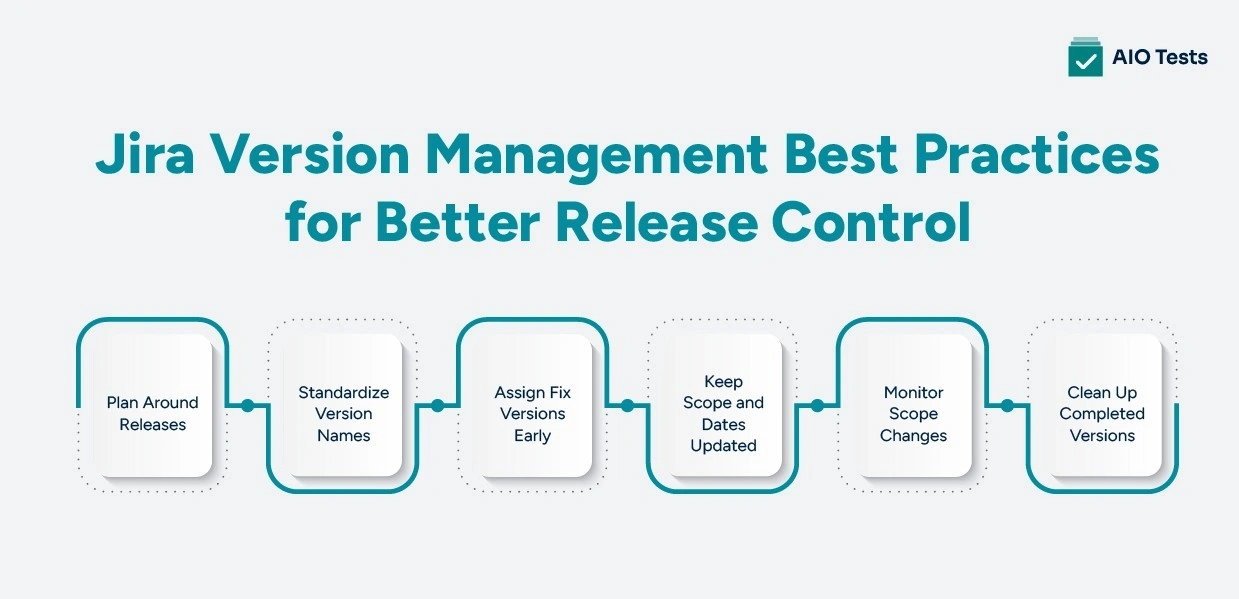
1. Create Versions Around Releases, Not Individual Sprints
Sprints and versions serve different purposes. A sprint covers the work a team plans to complete within a set period. A version groups the work that is expected to ship as part of a release.
Creating a new version for every sprint can quickly make Jira confusing, especially when several sprints contribute to the same release. Instead, create a version for the actual release and link the relevant work to it across sprints.
For example, three sprints could contribute to Version 5.0:
- Sprint 21: User authentication
- Sprint 22: Payment updates
- Sprint 23: Performance improvements
This gives the team a clear view of the release while keeping sprint-level planning separate.
2. Use a Consistent Version Naming Convention
A consistent naming convention makes releases easier to identify for product managers, developers, QA teams, and other stakeholders. It also reduces confusion when multiple versions are active at the same time.
Teams can choose a format that fits their release process, such as:
- v3.0
- Mobile-App-2026-Q3
- Platform-5.2
There is no single naming format that works for every team. What matters is choosing one format and using it consistently. Everyone should be able to look at a version name and understand which release it represents.
3. Assign Fix Versions During Release Planning
The Fix Version field connects a Jira issue to the release where the team plans to deliver it. Assigning it during release planning gives everyone a clearer picture of what the release is expected to include.
For example, if a new payment feature is planned for Version 5.0, assigning that Fix Version to the related Jira issue shows that the feature is part of the release scope.
Fix Versions should also be reviewed as priorities change. Moving an issue to a different release is sometimes necessary. The problem is leaving outdated version information in Jira, which can make release tracking and reporting less reliable.
4. Keep Release Dates and Scope Up to Date
Release plans rarely stay the same from the first planning meeting to the final delivery. New requirements may emerge, features may take longer than expected, or critical bugs may add unexpected work.
Teams should regularly review:
- Planned release date
- Work included in the version
- Remaining issues
- Scope changes
- Dependencies that could affect delivery
If the scope changes significantly, revisit the release plan instead of continuing with an outdated target. This gives stakeholders a more realistic view of where the release stands.
5. Track Scope Changes Before They Become Release Risks
Change is a normal part of Agile development. The problem comes when new work is added without considering how it could affect existing commitments.
For example, adding a high-priority feature late in a release could push testing or other planned work beyond the original deadline. Tracking these changes as they happen gives the team time to adjust the scope, priorities, or release date.
During regular version reviews, ask:
- What has been added since the last review?
- What work has moved to another release?
- Are any new defects likely to affect delivery?
- Is the current release date still realistic?
This turns scope changes into informed decisions instead of last-minute surprises.
6. Keep Released and Archived Versions Organized
Version management does not stop when a release goes live. Over time, completed and outdated versions can pile up in Jira, making it harder to identify current releases and increasing the risk of selecting the wrong version.
After a release, teams should:
- Confirm that the correct issues were included
- Move unfinished work to the appropriate future version
- Mark the version as released
- Archive versions that are no longer needed
- Consolidate duplicate versions when necessary
Keeping the version list organized makes Jira easier to work with and gives teams a clearer view of current and upcoming releases.
How AIO Tests Helps Improve Jira Release Management and Quality Visibility
Jira gives teams a clear way to organize release scope and track development work. But knowing which issues are planned for a release does not tell you whether those requirements have been tested, which tests have failed, or whether open defects could affect delivery.
AIO Tests, a Jira test management tool, brings structured test management into Jira, allowing teams to connect requirements, test cases, executions, and defects without switching between tools. This gives product, development, and QA teams a clearer view of testing progress as a release moves forward.
Connect Jira Requirements With Test Coverage
The platform helps teams build traceability across:
Teams can link test cases to Jira requirements, track execution results, and monitor related defects. This makes it easier to identify requirements without test coverage, failed tests, and defects affecting specific requirements.
For release planning, this adds an important layer of visibility. Instead of looking only at whether Jira issues are complete, teams can see whether the functionality behind those issues has been tested and where coverage gaps remain.
Traceability Summary and Traceability Detail reports provide additional visibility into requirement coverage, execution results, and linked defects.
Manage Test Execution Alongside Agile Releases
Testing needs to keep pace with development as a release progresses. Teams can use Test Cycles to organize testing by sprint, release, or environment and record execution results while linking related defects.
The platform supports both manual and automated testing, with integrations for frameworks such as JUnit, TestNG, Cucumber, Playwright, Cypress, and Katalon, as well as CI/CD tools such as Jenkins and Azure DevOps.
This gives QA and development teams a shared view of:
- Test execution progress
- Failed and blocked tests
- Related defects
- Manual and automated test results
Use Quality Insights to Support Release Decisions
Completed Jira issues do not necessarily mean a release is ready. Teams also need to understand testing progress, coverage, and unresolved defects.
Testing reports can provide visibility into:
- Test execution and coverage
- Requirement traceability
- Automation results
- Defect status
- Overall testing progress
These insights help product, development, and QA teams identify quality gaps earlier and make better-informed release decisions.

Jira Version Management vs Complete Release Readiness: What Agile Teams Need
Jira version management plays an important role in organizing Agile releases. However, complete release readiness requires both delivery visibility and quality validation.
For modern Agile teams, managing a release successfully requires more than knowing what will ship. Teams also need to know whether the release is ready to deliver value to customers.
Conclusion
A release can look well organized in Jira and still not be ready to ship. Having a defined version, clear scope, and completed development work tells only part of the story. Teams also need to know what has been tested, which defects are still open, and whether critical requirements have been validated.
Effective Jira version management gives teams a better way to plan releases, track changes, and keep everyone aligned. But when development and testing are managed separately, it can still be difficult to get a complete picture of release readiness.
A Jira-native test management solution like AIO Tests brings requirements, test cases, executions, and defects into the same workflow. This gives product, development, and QA teams the information they need to identify gaps and make better-informed release decisions.

Frequently Asked Questions
1. What is Jira version management?
Jira version management is the process of organizing and tracking the work planned for specific software releases. It helps teams group features, fixes, and improvements under a release so they can monitor scope and progress.
2. How do versions work in Jira?
A Jira version represents a planned release and can be associated with issues such as stories, bugs, and improvements. Teams assign these issues to a version using the Fix Version field and track the release as work progresses.
3. What are the best practices for managing Jira versions?
Use clear version names, assign Fix Versions during release planning, and keep the release scope and dates up to date. It is also important to review scope changes regularly and archive completed or outdated versions to keep Jira organized.
4. How do Jira versions support Agile release planning?
Jira versions give teams a release-level view of work while sprints focus on shorter development cycles. By connecting sprint work to versions, teams can track release scope, monitor progress, and identify potential delivery risks earlier.
5. What is the difference between Jira versions and Fix Versions?
A Jira version represents the overall release, while the Fix Version field associates an individual issue with the release in which it is expected to be delivered. In other words, the version is the release itself, and Fix Version connects specific work to that release.
6. How can teams use Jira versions to improve release management?
Teams can use Jira versions to define release scope, track progress, monitor changes, and keep development work aligned with delivery goals. When combined with testing and defect information, versions can also give teams a clearer view of overall release readiness.
7. How do you create and manage releases using Jira versions?
Teams can create a version in Jira, give it a clear name and release date, and assign relevant issues through the Fix Version field. As development continues, teams can update the scope, monitor progress, move unfinished work when needed, and mark the version as released once delivery is complete.


.svg)

