

.webp)
Summarize Blog
Quick Summary
Struggling to pull a clean coverage report the day before a release? This guide breaks down six common challenges QA teams face when managing test cases in Jira, including inconsistent test structure, missing execution history, poor traceability, and manual reporting. Discover how structured test management adds the testing capabilities Jira lacks while keeping QA teams inside the tools and workflows they already use.
It's the day before a major release. Your QA team is scrambling. Test cases in Jira are buried across dozens of issues; no one can pull a clean coverage report, and the product manager is asking questions nobody can answer confidently.
Sound familiar?
You're not alone. Studies show that poor software testing practices cost organizations an estimated $2.41 trillion annually in the US alone. Yet most QA teams are still trying to force Jira, a tool built for issue tracking, into doing a job it was never designed for.
In this guide, we break down the exact challenges QA teams face with test cases in Jira and how to fix them.
Why Managing Test Cases in Jira Is Harder Than It Looks
Jira is genuinely excellent at what it was built for: tracking bugs, managing sprints, and keeping development teams aligned. But managing test cases in Jira is a different story entirely.
At first, it seems manageable. A small QA team can get by using custom issue types, subtasks, and labels to track testing work. It feels like a reasonable workaround. But as your product grows, your team expands, and your test suite scales, that workaround starts cracking under the pressure.
Using Jira for test cases is like tracking deliveries in a calendar app. It sort of works, until it really doesn't.
The core problem is structural. Jira organizes work around issues, not test logic. There's no concept of test suites, test runs, execution history, or requirement coverage baked in.
QA teams end up building elaborate workarounds using fields, labels, and plugins that were never intended for this purpose, and they pay for it in lost time, inconsistent processes, and zero visibility when it matters most.
The challenges below aren't edge cases. They're what happens to almost every QA team that tries to scale test case management inside Jira without the right tooling.
The Real QA Challenges in Jira
Let's get specific. Here are the six QA challenges in Jira that teams run into most, and why each one is more costly than it looks.
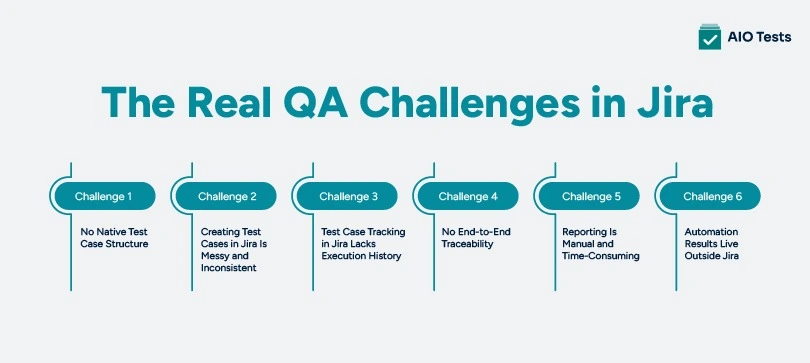
Challenge 1: No Native Test Case Structure
Jira doesn't have a test case object. Full stop. There are no folders, no test suites, no hierarchical test libraries. Teams typically hack together a structure using epics, stories, subtasks, or custom issue types, but none of these map cleanly to how QA teams actually think about test coverage.
The result is test cases scattered across projects, sprints, and boards with no consistent home. Finding a specific test case weeks later becomes a research project in itself.
Challenge 2: Creating Test Cases in Jira Is Messy and Inconsistent
Creating test cases in Jira without a standardized template means every tester does it differently. One person writes detailed step-by-step cases in the description field. Another uses subtasks. A third drops everything into a comment thread.
There's no enforced format, no required fields, no consistency. When someone new joins the team, they inherit a graveyard of half-finished, inconsistently structured test cases with no guidance on what "done" actually means.
Challenge 3: Test Case Tracking in Jira Lacks Execution History
This is one of the most painful limitations. Test case tracking in Jira hits a hard wall when it comes to execution history. Once a Jira issue is marked "Done," it's effectively closed. There's no native way to rerun that test case in a new cycle, track its pass/fail history over time, or link it to a specific build or release.
Every regression cycle forces teams to either manually clone tickets, creating noise and duplication, or lose historical data entirely. For teams doing frequent releases, this isn't a minor inconvenience. It's a fundamental blocker.
Challenge 4: No End-to-End Traceability
Traceability, the ability to link a test case back to a requirement and forward to a defect, is non-negotiable for mature QA teams and absolutely critical for compliance-heavy industries. Jira doesn't support this natively.
You can link issues together, but there's no structured traceability matrix, no visual map of what's tested and what isn't, and no automated way to know if a requirement has sufficient test coverage. When auditors or stakeholders ask, "How do we know this feature is fully tested?" the honest answer from a Jira-only setup is often, "We don't, not cleanly."
Challenge 5: Reporting Is Manual and Time-Consuming
Ask any QA lead how they generate test reports in Jira, and you'll hear the same answer: spreadsheets, manual exports, and a lot of copy-pasting. There are no built-in QA dashboards that show pass rates, execution progress, coverage by requirement, or defect trends across cycles.
Every stakeholder update requires a QA manager to go digging. This is time that should be spent on testing, not on assembling slide decks for a Monday morning standup.
Challenge 6: Automation Results Live Outside Jira
Modern QA teams run automated tests using frameworks such as Cypress, Selenium, JUnit, and Playwright. Those results live in CI/CD pipelines, Jenkins, GitHub Actions, CircleCI, completely disconnected from wherever manual test results are tracked.
There's no unified view. Developers see one picture, QA sees another, and neither has the full story. When a release decision needs to be made quickly, this fragmentation is a serious liability.
Jira Testing Challenges Get Worse at Scale
Here's what makes all of this especially dangerous: every one of these Jira testing challenges compounds as your team grows.
More sprints mean more scattered test cases across more projects. More features mean more duplicate test cases that no one has time to audit and clean up. More team members mean more inconsistency in how test cases are created, named, and tracked. And more stakeholders mean more demand for real-time visibility into QA progress, the kind of visibility that Jira simply cannot generate without significant manual effort.
A team of three QA engineers can manage the chaos. A team of fifteen cannot. And by the time the pain becomes undeniable, the technical debt in your test case library is already significant.
The answer isn't to abandon Jira. It's to give your QA team the right layer on top of it.
What Good QA Test Case Management Actually Looks Like?
Before jumping to a solution, it's worth defining what effective QA test case management should deliver, regardless of what tool you use.
- A proper test case management setup gives you a centralized test case repository that lives within your existing workflow, not on a separate platform your team has to switch to.
- It supports reusable test cycles, so regression testing doesn't mean duplicating hundreds of tickets every sprint. It provides clean requirement-to-test traceability so you can always answer "what's covered and what isn't."
- It generates automated reports and dashboards that update in real time, not after a manual export. And it integrates natively with automation frameworks like Cypress, Selenium, and JUnit, so manual and automated results are always visible in one place.
- If your current setup can't deliver all five of these, your QA process has gaps, and those gaps grow more expensive over time.
How to Manage Test Cases in Jira the Right Way: Enter AIOTests
So what does it actually look like to manage test cases in Jira properly? That's exactly what AIO Tests is built for.
AIO Tests: The Best Test Management Tool For Jira
AIO Tests is a Jira-native test management tool built entirely within Jira, with no context switching, no external dashboards, and no separate platform to learn on. Your QA team stays in Jira. They just get all the test management capabilities that Jira could never provide natively.
How AIO Tests Solves Each Challenge?
Why Jira-Native Matters?
The biggest reason QA tools fail at adoption is context switching. When testers have to leave Jira to log results, update test cases, or check coverage, they don't do it consistently. Data gets stale. Reports become unreliable. The tool gets abandoned.
Because AIO Tests lives entirely inside Jira, there's zero friction between QA and development workflows. Both teams work from the exact same source of truth.
Every test case, every execution result, every defect is linked and visible without leaving the platform your team already uses every day. And for teams in regulated industries, AIO Tests provides compliance-ready audit trails with no additional configuration needed.
Best Practices for Test Case Management in Jira
Whether you're implementing a new tool or cleaning up an existing setup, these practices will make a measurable difference:
- Standardize your test case naming convention from day one; every tester should follow the same format without exception
- Map every test case to a user story or requirement. If a test case isn't tied to a business need, question whether it needs to exist
- Never reuse a "Done" ticket for regression; use proper test cycles that preserve execution history across runs
- Review and archive outdated test cases at the end of every sprint. A bloated test library is a slow, unreliable one
- Integrate automation results into the same platform as manual tests; a unified view is the only view that gives you an accurate picture of release readiness
Final Words
Jira is one of the most powerful project management tools available, but it was never built to handle test case management at scale. The challenges covered in this guide are real, they're widespread, and left unaddressed, they compound into something that slows every release and frustrates every QA team member.
The good news is that the fix doesn't require leaving Jira. It requires building the right layer on top of it.
Picture a release cycle where every test case is traceable, every report updates automatically, and every stakeholder has real-time visibility into QA progress without asking for it. That's not aspirational; that's what structured test case management inside Jira actually delivers.

FAQs
1) Can you create and manage test cases directly in Jira without a plugin?
Technically, yes, but with significant limitations. Jira allows teams to use custom issue types, subtasks, and labels to approximate test case management. However, it lacks native support for test suites, execution history, traceability matrices, and QA reporting. Most teams find that this approach breaks down quickly at scale.
2) What are the biggest limitations of using Jira for test case management?
The most critical limitations are the absence of a native test case structure, no execution history for regression cycles, a lack of end-to-end traceability between requirements and defects, and no built-in QA dashboards. Teams are forced to build manual workarounds that create inconsistency and technical debt over time.
3) How does test case tracking in Jira differ from a dedicated test management tool?
Test case tracking in Jira relies on repurposed issue types and manual status updates with no historical execution data. A dedicated tool like AIO Tests provides structured test cycles, reusable runs, pass/fail history across builds, and automated reporting, all of which native Jira cannot deliver.
4) Is AIO Tests a Jira-native test management solution?
Yes. AIO Tests is built entirely inside Jira, there is no external platform, no separate login, and no context switching required. QA teams manage test cases in Jira using AIO Tests the same way they manage any other Jira work, with the added structure and capabilities that native Jira lacks.
5) How do QA teams handle regression testing and test case reuse in Jira?
Without a dedicated tool, most teams manually clone old tickets, which creates duplicates and loses execution history. With a proper QA test case management tool like AIO Tests, teams use reusable test cycles that preserve full run history across every sprint and release, making regression testing structured, fast, and reliable.


.svg)
