

.webp)
Summarize Blog
Quick Summary
Learn Test Case Management Best Practices to organize, execute, and scale QA efficiently inside Jira. Discover practical strategies for traceability, automation, AI-assisted testing, and faster, release-ready software delivery.
Software teams have largely standardized on Jira for planning, tracking, and delivering work, yet many QA teams still rely on spreadsheets or disconnected tools to manage their test cases. This split creates unnecessary friction.
Test coverage becomes difficult to verify, bugs slip through releases, and QA engineers spend valuable time manually updating statuses instead of testing software.
Following proven Test Case Management Best Practices helps eliminate these inefficiencies by keeping planning, execution, traceability, and reporting inside Jira. This guide explores the practices that enable QA Leads and Managers to build a scalable, organized, and release-ready testing process.
Why Test Case Management In Jira Fails Without A Clear Framework?
Many teams assume that simply storing test cases somewhere is enough. In reality, test case management in Jira only delivers value when there is a structured process behind it. As applications grow, testing becomes increasingly difficult without clear standards for organization, execution, and traceability.
The problems rarely appear during the first sprint. They become obvious after months of feature releases, regression cycles, and multiple team members contributing to the same repository.
Duplicate cases appear, outdated scenarios remain active, and release managers struggle to answer a simple question: Have we tested everything that matters?
The Core Test Case Management Best Practices Every Jira Team Needs
Strong QA processes are built on repeatable practices rather than individual effort. The following recommendations help create a scalable testing workflow that supports faster releases, clearer reporting, and better collaboration between QA and development teams.
The following are the test management best practices that every Jira team needs to know.
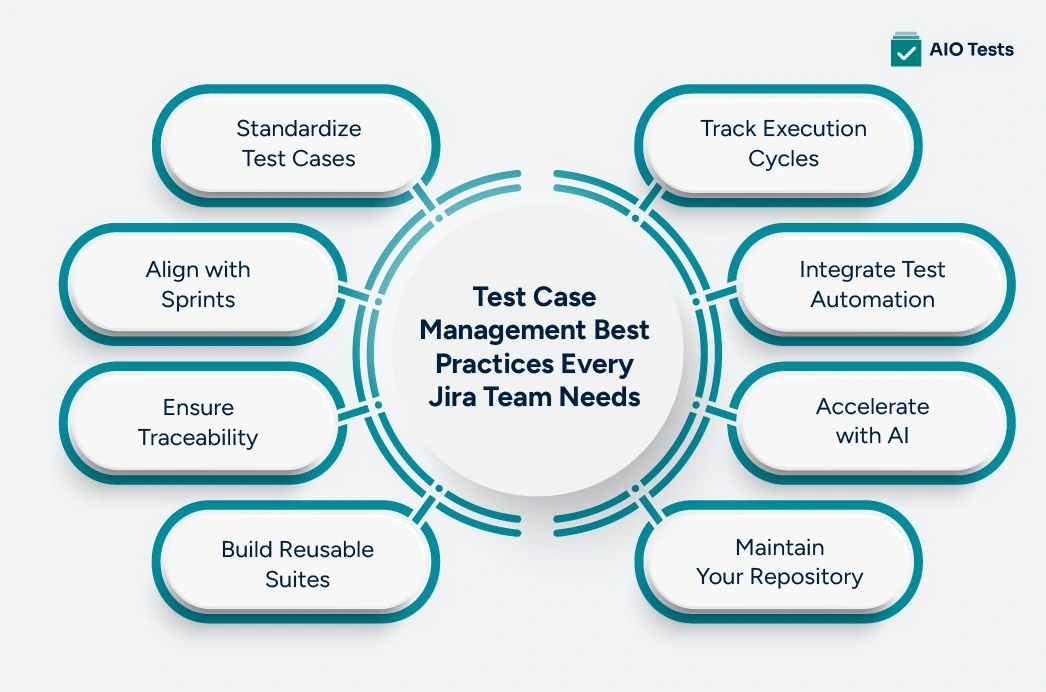
1. Standardize Test Cases
Well-structured test cases are easier to maintain, review, and reuse throughout the software lifecycle. Every test case should follow a consistent format so anyone on the team can understand and execute it without additional clarification.
Inside Jira, custom fields and standardized templates help enforce consistency across every new test case.
Apply this inside Jira:
- Create unique IDs for every test case.
- Use consistent naming conventions.
- Document preconditions before execution steps.
- Separate test steps from expected results.
- Make mandatory fields part of your template.
2. Align With Sprints
A successful test case management workflow should mirror the way development work progresses through each sprint. Testing should never operate independently of planning and development.
Instead of creating isolated execution cycles, align testing activities with sprint stories so QA progresses alongside development. This improves visibility and prevents testing from becoming a last-minute release activity.
A simple workflow often includes:
Draft → Ready → In Progress → Passed → Failed → Blocked
Apply this inside Jira:
- Link test cases to sprint stories.
- Create execution cycles for every sprint.
- Define standard execution statuses.
- Review incomplete executions during sprint reviews.
- Track blocked cases separately from failures.
3. Ensure Traceability
One of the biggest advantages of modern Jira test case management is complete traceability between requirements and testing activities. Every user story should have clear evidence showing how it has been validated before release.
Requirement-to-test-case mapping allows QA teams to quickly identify missing coverage, assess release readiness, and simplify compliance reporting. Instead of manually checking documentation, stakeholders can immediately understand which requirements have passed validation.
Apply this inside Jira:
- Link every user story to related test cases.
- Maintain bidirectional traceability.
- Review coverage before sprint completion.
- Use traceability reports during release planning.
- Identify untested requirements early.
4. Build Reusable Suites
Many QA teams rebuild regression suites every sprint because their test repository lacks organization. Over time, this creates duplicate work and inconsistent coverage.
Instead, organize test cases into reusable suites based on products, modules, features, or testing objectives. A well-organized repository allows teams to assemble execution cycles in minutes rather than recreating them for every release.
Reusable suites also improve collaboration because everyone knows where new test cases belong.
Apply this inside Jira:
- Create folders by module or feature.
- Tag regression, smoke, exploratory, and integration tests.
- Build reusable regression collections.
- Archive obsolete suites instead of deleting them.
- Reuse existing cases whenever possible.
5. Track Execution Cycles
Looking at individual test case results provides only a partial picture of release quality. A release might contain hundreds or thousands of test executions, making individual pass or fail statuses difficult to interpret.
Tracking execution at the cycle level helps QA managers monitor overall sprint health, identify bottlenecks, and determine whether a release is ready for production. Dashboards that summarize execution progress, pass rates, blocked tests, and unresolved failures provide far more actionable insights than isolated case-level updates.
Apply this inside Jira:
- Create execution cycles for every sprint or release.
- Monitor pass, fail, blocked, and skipped percentages.
- Review execution dashboards during daily stand-ups.
- Use cycle-level reports for release approvals.
- Investigate trends across multiple sprints instead of individual cases.
6. Integrate Test Automation
As software delivery accelerates, automation becomes essential for maintaining quality. However, automation only delivers its full value when test results are visible alongside manual testing. Treating automated tests as a separate process creates reporting gaps and forces QA teams to consolidate results manually before every release.
A mature software test case management process keeps manual and automated execution within the same workflow. By syncing automated results directly into Jira, teams gain a complete view of release health without switching between multiple tools or updating spreadsheets.
Apply this inside Jira:
- Connect your CI/CD pipeline to Jira test cycles.
- Automatically sync execution results after every build.
- Combine manual and automated test reporting.
- Monitor failed automated tests alongside manual defects.
- Review release dashboards using unified execution data.
7. Accelerate With AI
AI is changing how QA teams create and maintain test cases, but it should enhance, not replace, human expertise. Instead of writing every test case from scratch, testers can use AI to generate an initial draft based on user stories, acceptance criteria, or requirements.
This approach significantly reduces documentation time while allowing QA engineers to focus on edge cases, exploratory testing, and business-specific validation. AI is most valuable when paired with experienced testers who review and refine the generated output.
Apply this inside Jira:
- Generate draft test cases from user stories.
- Create BDD/Gherkin scenarios automatically.
- Refine AI-generated content before execution.
- Use AI to identify missing scenarios.
- Maintain human review before publishing new cases.
8. Maintain Your Repository
Test repositories naturally grow over time, but not every test case remains valuable. Features evolve, workflows change, and obsolete scenarios continue consuming execution time if they are never reviewed.
Instead of waiting until regression testing becomes unmanageable, schedule regular maintenance after every release. Removing outdated cases and updating existing ones keeps the repository accurate, efficient, and aligned with the current product.
Apply this inside Jira:
- Remove obsolete test cases.
- Merge duplicate scenarios.
- Update cases affected by product changes.
- Archive deprecated features.
- Schedule repository reviews after every release.
A smaller, well-maintained repository usually delivers better coverage than an oversized collection of outdated tests.
What To Look For In Test Case Management Tools For Jira Teams?
Choosing the right test case management tools is about more than creating and executing tests. The platform should support your entire QA lifecycle, from planning and traceability to automation and reporting, without forcing your team to leave Jira.
The following capabilities have the biggest impact on long-term scalability.
Why Jira-Native Tools Reduce Adoption Friction Compared To External Platforms?
Every additional platform introduces another login, another interface, and another synchronization challenge. When QA teams work inside Jira, developers, testers, and project managers all operate from the same source of truth.
Jira-native tools reduce onboarding time, simplify collaboration, and eliminate the need to constantly switch between systems. Teams spend more time testing and less time managing integrations.
How Do AIO Tests Handle Test Case Management Natively Inside Jira?

AIO Tests extends Jira with capabilities specifically designed for modern QA teams while allowing them to continue working inside their existing environment.
Teams can create structured test repositories, generate AI-assisted test cases using Rovo Assistant, build BDD/Gherkin scenarios, and establish end-to-end traceability between requirements and testing activities.
The platform also supports CI/CD integrations with frameworks such as Cucumber, TestNG, JUnit, Playwright, and Katalon, enabling automated execution results to flow directly into Jira dashboards.
Top Features
- AI Test Creation
Generate classic or BDD-style test cases directly from Jira requirements using AI-powered assistance. With Rovo Assistant and AI capabilities, QA teams can reduce manual effort while accelerating test design and maintaining quality through human review.
- BDD Scenario Management
Create, edit, and manage BDD/Gherkin scenarios without leaving Jira. Teams can import feature files, reuse scenarios, and keep requirements and executable specifications synchronized throughout development.
- End-To-End Traceability
Link requirements, test cases, executions, and defects to establish complete traceability across the software lifecycle. Built-in reports help QA teams verify coverage and confidently assess release readiness before deployment.
- Automation Integration
Integrate automated testing frameworks such as Cucumber, TestNG, JUnit, Playwright, and Katalon with Jira test cycles. Automated execution results sync directly into Jira, giving teams a unified view of manual and automated testing progress.
- Reusable Test Repository
Organize test cases using structured repositories with folders, linked steps, version control, and reusable assets. This makes maintaining large test suites easier while reducing duplication and simplifying regression testing across releases.

Common Test Case Management Mistakes Jira Teams Make (And How To Fix Them)
Even experienced QA teams can develop habits that reduce efficiency over time. Recognizing these mistakes early helps create a more sustainable testing process.
Delayed Test Creation
Waiting until development is complete often leads to rushed documentation and missed scenarios. Creating test cases alongside requirements ensures coverage is planned before coding begins.
Ignore Reusability
Treating every test case as a one-time execution creates unnecessary duplicate work. Instead, organize test cases into reusable suites so they can support future sprints without being recreated.
Separate Automation Results
Automation reports stored outside Jira make release tracking more difficult and reduce visibility across the team. Sync execution results back into Jira so manual and automated testing contribute to the same release dashboard.
Skip Cycle Reporting
Individual pass or fail results provide limited insight into release readiness. Review execution cycle reports to understand sprint progress, identify risk areas, and verify overall test coverage before approving a release.
Neglect Test Maintenance
An unmanaged repository quickly fills with obsolete and duplicate cases. Schedule routine reviews after every release to remove outdated tests, update existing ones, and keep your test suite accurate and maintainable.
Final Words!
Strong Test Case Management Best Practices only deliver lasting value when they become part of your team's everyday workflow.
For Jira teams, that means managing planning, execution, automation, reporting, and traceability within the same environment rather than relying on disconnected spreadsheets or external tools.
A Jira-native solution like AIO Tests helps bring these practices together, enabling QA teams to improve collaboration, increase visibility, and release software with greater confidence.

Frequently Asked Questions
- What is the difference between test case management and test management in Jira?
Test case management focuses on creating, organizing, executing, and maintaining individual test cases. Test management is broader and includes planning, execution, tracking, defect management, reporting, and overall QA coordination.
- Can Jira handle test case management without a third-party tool?
Jira can track issues and workflows, but it lacks dedicated capabilities such as reusable test repositories, traceability reporting, execution management, and automation integrations. Most growing QA teams adopt a Jira-native test management app to fill these gaps.
- How many test cases should a QA team manage per sprint in Jira?
There is no fixed number. The right volume depends on application complexity, sprint scope, automation coverage, and risk. The emphasis should always be on meaningful coverage rather than maximizing the number of test cases.
- What makes a Jira-native test management tool better than an external one?
Jira-native tools eliminate context switching by keeping development, testing, reporting, and collaboration within the same platform. This improves adoption, simplifies traceability, and reduces administrative overhead.
- How does AI change test case management best practices for QA teams in 2026?
AI accelerates test case creation by generating initial drafts, suggesting scenarios, and producing BDD/Gherkin specifications. QA professionals still review and refine these outputs, using AI to improve speed while maintaining testing quality and business context.


.svg)

