


Summarize Blog
Quick Summary
Jira data residency covers defined Jira Cloud data, not every connected QA system. Learn how residency requirements affect testing workflows and how AIO Tests support secure, connected test management operations.
Two days before release, compliance asks a question nobody on the QA team can answer with confidence: Where are the failed-test screenshots, API responses, execution logs, and automation reports actually stored?
Jira Cloud is already pinned to the EU, so the obvious answer is “inside Jira.” But that answer falls apart once the team maps its testing workflow. Test data moves through Marketplace apps, CI/CD pipelines, automation frameworks, artifact repositories, reporting tools, and AI services. Any one of them may process or retain a separate copy outside the selected region.
This is the gap many data residency Jira reviews overlook. Pinning Jira controls specified Jira Cloud data, not the complete QA data flow. The real challenge is meeting residency requirements without weakening traceability or slowing releases. This guide explains where those risks appear and how Jira test management helps build a more connected, residency-aware test-management workflow.
What Is Jira Data Residency?
Jira data residency gives organizations control over the geographic location where specified Jira Cloud data is hosted.
By default, an Atlassian application may have a “Not Set” status, allowing its in-scope data to be hosted in a dynamically assigned location. When an organization pins Jira to a supported location, Atlassian keeps the covered data within the corresponding geographic boundary.
An organization administrator manages this setting through Atlassian Administration. However, residency is configured at the application level. It cannot be set independently for each Jira project, customer, or user.
Atlassian currently offers locations including the US, EU, UK, Germany, Australia, Canada, India, Japan, Singapore, South Korea, and Switzerland. Organizations may select one because of regulatory obligations, customer contracts, procurement requirements, or internal enterprise data management policies.
The selected location applies only to in-scope Jira Cloud data, making it important to understand precisely what Atlassian includes.
How Are Data Residency, Data Sovereignty, and Data Compliance Different?
These related concepts answer different questions about enterprise information.
Data residency can support compliance, but it does not guarantee it. For example, GDPR regulates the processing and transfer of personal data but does not universally require all EU personal data to remain inside the EU. Approved transfer mechanisms may permit information to move outside the EEA. The European Commission explains these international transfer mechanisms.
What Jira Cloud Data Is Covered by Data Residency?
Atlassian separates Jira information into data that can be pinned and data that remains outside the standard residency scope.
Jira Data That Can Be Pinned
In-scope Jira data includes:
- Jira issues and field content
- Comments and attachments
- Board and sprint data
- Jira search data
- Project configuration
- Workflows and board configuration
- Custom-field configuration
- In-app notification data
This covers much of the information teams create and use in Jira every day.
Jira-Related Data That May Remain Outside the Scope
Atlassian identifies several categories that may not be pinned with the core application data:
- Connected DevOps data, including commits, builds, branches, and deployments
- AI data
- App analytics
- User account information
- App, audit, and operational logs
- Third-party integration data
- Cached content
- Data in transit
Atlassian also notes that some Marketplace app data can be pinned while other app data cannot. Coverage depends on the individual app and its vendor.
A pinned Jira site does not mean that every piece of Jira-related or connected data remains exclusively in the selected region.
This distinction is central to Jira data compliance. Organizations must review the official in-scope and out-of-scope data table rather than assuming the setting covers the entire Jira ecosystem.
Why Does Data Residency Matter for Jira Test Management?
Test repositories frequently contain more sensitive information than organizations expect. Along with test steps and expected results, they may hold:
- Product requirements and technical specifications
- Tester names, assignments, and comments
- Screenshots, videos, and execution evidence
- API requests and responses
- Defect records and application logs
- Environment and infrastructure details
- Automation result files
- Production-derived test data
- Credentials accidentally captured in logs or screenshots
A failed API response may expose customer information. A screenshot can display an email address, account number, or internal interface. A diagnostic log may reveal tokens or infrastructure details.
Test data should therefore not be classified as non-sensitive by default. It belongs within the organization’s wider enterprise data management program, including classification, access, retention, deletion, and cross-border transfer policies.
Effective test management security begins with understanding what information QA teams create and where each artifact travels.
How Do Jira Data Residency Requirements Impact QA Workflows?
Jira data residency requirements affect more than the initial storage location. They influence how teams prepare data, collect evidence, report automation results, create defects, use AI, and share testing information.
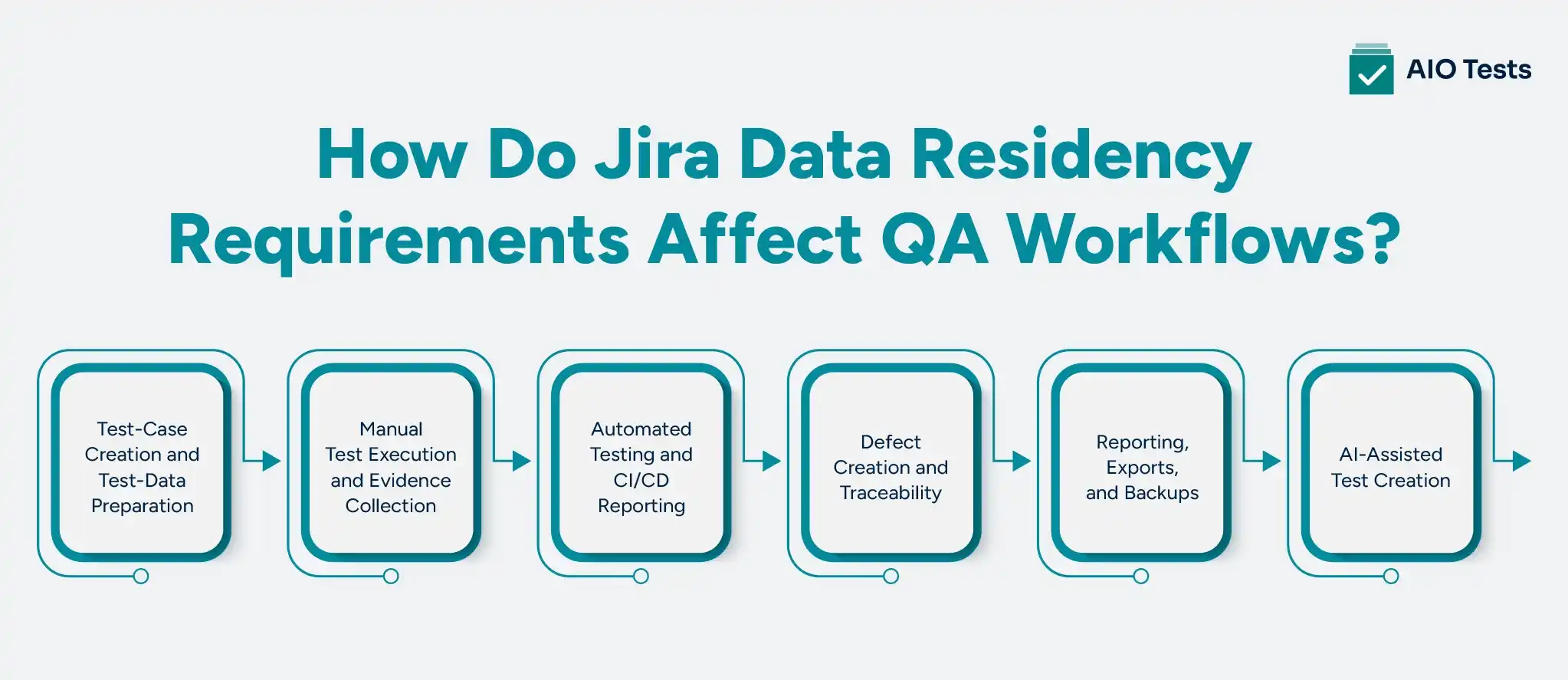
1. Test-Case Creation and Test-Data Preparation
Copying production records directly into test cases can introduce personal or confidential data into Jira and connected applications. QA teams should use synthetic, anonymized, or masked data wherever possible.
Parameters, preconditions, expected results, and attachments also require review. Teams need clear rules governing what information testers can enter and which files they can attach.
2. Manual Test Execution and Evidence Collection
Screenshots, recordings, logs, and tester comments can expose sensitive application information. Downloading these files creates additional copies on local devices, shared drives, or collaboration platforms.
External testing vendors and remote teams also introduce questions about where data is accessed. Although access location is not always the same as storage location, it may still matter under a contract or regional transfer rule. Offline testing requires additional controls for local storage and deletion.
3. Automated Testing and CI/CD Reporting
An automated result may pass through several systems:
Automation runner → CI/CD platform → Artifact repository → Test-management app → Jira
Result files, API payloads, screenshots, videos, and logs may be retained at multiple points. Pinning Jira does not automatically apply the same controls to Jenkins, Azure DevOps, GitHub, GitLab, Bitbucket, or another build environment.
Teams must inspect the entire data path, not only the summarized status eventually sent to Jira.
4. Defect Creation and Traceability
A failed test may create or update a Jira defect with logs, screenshots, error messages, and environment information. QA teams should define which evidence is necessary and remove sensitive details before publishing it.
Clear traceability between requirements, tests, executions, and defects can support coverage reviews and audit preparation without relying on uncontrolled spreadsheets.
5. Reporting, Exports, and Backups
Scheduled emails, downloaded reports, spreadsheets, BI connectors, and local exports create copies outside the primary test repository. Retention and deletion rules should cover those copies.
Organizations also need to confirm where backups are stored and whether existing backups move when the primary region changes.
6. AI-Assisted Test Creation
Before using AI to create tests, teams should determine:
- Which Jira context the AI service receives
- Where the information is processed
- Whether prompts and outputs are retained
- Whether customer content is used for model training
- Whether users review generated cases before saving them
- Whether AI can be restricted for sensitive projects
These controls help organizations use AI-assisted testing without weakening established QA compliance practices.
How Do Marketplace Apps Affect Jira Data Compliance?
A Jira Marketplace app may process or store information in infrastructure operated by its vendor. As a result, pinning Jira does not automatically determine where every test-management app stores its data.
App vendors decide which locations they support. Existing app data may also require a separate migration after Jira moves.
Atlassian uses two capabilities to manage these scenarios:
- Realm pinning selects a supported regional location when an app is installed
- Realm migration allows app data to move when the Jira host product changes locations.
Before approving a test-management application, buyers should ask:
- What information does the app store?
- Does any data leave Jira?
- Which residency locations are supported?
- Can existing app data be migrated?
- Where are backups and logs stored?
- Which subprocessors handle the data?
- How does the app process AI requests?
- What happens after uninstallation?
Atlassian recommends reviewing the app’s Privacy & Security tab and vendor documentation because support differs between Marketplace partners. It also explains how eligible apps can be moved to another location.
What Test Management Security Controls Should Enterprises Evaluate?
Regional hosting should be assessed alongside the controls required to manage enterprise testing securely.
A product may offer the required region but lack the traceability, reporting, permissions, or automation support necessary for enterprise QA. Effective test management security requires both geographic control and practical testing capabilities.
How Does AIO Tests Support Residency-Aware QA Workflows in Jira?
Once an organization understands where its QA data must reside, it still needs a test-management platform that supports those requirements without separating testing from the Jira development workflow.
Supports US and EU Data Residency
AIO Tests supports US and EU data residency for Jira Cloud. These regional options can help organizations address common geographic hosting requirements while keeping core testing activities connected to Jira.
Residency support should still be evaluated alongside applicable laws, contracts, internal policies, and connected services. It supports data residency compliance efforts but does not independently guarantee compliance.
Offers Jira Cloud and Data Center Deployment
Organizations can use AIO Tests with Jira Cloud or Jira Data Center.
Cloud suits teams that prefer managed infrastructure and supported regional hosting. Data Center gives an organization direct control over where it hosts its Jira and testing environment, but it also places infrastructure security, maintenance, backups, and disaster recovery under the organization’s responsibility.
The right choice depends on the company’s infrastructure, governance, and residency requirements.
Keeps Core QA Work Connected to Jira
AIO Tests allows teams to manage test cases, sets, cycles, executions, defects, and reports within their Jira workflow. This reduces reliance on separate spreadsheets and disconnected repositories that make QA information harder to govern.
The platform supports Classic and BDD/Gherkin test cases, configurable fields, permissions, workflows, reusable cases, and test-case versioning.
Provides End-to-End Traceability
The platform connects:
Requirement → Test case → Execution → Defect
This relationship helps teams review test coverage, assess the impact of requirement changes, investigate failures, and support release decisions. It also provides a clearer testing record for internal reviews and audits.
Consolidates Manual and Automated Results
AIO Tests supports automation reporting from JUnit, TestNG, NUnit, Robot Framework, Cucumber, Newman, Cypress, and Katalon. Teams can also work with Jenkins, Azure DevOps, and other CI/CD systems through integrations and REST APIs.
Manual and automated results can appear in connected reports, giving stakeholders a shared view of test progress. The CI/CD platform and automation infrastructure must still be reviewed separately for regional storage and retention.
Supports Structured Test Governance
Permissions help teams limit changes to important testing assets. Custom fields and project configurations allow organizations to standardize how cases, cycles, and runs are managed.
Version history, traceability, and reports create a clearer record of what was tested, when it was executed, and what defects were found.
AIO Tests is also listed as a Cloud Fortified app on the Atlassian Marketplace, and the company states that it is ISO 27001 certified. These trust signals can support vendor assessment, although they should be considered with the organization’s complete security requirements.
Provides Controlled AI Assistance
Teams can generate Classic and BDD test cases from Jira requirements. The separate AIO Tests Rovo Assistant extends this into a conversational workflow.
According to AIO Tests’ Rovo security guidance, the assistant follows Jira permissions and requires users to review suggestions before saving a test case. It is optional and remains subject to Atlassian Rovo’s data-processing and governance rules.
Supports Test-Asset Migration
Teams can import cases from Excel, CSV, BDD files, and feature files. AIO Tests also provides migration support for Xray and Zephyr.
Organizations can validate the new configuration during a trial before cutting over. Migration files, staging environments, and temporary exports should remain covered by the organization’s retention and deletion controls.

How Can Teams Build a Residency-Aware Jira Testing Workflow?
A residency-aware workflow starts with a complete view of QA data rather than a single hosting setting.
- Identify applicable requirements. Document relevant laws, contracts, customer commitments, and internal policies.
- Classify QA information. Identify which test cases, evidence, logs, defects, and reports contain sensitive data.
- Map the data flow. Record where information is stored, processed, backed up, exported, and accessed.
- Confirm Jira’s location and scope. Verify the pinned location and which Jira data categories it covers.
- Evaluate Marketplace apps separately. Review supported locations, migration capabilities, subprocessors, and retention.
- Inspect integrations. Include automation runners, CI/CD systems, reporting services, and AI tools.
- Apply operational controls. Use masking, permissions, encryption, retention periods, and controlled deletion.
- Document and review. Reassess the workflow when adding an integration, changing regions, or introducing new AI capabilities.
Responsibility should be shared across QA, engineering, DevOps, Jira administration, security, compliance, and procurement. No single team has complete visibility into every part of the workflow.
Conclusion
Jira pinning is an important data-location control, but it covers specified information rather than the complete testing ecosystem. Marketplace apps, automation systems, execution evidence, exports, backups, and AI processing require separate review.
AIO Tests brings Jira-native test management, US and EU data residency support, Cloud and Data Center deployment, end-to-end traceability, automation reporting, and structured controls into a connected QA workflow.
This helps enterprises address residency requirements without separating testing from the systems their development teams already use.

FAQs
1. How Does Data Residency Impact Jira Test Management?
Data residency affects where test cases, execution results, attachments, defects, and reports are stored. Jira, Marketplace apps, CI/CD platforms, and automation systems may hold separate copies, so teams must evaluate the complete testing data flow rather than Jira’s location alone.
2. What Jira Data Residency Requirements Should QA Teams Consider?
QA teams should identify the required location, confirm Jira’s in-scope data, evaluate Marketplace app support, and review backups, integrations, AI processing, access, retention, and cross-border transfers. Requirements may come from regulations, contracts, procurement terms, or enterprise data management policies.
3. How Can Data Residency Compliance Affect QA Workflows?
Data residency compliance can change how teams prepare test data, collect evidence, report automation results, provide remote access, export reports, and use AI. Teams may need masked data, stricter permissions, controlled evidence handling, and documented deletion procedures.
4. How Does Jira Data Residency Support Enterprise QA Compliance?
Jira data residency allows specified Jira Cloud data to be pinned to supported geographic locations. This can support enterprise QA compliance, but connected apps, automation tools, permissions, encryption, retention, transfer mechanisms, and governance documentation must also meet the organization’s requirements.
5. What Data Residency Challenges Can QA Teams Face in Jira?
Common challenges include testing data spread across systems, unsupported app locations, sensitive information in evidence, external CI/CD storage, uncontrolled exports, unclear AI processing, migration downtime, and limited visibility into backups. Each can create data outside Jira’s pinned location.
6. How Can Teams Maintain Secure Test Management Under Data Residency Requirements?
Teams should classify testing information, use synthetic or masked data, verify Jira and app locations, apply permissions and encryption, review integrations, control exports, and document data flows. AIO Tests supports this approach through US and EU residency options and connected Jira test-management controls.


.svg)
